How to flash the GAP8 depends on which examples you use, because they need different firmware on the ESP32, see switching firmware:
- NanoCockpit examples: flashed with a JTAG programmer.
- Other examples: flashed over the air with a Crazyradio, or with a JTAG programmer.
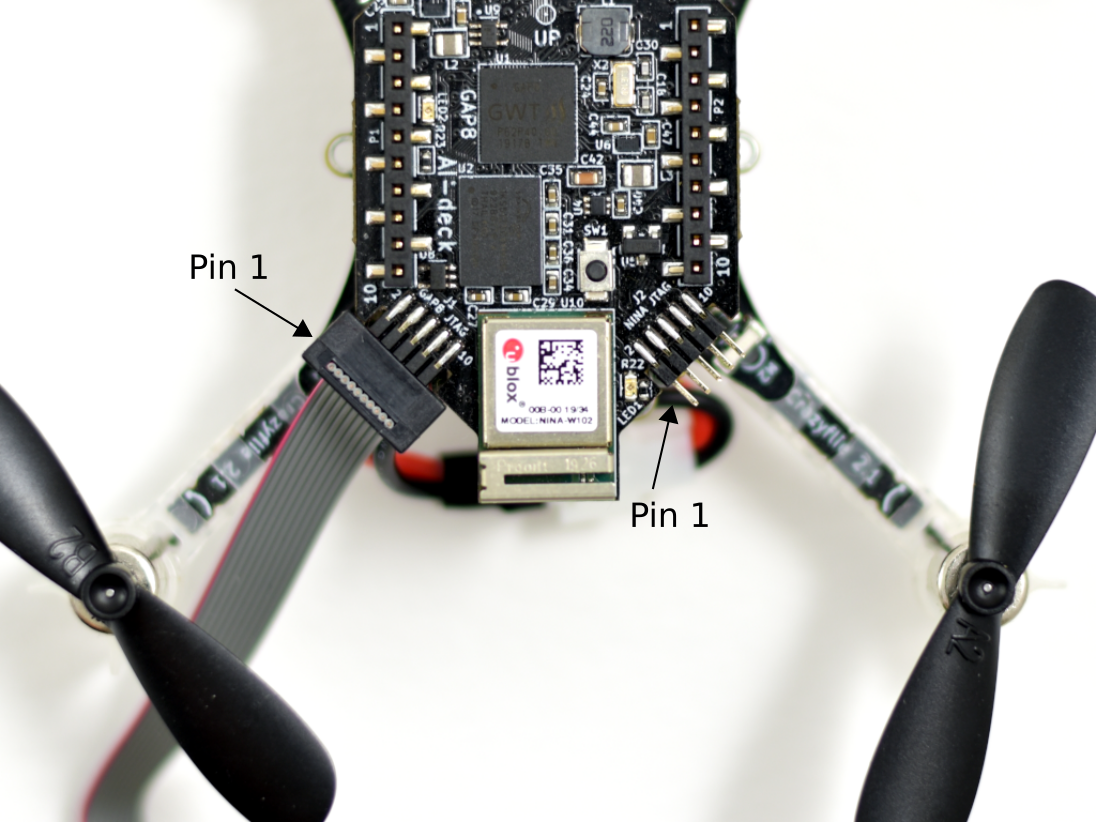
Both use the same JTAG programmer, connected to the GAP8 JTAG connector, with the AI-deck mounted on the Crazyflie:
Note: USB in Docker is only supported on Linux.
NanoCockpit examples
The NanoCockpit examples need the ESP32 firmware for NanoCockpit, and are built and flashed with GAP SDK 3.8.1. They can only be flashed with a JTAG programmer. The commands below are for the Olimex ARM-USB-TINY-H.
Flashing overwrites the GAP8 bootloader, see switching firmware if you later want to use the other examples. After flashing, disconnect the programmer and power cycle the Crazyflie.
Building and flashing an example
From the root of this repository, start a console in the container:
docker run --rm -it -v "${PWD}:/module/data/" -P \
    -e "GAPY_OPENOCD_CABLE=interface/ftdi/olimex-arm-usb-tiny-h.cfg" \
    --device-cgroup-rule="c 189:* rmw" \
    -v /dev/bus:/dev/bus:ro -v /dev/serial:/dev/serial:ro \
    bitcraze/aideck:3.8.1 \
    /bin/bash -c "source /gap_sdk/configs/ai_deck.sh; cd /module/data/; bash"
In the container, go to the directory of the example and build and flash it, for example for the streamer:
cd nanocockpit/examples/streamer
make clean build image flash
Running an example without flashing
In the same container, run loads the example into the memory of the GAP8 and starts it, without
writing it to flash:
cd nanocockpit/examples/coroutine
make clean build run
The output of the example is shown in the terminal. Keep the programmer connected while the example runs, and stop it with Ctrl-C. The error messages printed after Ctrl-C are expected.
Flashing a ready-made image
A ready-made image, such as the released aideck_gap8_nanocockpit_streamer.bin from the
releases page, is flashed without
building anything. Run the following command in the directory where the image is, and replace the
file name after f= if needed:
docker run --rm -it -v "${PWD}:/module" -w /module \
    --device-cgroup-rule="c 189:* rmw" \
    -v /dev/bus:/dev/bus:ro -v /dev/serial:/dev/serial:ro \
    bitcraze/aideck:3.8.1 \
    bash -c 'source /gap_sdk/configs/ai_deck.sh; f=aideck_gap8_nanocockpit_streamer.bin; gap8-openocd -c "gdb_port disabled; telnet_port disabled; tcl_port disabled" -c "script interface/ftdi/olimex-arm-usb-tiny-h.cfg; script target/gap8revb.tcl; script tcl/flash_image.tcl; script tcl/jtag_boot.tcl; gap_flash_raw_hyper $f $(stat -c %s $f) /gap_sdk/tools/gap8-openocd-tools; exit;"'
Other examples
The other examples need the original ESP32 firmware, and are built with the latest
bitcraze/aideck image. They can be flashed over the air or with a JTAG programmer.
Over the air
Flashing over the air needs the original ESP32 firmware and the GAP8 bootloader on the AI-deck. All AI-decks from version 1.1 Rev D leave the factory with the bootloader. After using NanoCockpit, or after upgrading the Crazyflie with a release package that includes the ESP32 firmware for NanoCockpit, see switching firmware.
With a Crazyradio, flash the example with cfloader:
$ cfloader flash [binary] deck-bcAI:gap8-fw -w [CRAZYFLIE_URI]
You find the binary (after you built your code) under BUILD/GAP8_V2/GCC_RISCV_FREERTOS/target.board.devices.flash.img. An example for the CRAZYFLIE_URI is radio://0/80/2M/E7E7E7E7E7. cfcli can be used instead of cfloader.
With a JTAG programmer
You can flash an example with an Olimex ARM-USB-TINY-H using the following command (replacing example-directory with the example you want to flash):
docker run --rm -v ${PWD}:/module --device /dev/ttyUSB0 --privileged -P bitcraze/aideck tools/build/make-example [example-directory] flash
Note: This will overwrite the bootloader! Remove the partition table offset (-DFS_PARTITIONTABLE_OFFSET) if used in the application
How flashing over the air works
GAP8 always executes code from L2 (second-level RAM), as it has no internal flash. However, it can load code into L2 over a HyperBus interface from external flash memory on startup (which it does if a fuse is blown, however this is already done on your AIdeck and out of scope here). As GAP8 has only volatile memory, it must always load code from exactly the same flash address. To make it possible to update applications easily, we implemented a bootloader, a minimal program which is the first thing to run on startup. The bootloader can either update the application code in flash or copy it into L2, and, if the code is valid, run it. Why is this easier? First, you don’t need to connect a programmer, as the bootloader can read data over other peripherals (in our case SPI from the NINA module). Second, it is safer - if the update fails (and you, for some reason, end up with random code where your application should be) the firmware code will not be valid (the hash computation will fail) and GAP8 will not jump to the corrupt application code but instead safely stay in the bootloader.
As the chain for the over-the-air update with the bootloader is rather complex, we illustrate the ways to flash GAP8 in the image below.
- the blue path illustrates how you can program over JTAG - you can either write code directly into L2 to run it (this is volatile memory, the code will dissapear if you power cycle) or you can write it into flash (over GAP8), such that it is loaded on startup (if you overwrite the bootloader, not recommended) or with the bootloader.
- the red path is using the cfloader. Meaning it sends your code over the Crazyradio to the nRF, then further to the STM32, from there to the ESP32 (the NINA WiFi module) and from there to the GAP8. This path uses CPX messages; you can read more about it in the CPX documentation.
