
The reference
The base of a Loco Positioning system
How it works
The Loco Positioning Node is a versatile positioning device that mainly is used as an Anchor in a Loco Positioning system. The system measures the distance between Nodes and Tags, and from those distances the absolute position of objects carrying Tags can be calculated.
This product is intended to be used together with Loco Positioning deck .
Specifications
Features
- Supports Anchor, Tag or Sniffer mode
- Can be used as a standalone system with some Nodes acting as Anchors and one or more nodes acting as Tags
- Multiple powering options
- On board MCU
Mechanical specifications
- Weight: 13.3 g
- Size (WxHxD): 65x40x13 mm
- 4 mounting holes for M3 screws
Mechanical drawing
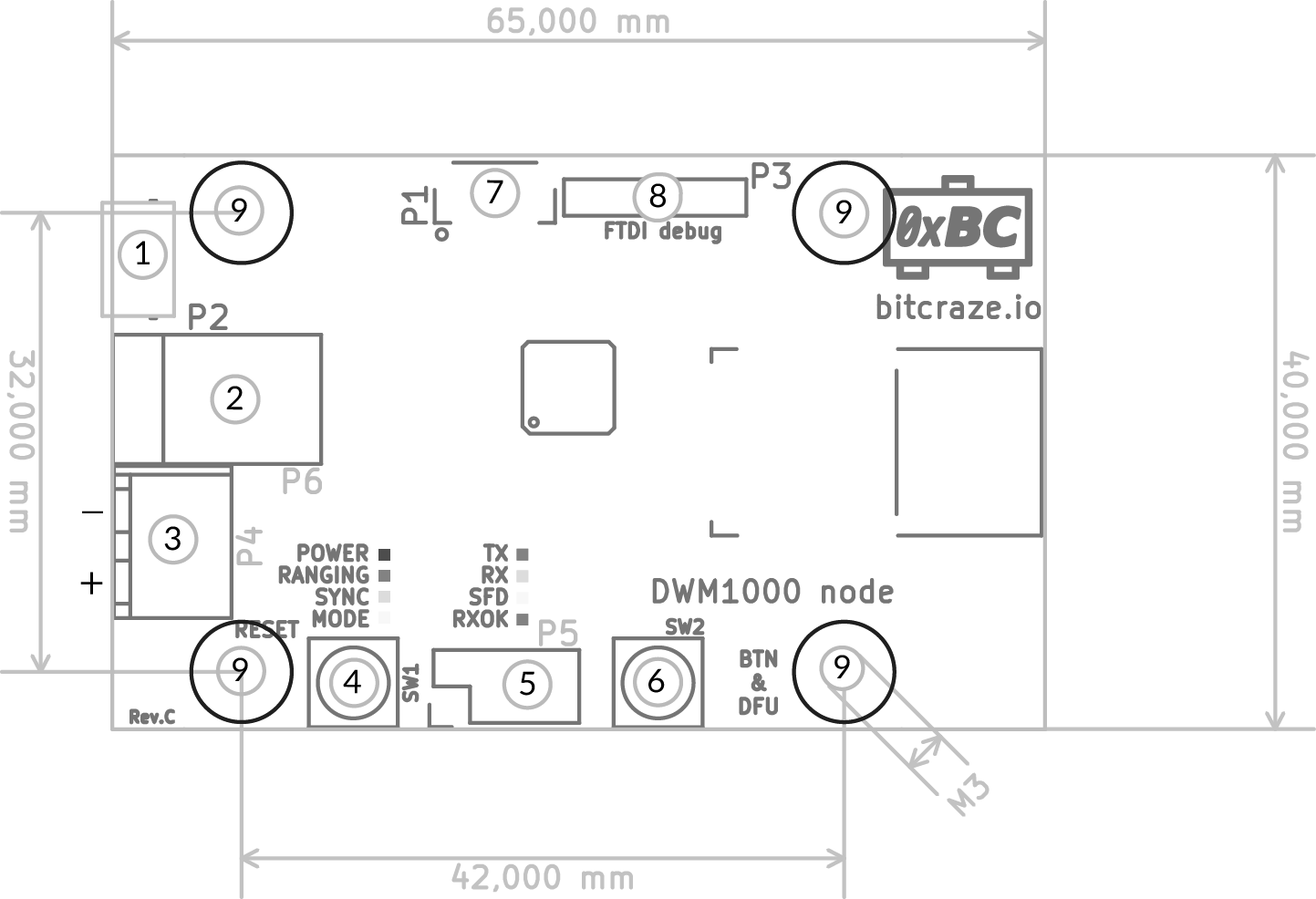
| ID | Type | Description |
|---|---|---|
| 1 | Connector | micro-USB for power and communication |
| 2 | Connector | DC-jack (5V) |
| 3 | Connector | Terminal (5V) |
| 4 | Button | Reset |
| 5 | Connector | Designed for ESP8266 but can be used for other things. Note: Pin-out changed between RevD and RevE (see blow) |
| 6 | Button | If pressed and held during reset or power on this will put the board into DFU bootloader mode. When the system is up and running the button is unused, but could be used to trigger functionality in the firmware. |
| 7 | Connector | SWD connector for programming and debugging MCU. Uses same pin-out as Crazyflie 2.X. |
| 8 | Connector | For FTDI serial-to-USB cable (TTL-232R-3V3). Can be used as a serial port for debugging and to power the board. Note that signals are 3V3 and power is 5V. |
| 9 | Mounting | M3 mounting holes |
LED legend:
| LED | Color | Controlled by | Description |
|---|---|---|---|
| POWER | Blue | MCU | On when board is powered |
| RANGING | Red | MCU | Blinking when ranging is in progress |
| SYNC | Green | MCU | TDB |
| MODE | Yellow | MCU | On in Anchor mode, off in Tag mode and blinking in Sniffer mode |
| TX | Red | DWM1000 | Transmitting |
| RX | Green | DWM1000 | Receiving |
| SFD | Yellow | DWM1000 | Received packet timestamp |
| RXOK | Red | DWM1000 | Packet received without error |
Electrical specification
- Based on the Decawave DWM1000 module
- Implements IEEE 802.15.4 UWB
- STM32F072 MCU (Cortex-M0, 48MHz, 16kb SRAM, 128kb flash)
- High precision pressure sensor (LPS25H)
- micro-USB connector
- Full speed USB device interface
- Powered by USB, 6 mm barrel jack (5 - 12V) or screw terminal (5 - 12V)
- FTDI debug port (not populated)
- Serial connector compatible with ESP8266 module (not populated)
- Power consumption 180 mA max
Radio specification
- Operates at 3.2 - 7 GHz
- Channel bandwidth 500 MHz
Ranging specification
- Ranging accuracy ±10 cm according to DWM1000 spec
- Maximum tested range 10 m
- Nr of anchors required: theoretical minimum of 4 for 3D positioning. More anchors adds redundancy and accuracy, up to 8 supported.
Usage
Go to the Loco positioning system tutorial to set-up the loco positioning nodes with the Loco Positioning deck . Also for more general information over how the loco positioning system fits in our eco system, go to Positioning Systems Overview.
Development
Please check out the Loco positioning node firmware for implementation details, with its accomendating documentation.
Resources
- Loco Positioning system
- Start here
- FAQ
- Getting help
- Datasheet
- Schematics (rev. D)
- Schematics (rev. E)
- Store
Tutorials
If you have any further questions please contact support@bitcraze.io