This page contains generic information about various topics that might be interesting while developing for the Crazyflie Python client. The same kind of information is available here for the Crazyflie Python API.
Here's a quick overview:
- The GUI is made in QT6 (using QTDesigner and loading the .ui files at runtime)
- It uses the SDL2 to read input devices on Windows/Mac OSX and raw jsdevs on Linux. It also supports custom input from LeapMotion and ZMQ.
Architecture
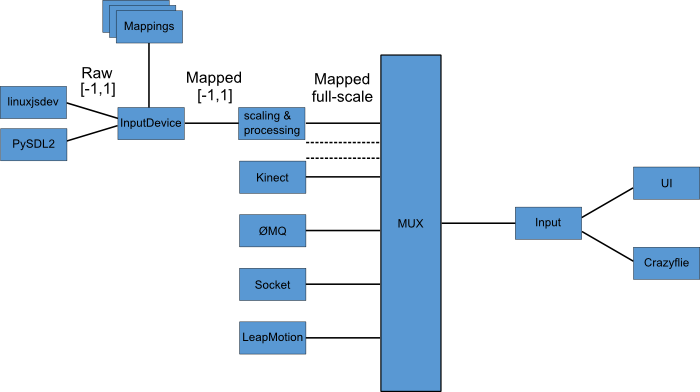
Input devices
The architecture for the input devices in the client strives to give as much flexibility as possible and to make cross platform compatibility smooth. It combines raw readings from input devices with input device mappings to create control values for the Crazyflie and the application. It's also possible to input control values directly.
Below is a walk though of every step of the process, from reading the device to sending the control values to the Crazyflie.
InputDevice
There are two ways to get input into the client: Input readers and input interfaces. On startup the modules src/cfclient/utils/input/inputreaders and src/cfclient/utils/input/inputinterfaces are initialized and these directories are scanned for implementations that can be used. Each python file in these directories represent a "backend" that handles input. Each backend can have zero, one or multiple devices that it can control. The inputreaders module is used to read normal joysticks/gamepads while the inputinterfaces module is used to read any custom interface that's not a joystick/gamepad.
Once the backends are found the client tries to initialize each backend. If successful it is scanned for devices, otherwise it's quietly discarded (only printing a message to the console). A structure is build where the dependency is reversed (backend->device to device->backend) and a list of devices (with connected backends) is passed on.
The client can now open any device in the list and read it. If the device is from the inputreaders module a mapping has to be supplied as described below.
Input readers
Currently there's two types of inputreaders: SDL2 and Linux. The Linux backend is used on Linux and SDL2 on all other platforms. In order to use the devices connected to the backend a mapping has to be supplied to translate the raw axis/buttons indexes (0, 1, 2..) to usable values (roll/pitch/yaw/thrust..).
Input interfaces
The input interfaces don't use any mapping, the devices itself directly generate useful values (like roll/pitch/yaw/thrust). Currently there's two implementations: LeapMotion and ZMQ. Values are read the same way as from normal gamepads/joysticks, at 100Hz. For more information on how the ZMQ interface works read here.
Files
To support the application there's a number of files around it, such as
configuration and caching. All these use JSON to store information. All
of the user configuration files are stored in a local config directory,
hereafter refered to as
User configuration file
To save the configuration between runs of the application there's a
configuration file (*
{
  "link_uri": "radio://0/100/250K",
  "input_device": "Sony PLAYSTATION(R)3 Controller",
  "slew_limit": 45,
  "max_rp": 30,
  "ui_update_period": 100,
  "trim_pitch": 0.0,
  "device_config_mapping": {
    "Leapmotion": "LeapMotion",
    "Sony PLAYSTATION(R)3 Controller": "PS3_Mode_1_Split-Yaw_Linux",
    "PLAYSTATION(R)3 Controller (34:C7:31:8E:CF:0E)": "PS3_Mode_1",
    "Microsoft X-Box 360 pad": "xbox360_mode1_linux"
  },
  "slew_rate": 30,
  "auto_reconnect": false,
  "max_yaw": 200,
  "flightmode": "Advanced",
  "open_tabs": "Flight Control,Parameters,Console",
  "input_device_blacklist": "(VirtualBox|VMware)",
  "trim_roll": 0.0,
  "max_thrust": 80.0,
  "min_thrust": 25.0
}
| Field | Format | Comments |
|---|---|---|
| link_uri | string | The last successfully connected Crazyflie URI. This is used to fill in the address in the top bar at startup |
| auto_reconnect | boolean | Set's if auto-reconnect is enabled or not |
| ui_update_period | int | The minimum time (in ms) between UI updates for logging values |
| open_tabs | string | A comma-separated list of the open tabs (using the tab.tabName attribute) |
| input_device | string | The readable name of the last used input device |
| device_config_mapping | dict | A dictionary where the keys are readable input device names and the values are the last used mapping for the device |
| input_device_blacklist | string | A regexp that will sort out input devices while scanning. This is to avoid detecting virtual joysticks while using a VM |
| flight_mode | string | The name of the last used flightmode (either Advanced or ?) |
| slew_limit | int | The limit (in %) where the slew-tate limiting kicks in, only applicable in Advanced mode |
| slew_rate | int | The slew rate in %/s that will limit the lowering of the thrust, only applicable in Advanced mode |
| trim_pitch | float | The pitch trim (degrees) |
| trim_roll | float | The roll trim (degrees) |
| max_thrust | float | Max allowed thrust, only applicable in Advanced mode |
| min_thrust | float | Min allowed thrust, only applicable in Advanced mode |
| max_yaw | float | Max allowed yaw rate (degrees/s), only applicable in Advanced mode |
| max_rp | float | Max allowed roll/pitch (degrees), only applicable in Advanced mode |
Default configuration file
The source code contains a default configuration file
(src/cfclient/configs/config.json). The file contains two parts: The
default writable part and the default read-only part. When the
application is started for the first time (and /conf/ doesn't exists)
the writable part of this configuration file is copied to the
*
{
  "writable" : {
    "input_device": "",
    "link_uri": "",
    "flightmode": "Normal",
    "open_tabs": "Flight Control",
    "trim_pitch": 0.0,
    "slew_limit": 45,
    "slew_rate": 30,
    "trim_roll": 0.0,
    "max_thrust": 80,
    "min_thrust": 25,
    "max_yaw": 200,
    "max_rp": 30,
    "auto_reconnect": false,
    "device_config_mapping": {},
    "input_device_blacklist": "(VirtualBox|VMware)",
    "ui_update_period": 100
  },
  "read-only" : {
    "normal_slew_limit": 45,
    "normal_slew_rate": 30,
    "normal_max_thrust": 80,
    "normal_min_thrust": 25,
    "normal_max_yaw": 200,
    "normal_max_rp": 30,
    "default_cf_channel": 10,
    "default_cf_speed": 0,
    "default_cf_trim": 0
  }
}
TOC cache files
In order to speed up the connection procedure for the Crazyflie the TOCs
are cached (more info on logging/parameter frameworks and
TOC ). The writable part of the TOC
cache is located in *
The TOC cache files are organized in a hierarchical manner after the group.name concept. In the examples below you first see the group acc which contains the variables y,x,z,zw and mag2. Each of these variables have a set of attributes that are described below.
| Field | Format | Comments |
|---|---|---|
| ident | int | The TOC id of the variable |
| group | string | The group the variable belongs to |
| name | string | The name of the variable |
| prototype | string | The Python unpack string of the variable used when unpacking the binary data |
| [class]{.underline} | string | The name of the class that can hold this variable (either LogTocElement or ParamTocElement) |
| ctype | string | The variable type in the firmware |
| access | int | The access restrictions mask for the variable (only applicable for parameters). 0 = RW, 1 = RO |
Below is an example of part of the log TOC cache:
{
  "acc": {
    "y": {
      "ident": 8,
      "group": "acc",
      "name": "y",
      "pytype": "<f",
      "__class__": "LogTocElement",
      "ctype": "float",
      "access": 0
    },
    "x": {
      "ident": 7,
      "group": "acc",
      "name": "x",
      "pytype": "<f",
      "__class__": "LogTocElement",
      "ctype": "float",
      "access": 0
    },
    "z": {
      "ident": 9,
      "group": "acc",
      "name": "z",
      "pytype": "<f",
      "__class__": "LogTocElement",
      "ctype": "float",
      "access": 0
    },
    "zw": {
      "ident": 10,
      "group": "acc",
      "name": "zw",
      "pytype": "<f",
      "__class__": "LogTocElement",
      "ctype": "float",
      "access": 0
    },
    "mag2": {
      "ident": 11,
      "group": "acc",
      "name": "mag2",
      "pytype": "<f",
      "__class__": "LogTocElement",
      "ctype": "float",
      "access": 0
    }
  },
  "mag": {
    "y": {
      "ident": 39,
      "group": "mag",
      "name": "y",
      "pytype": "<f",
      "__class__": "LogTocElement",
      "ctype": "float",
      "access": 0
    },
    "x": {
      "ident": 38,
      "group": "mag",
      "name": "x",
      "pytype": "<f",
      "__class__": "LogTocElement",
      "ctype": "float",
      "access": 0
    },
    "z": {
      "ident": 40,
      "group": "mag",
      "name": "z",
      "pytype": "<f",
      "__class__": "LogTocElement",
      "ctype": "float",
      "access": 0
    }
  },
  "stabilizer": {
      ....
  }
}
Below is an example of part of the param TOC cache:
{
  "imu_sensors": {
    "AK8963": {
      "ident": 0,
      "group": "imu_sensors",
      "name": "AK8963",
      "pytype": "<B",
      "__class__": "ParamTocElement",
      "ctype": "uint8_t",
      "access": 1
    },
    "LPS25H": {
      "ident": 1,
      "group": "imu_sensors",
      "name": "LPS25H",
      "pytype": "<B",
      "__class__": "ParamTocElement",
      "ctype": "uint8_t",
      "access": 1
    }
  },
  "sensorfusion6": {
    "ki": {
      "ident": 30,
      "group": "sensorfusion6",
      "name": "ki",
      "pytype": "<f",
      "__class__": "ParamTocElement",
      "ctype": "float",
      "access": 0
    },
    "kp": {
      "ident": 29,
      "group": "sensorfusion6",
      "name": "kp",
      "pytype": "<f",
      "__class__": "ParamTocElement",
      "ctype": "float",
      "access": 0
    }
  },
  "flightmode": {
    "althold": {
      "ident": 10,
      "group": "flightmode",
      "name": "althold",
      "pytype": "<B",
      "__class__": "ParamTocElement",
      "ctype": "uint8_t",
      "access": 0
    }
  },
  "firmware": {
    "revision0": {
      "ident": 57,
      "group": "firmware",
      "name": "revision0",
      "pytype": "<L",
      "__class__": "ParamTocElement",
      "ctype": "uint32_t",
      "access": 1
    },
    "revision1": {
      "ident": 58,
      "group": "firmware",
      "name": "revision1",
      "pytype": "<H",
      "__class__": "ParamTocElement",
      "ctype": "uint16_t",
      "access": 1
    },
    "modified": {
      "ident": 59,
      "group": "firmware",
      "name": "modified",
      "pytype": "<B",
      "__class__": "ParamTocElement",
      "ctype": "uint8_t",
      "access": 1
    }
  },
  "cpu": {
     ....
  }
}
Input device configuration
Input device configurations are used to map raw axis (integers) to
values such as roll/pitch/yaw/thrust (more info above). The
configurations are stored in *
A raw axis can be mapped to one or more values, that way it's possible to split up values on multiple axis. An example of this is using the bumper buttons to control the yaw, where the left one controls CW rotation and the right one controls CCW rotation.
| Field | Format | Comments |
|---|---|---|
| inputconfig | dict | Contains one input device |
| inputdevice | dict | Contains a configuration for an input device |
| updateperiod | int | Specifies how often the device is read (not used) |
| name | string | Readable name of the configuration |
| axis | list | A list of every axis that is mapped |
| scale | float | A scale that should be applied to the axis value (will be divided with the scale). Negative values can be used to invert the axis |
| offset | float | An offset that should be applied to the axis value |
| type | string | Either Input.AXIS or Input.BUTTON depending on if it's an axis or a button that id or ids refer to |
| id | int | The driver id of the axis (used for single axis mapping) |
| ids | list of ints | The driver ids of the axis (used for split axis configuration). The first one will be the negative part and the second one the positive part |
| key | string | This string is used inside the application to determine what value should be updated using this axis |
| name | string | Readable name of the axis (not used) |
{
  "inputconfig": {
    "inputdevice": {
      "updateperiod": 10,
      "name": "PS3_Mode_1_Split-Yaw_Linux",
      "axis": [
        {
          "scale": -1.0,
          "type": "Input.AXIS",
          "id": 3,
          "key": "thrust",
          "name": "thrust",
          "offset": 1.0,
        },
        {
          "scale": 1.0,
          "type": "Input.AXIS",
          "ids": [
            12,
            13
          ],
          "key": "yaw",
          "name": "yaw"
        },
        {
          "scale": 1.0,
          "type": "Input.AXIS",
          "id": 0,
          "key": "roll",
          "name": "roll"
        },
        {
          "scale": -1.0,
          "type": "Input.AXIS",
          "id": 1,
          "key": "pitch",
          "name": "pitch"
        },
        {
          "scale": -1.0,
          "type": "Input.BUTTON",
          "id": 6,
          "key": "pitchcal",
          "name": "pitchNeg"
        },
        {
          "scale": 1.0,
          "type": "Input.BUTTON",
          "id": 4,
          "key": "pitchcal",
          "name": "pitchPos"
        },
        {
          "scale": 1.0,
          "type": "Input.BUTTON",
          "id": -1,
          "key": "estop",
          "name": "killswitch"
        },
        {
          "scale": -1.0,
          "type": "Input.BUTTON",
          "id": 7,
          "key": "rollcal",
          "name": "rollNeg"
        },
        {
          "scale": 1.0,
          "type": "Input.BUTTON",
          "id": 5,
          "key": "rollcal",
          "name": "rollPos"
        },
        {
          "scale": 1.0,
          "type": "Input.BUTTON",
          "id": 14,
          "key": "althold",
          "name": "althold"
        },
        {
          "scale": 1.0,
          "type": "Input.BUTTON",
          "id": 12,
          "key": "exit",
          "name": "exitapp"
        }
      ]
    }
  }
}
Log configuration files
The user can configure custom logging configurations from the UI (more
information on logging/parameter
frameworks (/doc/crazyflie/dev/arch/logparam) ). These will be saved in
the *
| Field | Format | Comments | |
|---|---|---|---|
| logconfig | dict | Contains a logging configuration | |
| logblock | dict | A logging configuration | |
| name | string | A readable name of the configuration that will be shown in the UI | |
| period | int | The period the logging data should be requested in. Minimum resolution | is 10th of ms |
| variables | list | A list of dictionaries, one for each variable in the configuration | |
| name | string | The full name of the variable in the group.name format | |
| type | string | Could be either TOC or Memory, currently only TOC is implemented | |
| stored_as | string | The format (as C type) that the variable is stored as in the firmware | |
| fetch_as | string | The format (as C type) that the variable should be logged as |
Below is an example of a log configuration file:
{
  "logconfig": {
    "logblock":
    {"name": "Stabilizer", "period":20,
     "variables": [
          {"name":"stabilizer.roll", "type":"TOC", "stored_as":"float", "fetch_as":"float"},
          {"name":"stabilizer.pitch", "type":"TOC", "stored_as":"float", "fetch_as":"float"},
          {"name":"stabilizer.yaw", "type":"TOC", "stored_as":"float", "fetch_as":"float"}
     ]}
  }
}