Most of us who work on Crazyflie firmware live in one corner of it at a time — a driver here, a control loop there — and rarely step back to see the whole tree at once. We built a treemap of the firmware to do exactly that: one picture, every source file, sized by how much code it actually is and grouped by the directory it lives in. It makes you realize how much is going on in the firmware to make your part work.
How the map was built
The map straight out of a real build: for the cf2 target, we let Kbuild run to completion and then read its own .cmd files, the bookkeeping Kbuild already writes for every compiled object, recording exactly which source file produced it. Group those files by their top-level directory under src/ — deck, drivers, hal, init, lib, modules, platform, utils — plus vendor and scripts alongside, size each tile by lines of code, and the tree draws itself.
The treemap
Below is the top-level view of the crazyflie-firmware. Quite beautiful, right? We think so, at least. It contains years of work from the Bitcraze team and all of you out there who have directly contributed or indirectly by finding bugs and asking for new features.
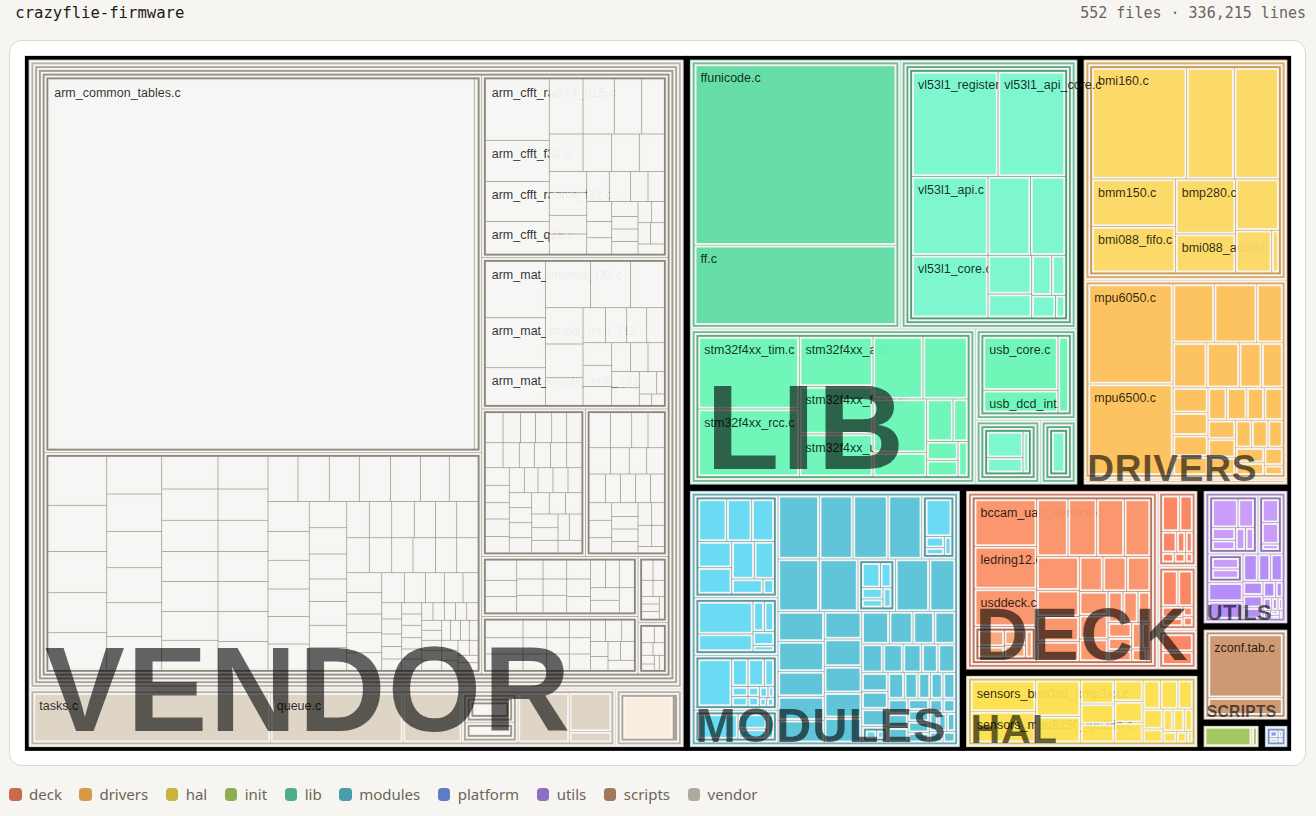
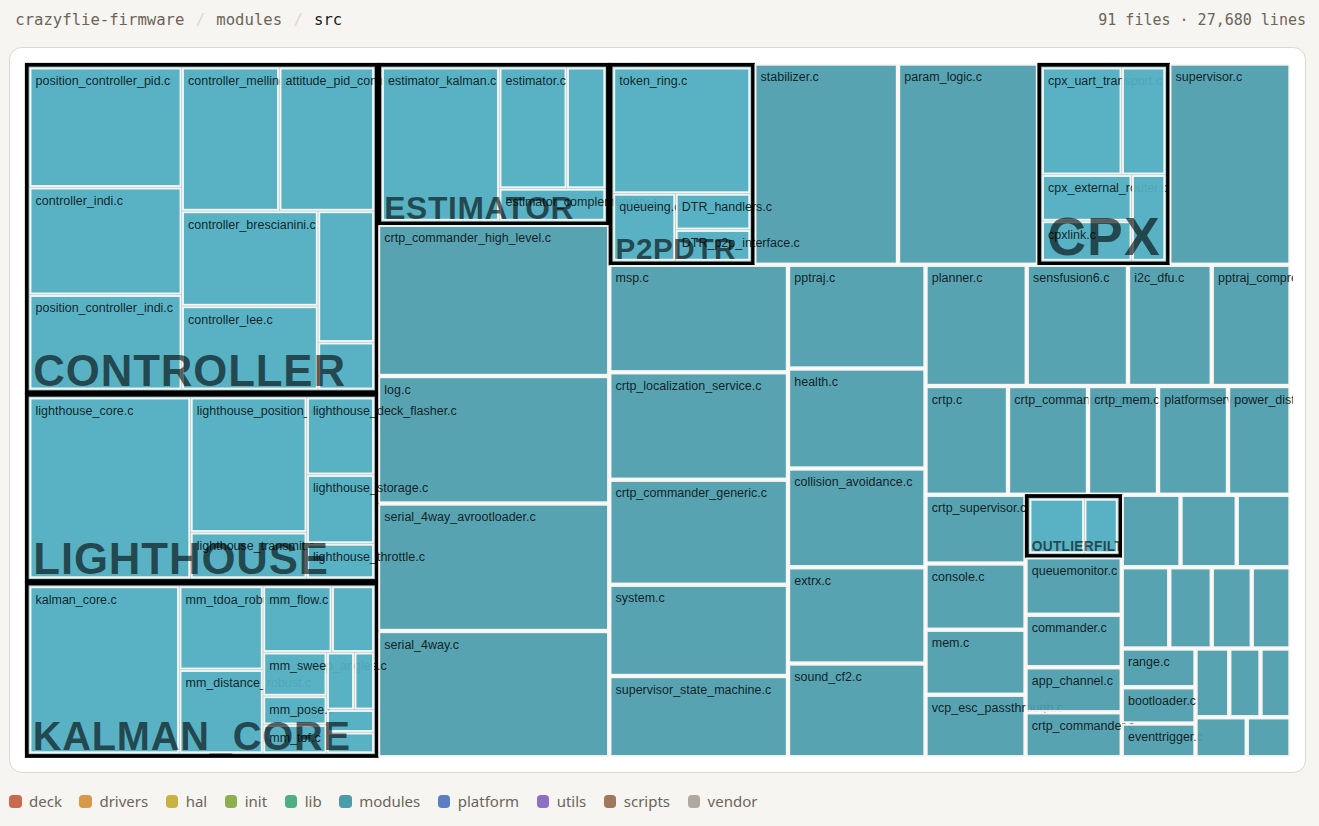
Click into modules/src and it’s 91 files, 27,680 lines — the flight logic. hal/src is leaner: 21 files, 7,036 lines, sitting right above the raw drivers.
Walking the tree
Ordered the way the map itself reads, biggest tile first:
- vendor — a second, separate pile of third-party code (FreeRTOS itself, libdw1000, test frameworks), distinct from
lib. - lib — vendored third-party libraries the firmware builds on (the STM32 standard peripheral library, CMSIS, FatFS, Segger RTT).
- drivers — low-level code talking directly to individual chips: sensors, radio, motors.
- modules — the flight logic: commander, controller, state estimator, Kalman filter, CRTP handling.
- deck — drivers for the decks (flow deck, lighthouse, LED ring, and the rest), detected and brought up at runtime.
- hal — the hardware abstraction layer sitting above the raw drivers (sensor fusion input, power management, storage) that the rest of the firmware calls into.
- utils — small shared helpers used across the rest of the tree: CRC, PID, filters, assertions.
- scripts — build tooling (Kconfig, Makefiles, dependency-checking scripts). Sized like everything else, but none of it is actually compiled into the firmware.
platform and init are in there too, but at this scale they barely register as pixels — more on why that’s fitting below.
Some observations
Diff two builds instead of looking at just one, and a couple of things pop out that are easy to state but satisfying to actually go and check.
CF2 vs. CF2.1 Brushless. These are two different physical boards, but walk the diff and the only directories where a single file differs are hal/src and platform/src. Everything else in the tree — all of modules, all of drivers, all of lib — is the same source code, regardless of whether it ends up on a brushed or a brushless frame. The resulting code differs mainly due to the configuration found in e.g. platform_defaults_cf2.h.
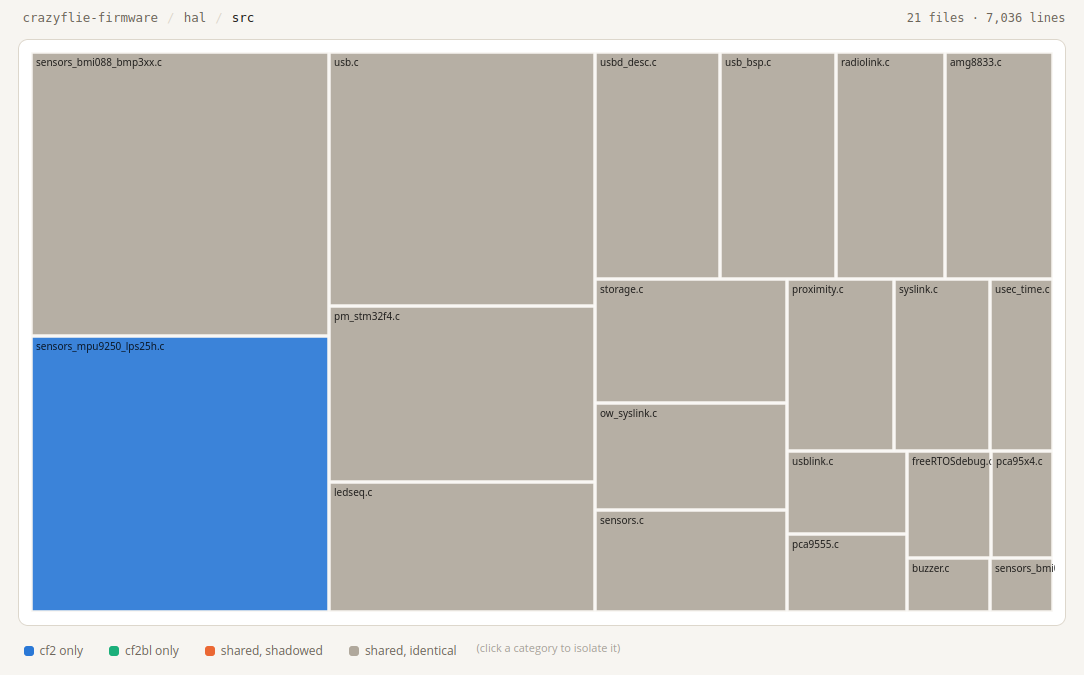
sensors_mpy9250_lps25h.c in the bottom left corner is not compiled into the Brushless – it does not have those sensors. The same is true for Crazyflie 2.1. However, the Crazyflie 2.0 has these sensors. The sensor setting is selected at runtime, which is why you can flash your CF2.0 and CF2.1 with the same firmware.
Every controller ships in every build. modules/src has a whole cluster of controllers sitting side by side — PID, Mellinger, INDI, Brescianini, Lee — and all of them get compiled in. Which controller actually flies the drone is a parameter you can flip at runtime.
Closing thoughts
Line them all up and the codebase is huge, but the part of it that’s actually specific to one physical board is tiny. platform and init — the directories that differ per board and handle bringing the system up — barely show up next to vendor and modules. That’s easy to feel intuitively after enough time in the codebase, and much easier to actually see laid out flat like this.
It would take a long time to work your way through every corner of this tree, if you ever fully do. The tool that generates this map can be found here, and it works on one or two (compare) Kbuild targets. It already has compiled examples.
Is this an interesting way to look at a codebase you already partly know? And now that it’s laid out flat in front of you — is there anything in here that looks like it could use some tidying up? We’d like to hear about it.