If you have set up a Lighthouse positioning system with the Crazyflie before, you are familiar with the geometry estimation step. Walking around the room holding a Crazyflie, clicking a few buttons in a wizard dialog, and hoping that at the end you get a working configuration defining a global coordinate system.
The last part – the hoping – is what we have been working on fixing.
The problem with the old wizard
The old geometry estimation wizard did the job, but it felt like a black box. You would follow the steps, add multiple samples, click “estimate geometry” and wait. If the wizard failed, either by returning a clearly wrong estimation or by not returning anything at all, you got very little information to go on. Was it a bad sample? Was the line of sight of a base station blocked? The only real solution was to clear everything and start the entire process from scratch.
We wanted geometry estimation to feel less unpredictable, and more like a process you can actually see, steer, and understand.
What’s new?
- Continuous geometry estimation.
- Sample collection and modification.
- Live feedback during geometry estimation.
- Verification samples.
- Updated UI.
Continuous geometry estimation
One of the biggest changes is found underneath: geometry estimation now runs continuously in the background. Every time you add a sample, the solver recomputes the geometry right away, using whatever data you’ve collected so far. That means you get live feedback instead of a final verdict, helping you understand if the last change you made improved the geometry estimation or not.
Sample collection and modification
The sample collection process has become more controlled. XYZ-space samples are no longer logged passively as you move the Crazyflie around the room. Instead, you collect each one separately by quickly rotating the Crazyflie at the required point.
Additionally, you can now access the data used for the geometry estimation. All recorded samples remain available, so you can modify them at any time. Any changes are automatically reflected in the geometry estimation, making it easy to correct mistakes or refine the result.
Being able to modify the samples, opens up workflows that were previously impossible. For example, moving the origin of the coordinate system or re-aligning the X-axis becomes as simple as collecting new samples. Similarly, if a base station is replaced or has moved, you can delete it and add the new or updated one by collecting only a few additional samples.
Live feedback during geometry estimation
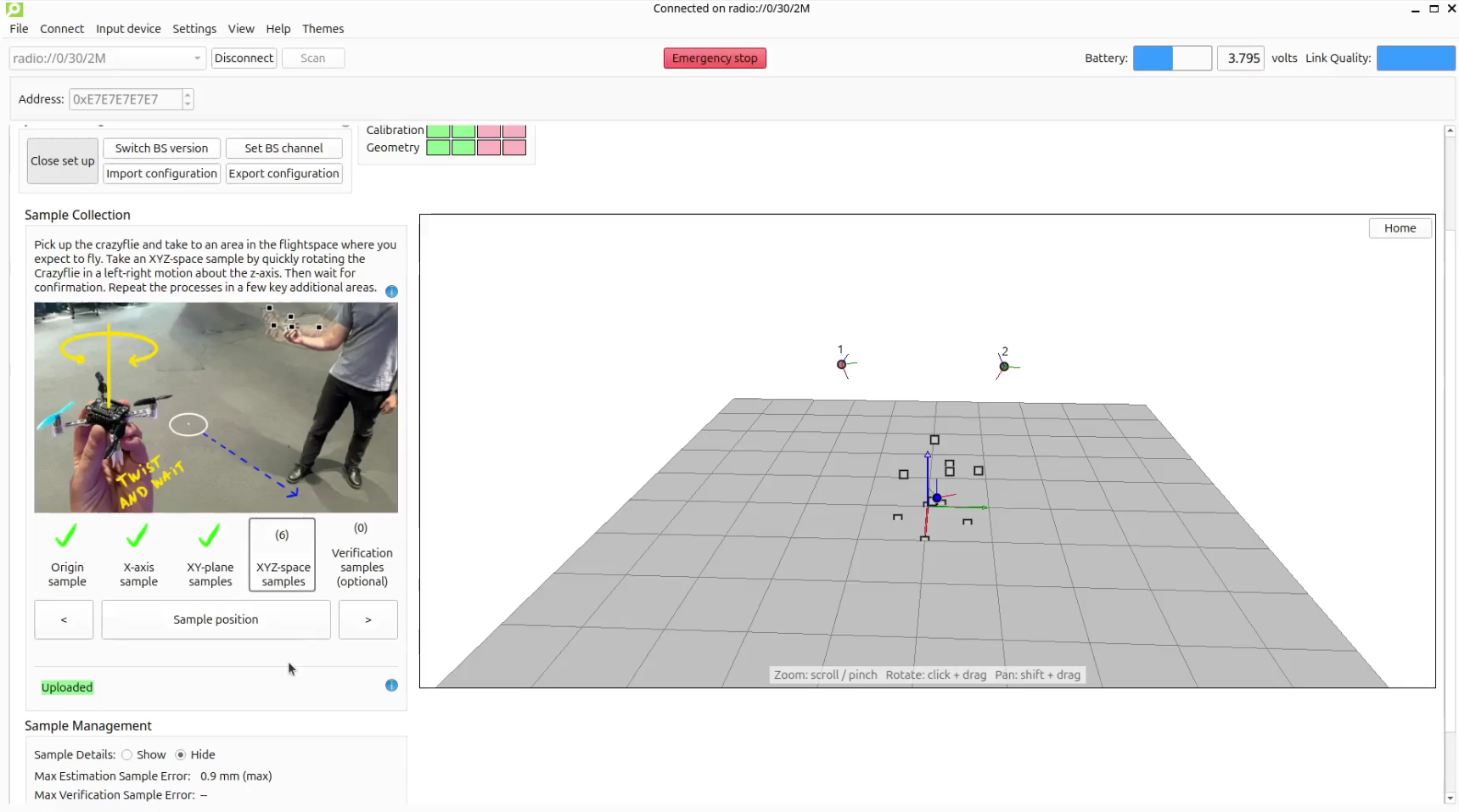
When setting up the lighthouse system, a status line tells you where things stand at all times: “Not enough samples” when the solver needs more data, “Updating…” when the solver is updating the geometry, “Uploading…” when the updated geometry is being written to the Crazyflie, and “Uploaded” when it’s confirmed. No more waiting with bated breath.
Whilst the live feedback avoids a heavily weighed pass-fail condition, much like the old system it does not guarantee that a truly accurate estimation has been uploaded to the Crazyflie, this is where the verification samples come into play.
Verification samples
This is one of the biggest advantages of this update. In addition to the samples used to estimate the geometry (estimation samples), you can now take verification samples. These are extra samples taken the same way, but not used for the estimation, giving you an independent check on how well the base stations agree on each verification sample’s position.
Previously, the only way to know if your geometry was actually good enough to fly on was to fly and see. Now the max verification sample error gives you a rough read on the quality of the geometry before the Crazyflie takes off. Then, if a particular part of the flight space isn’t well covered, you can add a few more XYZ-space samples to improve it.
Updated UI
The new workflow required a major update to the UI. We aimed to make it easier to adapt the system to your needs. This is done by having the ability to retrace your steps, allowing for more control during the set-up process. The design also has larger focus on guidance and feedback with more detailed graphics to guide you through and extra large visual confirmation for when you are collecting samples away form your screen. Additionally, the buzzer deck and any of the LED decks can now also provide confirmation.
The geometry estimation now lives directly in the Lighthouse Positioning tab instead of in a separate dialog. Click “Start set up” and the tab expands with a sample collection section, a 3D view of your base stations and samples, and (optionally) detailed tables of everything that’s been recorded.
This major update is part of the 2026.08 release. See the updated tutorial for Getting started with the lighthouse system to learn more. A special thanks to Joseph La Delfa (@cafeciaojoe) and Kristoffer Richardsson (@krichardsson) for their work that made this update possible.
We hope you enjoy it and are keen to hear your feedback!