Rust

AI coding agents have become increasingly useful lately. The main reason, as far as I can understand, is that agents like Claude Code can close the loop: they can produce code, test it, and iterate. This is critical because models will make mistakes, and the feedback loop allows them to iteratively correct problems and usually converge on a working solution.

When trying to use coding agents with embedded systems, I quickly found myself becoming a manual tester, copy-pasting logs and describing behavior back to the agent. I was the one closing the loop, which is both inefficient and frustrating. So I started looking for ways to improve that.

Control by CLI

One of the great strengths of coding agents is that they can close the loop through the command line. They can invoke CLI tools, and by assembling them together they can achieve far more than any single tool would allow, this is essentially the Unix philosophy applied to AI-assisted development.

The most effective way to extend an agent’s capabilities that I’ve found so far is to build dedicated command line tools and let the agent use them. I ran a couple of experiments with dev boards where I had the agent create a small Python tool to control the board. The minimum useful functionality was: flash firmware, observe the console output, and reset the board. With just those three capabilities, the agent gains the ability to iterate almost entirely on its own.

The crazyflie-agent-cli

This is where the idea came from for creating such a tool for the Crazyflie. I chose to write it in Rust, partly to exercise our newly developed Crazyflie Rust library.

The capabilities I gave it are:

  • Flash the Crazyflie using the bootloader
  • Reset the Crazyflie into bootloader or firmware mode
  • Console, stream the debug text output from the firmware
  • Parameters, read and write parameter values
  • Log variables, stream the value of log variables

This is roughly the minimum viable feature set for Crazyflie firmware development. Since AI coding agents already know how to write C code and compile projects, this is, in theory, enough to close the loop and let an agent implement new functionality, flash it, observe the behavior, find a bug, and iterate, just like in a normal development workflow.

Designing a CLI for agents, not humans

One design challenge worth mentioning: the Crazyflie communication model is inherently stateful. As a human, you would open an interactive client, connect to the drone, and then poke around, reading parameters, watching log variables, tweaking things live. That interactive, session-based workflow doesn’t translate well to agents, which can’t use interactive CLIs. Instead, the crazyflie-agent-cli uses a daemon/client architecture: the agent first launches a background daemon that establishes the radio connection, then uses separate one-shot commands to interact with the already-connected Crazyflie. It’s not the most ergonomic design for humans, you end up needing two terminals, but it turns out to work surprisingly well for an agent, which has no trouble managing background processes and firing off commands independently.

Putting it all together

The CLI gives the agent the capability to interact with the Crazyflie, but it also needs to know how to use it. We could tell the agent at the start of every session “here is a tool you can use,” and it would figure things out by calling --help. But a much more efficient approach is to use skills.

Alongside the CLI, I created a skill that teaches the agent how to use the tool for Crazyflie firmware development: what the workflow looks like, how to flash, how to debug. This is what truly closes the loop, once the skill is in place, the agent knows what a Crazyflie is, how to flash it, and how to debug it, without needing much guidance.

The end result: Claude Code can implement simple firmware functionality largely in one shot, and even when it doesn’t get it right the first time, it will iterate and generally get there.

Here is an example prompt that works end-to-end:

I have a Crazyflie on channel 80, 2M, default address. Add a log variable that exposes
the free heap size so I can monitor it over time. Build, flash, and verify the new
variable appears in the log list.Code language: PHP (php)

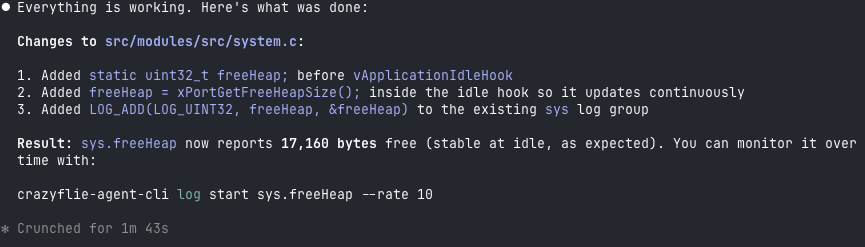
After a little while, the Crazyflie has been flashed, functionality has been verified and result looks something like:

Conclusion

This tool is not an official Bitcraze product, it’s a Fun Friday project. But we think it’s a nice demonstration of what is becoming possible with AI coding agents. By closing the loop, we can start to accelerate firmware development the same way AI has already accelerated other kinds of software development. That said, this is a force multiplier, not a replacement for engineering judgment. The human still needs to be in the loop.

For instance, I believe this CLI is already capable enough to let an agent bring up a new deck with a new sensor, exactly the kind of scoped, iterative task where the available functionality is sufficient. The tool could certainly be improved with more features, and we’ll see how much that happens. But we expect it will likely find its way into some of our day-to-day Crazyflie work at Bitcraze.

For the time being, treat it as an experiment and an example, not a finished product. The code is on GitHub at ataffanel/crazyflie-agent-cli if you want to try it out.

For quite a while now, I have been very interested in the Rust programming language and since Jonas joined us we are two rust-enthusiast at Bitcraze. Rust is a relatively recent programming language that aims at being safe, performant and productive. It is a system programming language in the sense that it compiles to machine code with minimal runtime. It prevents a lot of bugs at compile time and it provides great mechanisms for abstraction that makes it sometime feels as high level as languages like Python.

I have been interested in applying my love for Rust at Bitcraze, mostly during fun Fridays. There is two area that I have mainly explored so far: Putting Rust in embedded systems to replace pieces of C, having such a high-level-looking language in embedded is refreshing, and re-writing the Crazyflie lib on PC in rust to make it more performant and more portable. In this blog post I will talk about the later, I keep embedded rust for a future blog post :).

Re-implementing Crazyflie lib

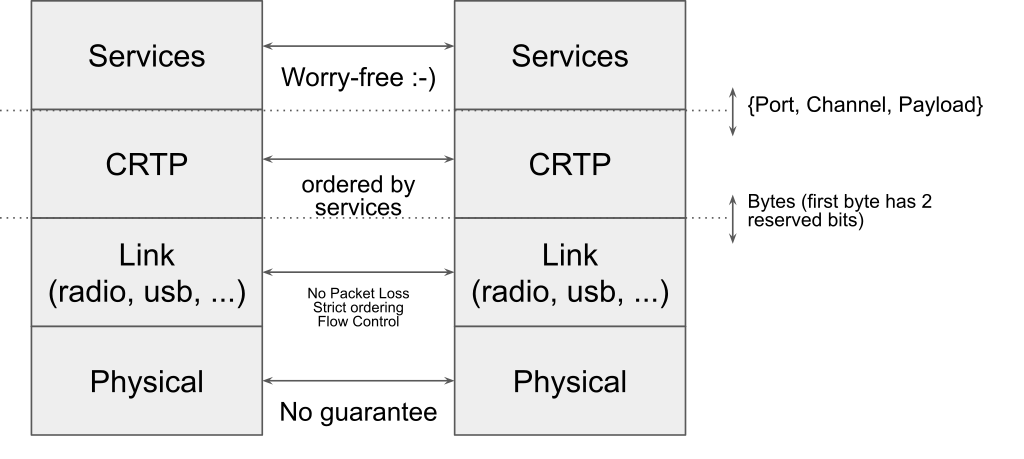
To re-implement the Crazyflie lib, the easiest it to follow the way the communication stack is currently setup, more information can be found on Crtp in a pevious blog post about the Crazyflie radio communication and the communication reliability.

Since I am currently focusing on implementing communication using the Crazyradio dongle, I have separated the implementation in the following modules (A crate is the Rust version of a library):

This organization is very similar to the layering that we have in the python crazyflie-lib, the difference being that in the Crazyflie lib all the layers are distributed in the same Python package.

At the time this blog post is written, the Crazyradio crate is full featured. The link is in a good shape and even has a python binding. The Crazyflie lib however is still very much work in progress. I started by implementing the ‘hard’ parts like log and param but more directly useful part like set-points (what is needed to actually fly the Crazyflie) are not implemented yet.

Compiling to the web: Wasm

One of the nice property of Rust is that compiling to different platform is generally easy and seemless. For instance, all the crates talked about previously will compile and run on Windows/Mac/Linux without any modification including the Python binding using only the standard Rust install. One of the Rust supported platform is a bit more special and interesting compared to the other though: WebAssembly.

WebAssembly is a virtual machine that is designed to be targeted by system programming language like C/C++ and Rust. It can be used in standalone (a bit like the Java VM) as well as in a web browses. All modern web browser supports and can run WebAssembly code. WebAssembly can be called from JavaScript.

The WebAssembly in the web is unfortunately not as easy to target as the native Windows/Mac/Linux: WebAssembly does not support threading yet, USB access needs to be handled via WebUSB and since we run in a web browser from JavaScript we have to follow some rules inherited from it. The most important being that the program can never block (ie. std::sync::Mutex shall not be used, I have tried ….).

I made two major modification to my existing code in order to make it possible to run in a web browser:

  • crazyflie-link and crazyflie-lib have been re-implemented using Rust async/await. This means that there is no thread needed and Rust async/await interfaces almost seamlessly with Javascript’s promises. The link and lib still compile and work well on native platforms.
  • I have created a new crate named crazyradio-webusb (not uploaded yet at the release of this post) that exposes the same API as the crazyradio crates but using WebUSB to communicate with the Crazyradio.

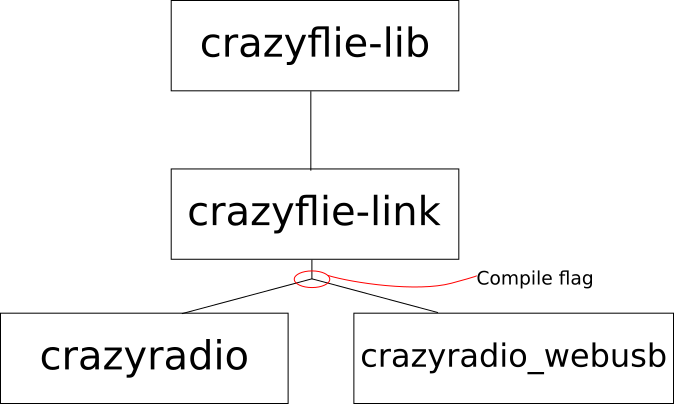
To support the web, the relationship between the crates becomes as follow:

The main goal is to keep the crazyflie-lib and crazyflie-link unmodified. Support for the Crazyradio in native and on the web is handled by two crates that exposes the same async API. The crate used is chosen by a compile flag (called Features in the rust world). This architecture could easily be expanded to other platform like Android or iOS.

Status, demo and future work

I have started getting something working end-to-end in the browser. The lib currently only implements Crazyflie Param and the Log TOC so the current demo scans for Crazyflie, connects the first found Crazyflie and prints the list of parameters with the parameters type and values. It can be found on Crazyflie web client test server. This doesn’t do anything useful now, but I am going to update this server when I make progress, so feel free to visit it in the future :).

Note that WebUSB is currently only implemented by Chromium-based browser so Chrome, Chromium and recent Edge. On Windows you need to install the WinUSB driver for the Crazyradio using Zadig. On Linux/Mac/Android it should work out of the box.

The source code for the Web Client is not pushed on Github yet, once it is, it will be named crazyflie-client-web. It is currently mostly implemented in Rust and it will likely mostly be Rust since it is much easier to stick with one (great!) language. One of the plan is to make a javascript API and to push it on NPM, this will then become a Crazyflie lib usable by anyone on the web from JavaScript (or a bit better, TypeScript …).

My goal for now is to implement a clone of the Crazyflie Client flight control tab on the web. This would provide a nice way to get started with the Crazyflie without having to install anything.