cflib

If you’ve ever gone looking for a more advanced, or use-case-specific Crazyflie example (something beyond the basic single-feature ones), you’ve probably ended up digging through the cflib and crazyflie-firmware example folders. That’s about to change.

We’ve created a new repository: crazyflie-demos. It’s a dedicated place where both us at Bitcraze and the broader community can host self-contained, well-described Crazyflie demos.

Why a new repository?

The examples in the core Bitcraze repositories were meant to be kept focused: demonstrating one feature, one API, or one subsystem at a time. But real demos tend to grow beyond that pretty quickly. Once you start combining positioning systems, swarming, custom firmware apps, external sensors, or other integrations, things stop fitting naturally into the firmware or library repos.

crazyflie-demos gives those larger, more practical examples a proper home, and finally provides a good answer to the question: “where should I put this cool thing I built?

Why not just a folder of examples?

We want to avoid the fate of some older example collections that gradually turned into an unmaintained pile of half-working demos and missing context.

The goal with crazyflie-demos is that every demo should be properly documented and actually runnable. That means clear descriptions, listed dependencies, and enough context to understand what’s going on without digging through source code for an hour.

Another important part is reproducibility: each demo is self-contained and uses pinned dependencies, so an example you clone two years from now should still work.

What’s in there already?

The repository is organized by demo type:

  • scripts/cflib: Host-side Python scripts using crazyflie-lib-python, covering the full Crazyflie API.
  • scripts/rust: Rust demos using crazyflie-lib-rs, showcasing its high-performance and native async support.
  • scripts/cflib2: Early demos for our new Python library, crazyflie-lib-python-v2, built on top of the Rust library. cflib2 doesn’t have a release yet, but we’re already writing demos for it to test the API and the performance.
  • firmware: Out-of-tree firmware apps that are flashed directly to the Crazyflie. Each demo carries its own crazyflie-firmware submodule so you’re always building against the right version.
  • hybrid: Demos that combine onboard firmware with a host-side script working together.

A place to share your work

A big motivation behind crazyflie-demos is making it easier to share work with the community.

If you’ve built something useful, or just a fun experiment using our products, this is the place for it. Not everything needs to live in its own repository or branch. A well-described demo here makes it easier for others to find, understand, and build on your work, and most importantly, to get inspired by it.

We’ll also be using this repository as the go-to reference whenever people ask for more use-case-specific examples, so good demos here will naturally help more people discover what’s possible with the Crazyflie ecosystem.

We’re happy to announce that release 2026.04 is now available. This update introduces a dedicated CRTP port for the supervisor subsystem and a radio startup gate for more reliable early connections, along with a number of smaller bug fixes and quality-of-life improvements. Alongside the release, we’re launching a new crazyflie-demos repository with self-contained examples demonstrating real-world use cases. Thanks to our community contributors for their valuable additions to this release.

Major changes

Demos repository
The new dedicated crazyflie-demos repository hosts more complex examples that combine features or subsystems to demonstrate best practices and real-world use cases. Every demo in the new repository is self-contained, with pinned software versions.

CRTP supervisor port
A new dedicated CRTP port provides direct access to the supervisor subsystem, consolidating supervisor-related commands that had historically ended up on unrelated ports. Arming, crash recovery, and emergency stop commands now go through this port instead of being spread across the platform and localization ports. The old ports still accept these commands for backward compatibility. The new port also exposes supervisor state (armed, flying, tumbled, crashed, etc.) through a direct query, so clients no longer need to set up a log block just to check supervisor status.

Radio startup gate
The STM32 now signals the nRF51 when it’s ready to receive radio packets. Previously, if a client connected during boot, packets could arrive before the firmware was ready to handle them, causing lockups.

Lighthouse calibration saving fix
Fixed a bug that made saving lighthouse calibrations unreliable: a signature mismatch in a memory-read failure callback could leave the memory subsystem locked, blocking further reads until reconnect.

Release overview

crazyflie-firmware release 2026.04 GitHub

crazyflie2-nrf-firmware release 2026.04 GitHub

cfclient (crazyflie-clients-python) release 2026.4 GitHub, PyPi

cflib (crazyflie-lib-python) release 0.1.32 GitHub, PyPi

We’re happy to announce that release 2025.09 is now available. This update includes Python 3.13 support and improved battery voltage compensation, along with enhanced trajectory control capabilities. The release also features substantial stability and architectural work that lays the groundwork for upcoming features and products. Thanks to our community contributors for their valuable additions to this release.

Major changes

Python 3.13 support
Added support for Python 3.13, with preparations already in place to ensure faster compatibility when Python 3.14 releases.

Improved battery voltage compensation
Enhanced voltage compensation for Crazyflie 2.1, 2.1+, and 2.1 with thrust upgrade kit provides more consistent flight performance across battery discharge cycles. Crazyflie Brushless battery voltage compensation coming soon. Thanks to @Rather1337 for this contribution.

Manual flight setpoint packet
New generic commander packet type for manual flight that allows dynamic switching between Angle and Rate modes for roll and pitch without re-flashing the firmware.

Fully relative trajectories
Trajectories can now be initiated relative to the drone’s current yaw, not just position. This enables fully relative trajectory execution where subsequent trajectories maintain the drone’s current orientation. Thanks to @johnnwallace for this contribution.

Modular deck discovery architecture
Replaced OneWire-only deck discovery with a modular backend system that supports multiple discovery protocols. This enables future deck communication methods while maintaining full backward compatibility with existing decks.

Release overview

crazyflie-firmware release 2025.09 GitHub

cfclient (crazyflie-clients-python) release 2025.9 GitHub, PyPi

cflib (crazyflie-lib-python) release 0.1.29 GitHub, PyPi

We are excited to announce that we are working on several new link performance metrics for the Crazyflie that will simplify the troubleshooting of communication issues. Until now, users have had access to very limited information about communication links, relying primarily on a “link quality” statistic based on packet retries (when we have to re-send data) and an RSSI channel scan. Our nightly tests have been limited to basic bandwidth and latency testing. With this update, we aim to expose richer data that not only enables users to make more informed decisions regarding communication links but also enhances the effectiveness of our nightly testing process. In this blog post, we will explore the new metrics, the rationale behind their introduction, and how they will improve your interaction with the Crazyflie. Additionally, we will be holding a developer meeting on Wednesday November 13th to discuss these updates in more detail, and we encourage you to join us!

“Link Quality”—All or Nothing

Until now, users of the Crazyflie have had access to a single link quality metric. Implemented in the Python library, this metric is based on packet retries—instances when data packets need to be re-sent due to communication issues. This metric indicates that for every retry, the link quality drops by 10%, with a maximum of 3 retries allowed. As a result, the link quality score usually ranges from 70% to 100%, with a drop to 0% when communication is completely lost. However, as packet loss occurs, users often experience a steep decline, commonly seeing 100% when packets are successfully acknowledged or dropping to 0% when communication is completely lost.

Client representation of link quality; no link, yes link

The current link quality metric has served as a basic indicator but provides limited insight, often making it difficult to gauge communication reliability accurately. Recognizing these limitations, we’re introducing several new link performance metrics to the Crazyflie Python library, designed to provide a far more detailed and actionable view of communication performance.

What’s Coming in the Upcoming Update

The first metric we are adding is latency. We measure the full link latency, capturing the round-trip time through the library, to the Crazyflie, and back. This latency measurement is link-independent, meaning it applies to both radio and USB connections. The latency metric exposed to users will reflect the 95th percentile—a commonly used measure for capturing typical latency under normal conditions.

Next are several metrics that (currently) only support the radio link. For these, we distinguish between uplink (from the radio to the Crazyflie) and downlink (from the Crazyflie to the radio).

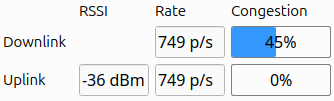
The first is packet rate, which simply measures the number of packets sent and received per second.

More interestingly, we are introducing a link congestion metric. Whenever there is no data to send, both the radio and the Crazyflie send “null” packets. By calculating the ratio of null packets to the total packets sent or received, we can estimate congestion. This is particularly useful for users who rely heavily on logging parameters or, for example, stream mocap positioning data to the Crazyflie.

The Received Signal Strength Indicator (RSSI) measures the quality of signal reception. Unlike our current “link quality” metric, we hope that a poor RSSI will serve as an early warning signal for potential communication loss. While RSSI tracking has been possible before with the channel scan example, this update will monitor RSSI in the library by default, and expose it to the user. The nRF firmware will also be updated to report RSSI by default. Currently, we only receive uplink RSSI, that is, RSSI measured on the Crazyflie side.

Work in progress client representation of new link performance metrics

We’ve already found these new metrics invaluable at Bitcraze. While we have, of course, measured various parameters throughout development, it was easy to lose track of the precise status of the communication stack. In the past, we relied more on general impressions of performance, but with these new metrics, we’ve gained a clearer picture. They’ve already shed light on areas like swarm latency, helping us fine-tune and understand performance far better than before.

You can follow progress on GitHub, and we invite you to try out these metrics for yourself. If there’s anything you feel is missing, or if you have feedback on what would make these tools even more helpful, we’d love to hear from you. Hit us up over on GitHub or join the developer meeting on Wednesday the 13th of November (see the join information on discussions).

We are happy to announce that release 2024.10 is now available! Special thanks to our community contributors for their valuable input and code contributions in this release!

Release overview

crazyflie-firmware release 2024.10 GitHub

crazyflie2-nrf-firmware release 2024.10 GitHub

crazyflie2-nrf-bootloader release 2024.10 GitHub

cfclient (crazyflie-clients-python) release 2024.10 GitHub, PyPI

cflib (crazyflie-lib-python) release 0.1.27 on GitHub, PyPI

User upgrade notice

While older versions may still function, users are encouraged to upgrade:

  • Minimum supported Python version changed to 3.10
  • Supported Ubuntu versions changed to 22.04 and 24.04

Major changes

  • Enhanced out-of-tree (OOT) kbuild configuration, allowing users to perform full Kconfig configuration for app layer applications.
  • Introduced recovery functionality, allowing users or scripts to safely re-enable the system after a crash without reboot.
  • Added a timeout for auto-disarming, allowing the system to remain armed during brief landings in manual arming mode.
  • Introduced a workaround for PID derivative kick, improving the performance of the PID controller during large setpoint changes (#1337, #1403).
  • Spiral and constant velocity high-level commander segments (#1410).
  • Changed BLE name format to include part of the NRF MAC address, allowing users to easily differentiate between Crazyflies.

For detailed release notes, check out the individual releases on GitHub. Links can be found in the release overview above.