Author: Rik

During my first Fun Friday as a Bitcraze intern in 2021, I discovered the musical note definitions in the Crazyflie firmware and thought about creating a musical performance using the Crazyflie’s motors, but never followed through.

A few weeks ago I decided to finally take it on as a Fun Friday Project with the slightly more ambitious goal of playing music across several Crazyflies at once.

crazyflie-jukebox takes a MIDI file, preprocesses it into motor frequency events, then uploads and plays the song by spinning the motors accordingly. Each Crazyflie contributes 4 voices (one per motor), so polyphony scales directly with your drone count.

I implemented this as a firmware app and a Python script using the work-in-progress cflib2 (running on Rust lib back-end). You can find the repository here, try it for yourself! Be aware that certain note combinations can cause the Crazyflie to move, flip, or take off unexpectedly.

Fitting music into 4 motors

The pipeline starts by parsing the MIDI file with mido. From there, an interactive track selection step shows you the instrument names, note counts, and ranges for each track so you can pick exactly which ones to include. The selected notes are then converted from MIDI note numbers into Hz frequencies that the motors can work with.

Each Crazyflie can only play 4 simultaneous voices (one per motor) so there’s some work involved in squeezing music into that constraint. I implemented a couple different voice allocation strategies: melodic priority, which keeps the bass and melody prioritized; voice stealing, which works like a LRU synth; and a simple round robin, which just assigns each new note to the next motor in turn, cutting off whatever was playing there. There’s also a frequency range problem to deal with: motors only reliably produce pitches in roughly the C4–B7 range, so notes outside that window get octave-shifted to fit.

Upload protocol

Events are packed into compact 6-byte structs containing a delta timestamp, motor index, an on/off flag, and the target frequency. These get streamed to the firmware app using the app channel in a simple START; events; END sequence. The Crazyflie app has a buffer limit of 5000 events, which effectively caps the length and complexity of what you can play. The 5000-event buffer was an arbitrary choice and you could probably get away with more, but it was enough for most songs I threw at it.

Synchronization

One of the trickier elements of this project was keeping Crazyflies synchronized. For starting in sync, I didn’t do anything special: no broadcast, no t-minus countdown, just sending start commands to each drone in sequence and relying on cflib2 to do it fast enough that the delay is negligible. That said, I’ve only tested with a small number of Crazyflies. With a larger fleet you’d probably need to implement something for the initial sync.

The real challenge is drift over time. The STM32’s crystal is rated at around 0.1% tolerance. This sounds tiny, but in the worst case, over a 1-minute song that’s already ~120 ms of drift between two drones. In a musical context, humans start noticing timing offsets around 20-30 ms; less for percussive sounds, and less for trained musicians. So left uncorrected, drift would become very audible well before the song ends.

To fix this, all clocks are reset to zero at song start. The host then periodically sends resync packets containing its own timestamp in microseconds, and each Crazyflie applies an offset correction to stay aligned, which as a bonus also irons out any initial start latency.

Rough edges

The biggest design constraint is that a single track can’t be split across Crazyflies, so if a track has more than 4 simultaneous voices, some get dropped. I thought of each Crazyflie as its own instrument, which made sense at the time, but it does mean a dense MIDI tracks can’t be split across multiple drones, which feels limiting in hindsight.

The usable pitch range is about 4 octaves (C4–B7), and propellers need to be attached for accurate pitch since the motors need load to produce the right frequencies, which makes the whole thing a bit unsafe. Certain note combinations can cause a drone to move, flip, or behave unpredictably. Only brushed motors are supported, and there’s a hard 71-minute per-song limit on clock sync. But honestly, if you’re sitting there listening to a 71-minute song on your Crazyflie, the clock drift is the least of your problems.
Check out crazyflie-jukebox on GitHub

We’re happy to announce that release 2025.09 is now available. This update includes Python 3.13 support and improved battery voltage compensation, along with enhanced trajectory control capabilities. The release also features substantial stability and architectural work that lays the groundwork for upcoming features and products. Thanks to our community contributors for their valuable additions to this release.

Major changes

Python 3.13 support
Added support for Python 3.13, with preparations already in place to ensure faster compatibility when Python 3.14 releases.

Improved battery voltage compensation
Enhanced voltage compensation for Crazyflie 2.1, 2.1+, and 2.1 with thrust upgrade kit provides more consistent flight performance across battery discharge cycles. Crazyflie Brushless battery voltage compensation coming soon. Thanks to @Rather1337 for this contribution.

Manual flight setpoint packet
New generic commander packet type for manual flight that allows dynamic switching between Angle and Rate modes for roll and pitch without re-flashing the firmware.

Fully relative trajectories
Trajectories can now be initiated relative to the drone’s current yaw, not just position. This enables fully relative trajectory execution where subsequent trajectories maintain the drone’s current orientation. Thanks to @johnnwallace for this contribution.

Modular deck discovery architecture
Replaced OneWire-only deck discovery with a modular backend system that supports multiple discovery protocols. This enables future deck communication methods while maintaining full backward compatibility with existing decks.

Release overview

crazyflie-firmware release 2025.09 GitHub

cfclient (crazyflie-clients-python) release 2025.9 GitHub, PyPi

cflib (crazyflie-lib-python) release 0.1.29 GitHub, PyPi

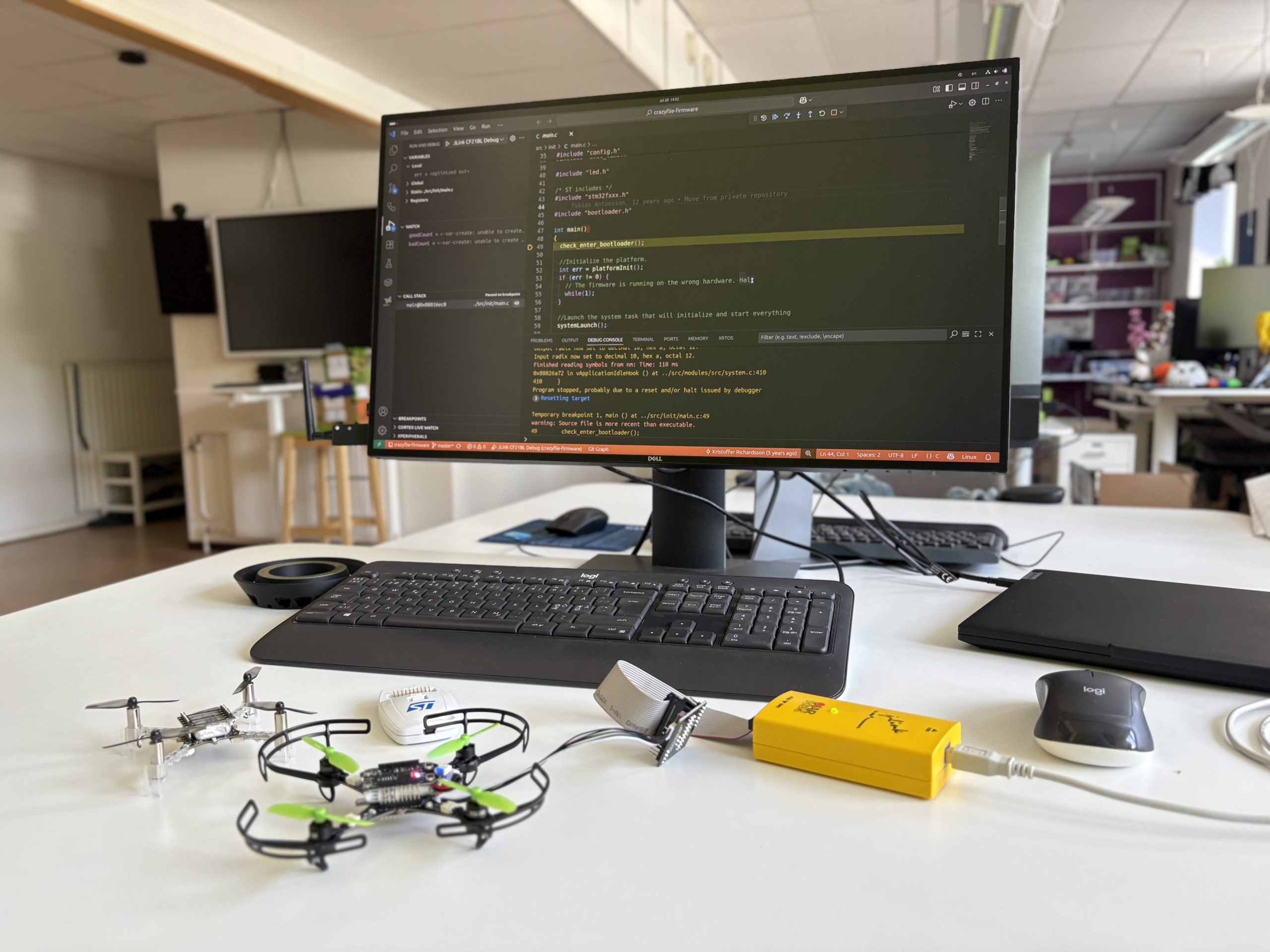
Debugging the Crazyflie using the debug-adapter kit gives you direct access to the STM32 with a hardware debugger. It makes it possible to pause execution, step through code, and inspect what’s happening in real time.

Even if you’re working mostly at a higher level, having this kind of visibility can be a huge time-saver when something unexpected happens. It’s a tool I use frequently when tracking down firmware issues or verifying low-level behavior.

We already have documentation for debugging the STM32 on the Crazyflie using ST-LINK and VS Code, but there are still a few missing pieces; like how to use J-Link, how to debug other platforms (like the Crazyflie 2.1 Brushless), and how enabling debug builds can help.

Debug Build

If you’re debugging and your breakpoints aren’t landing where you expect, or stepping seems unpredictable, or variables aren’t visible, it’s probably because the firmware was built with compiler optimizations enabled. When you select a debug build, the build system disables optimization by setting the compiler flag -O0, which preserves line-by-line correspondence between source code and machine instructions. This makes stepping and inspecting variables much more reliable.

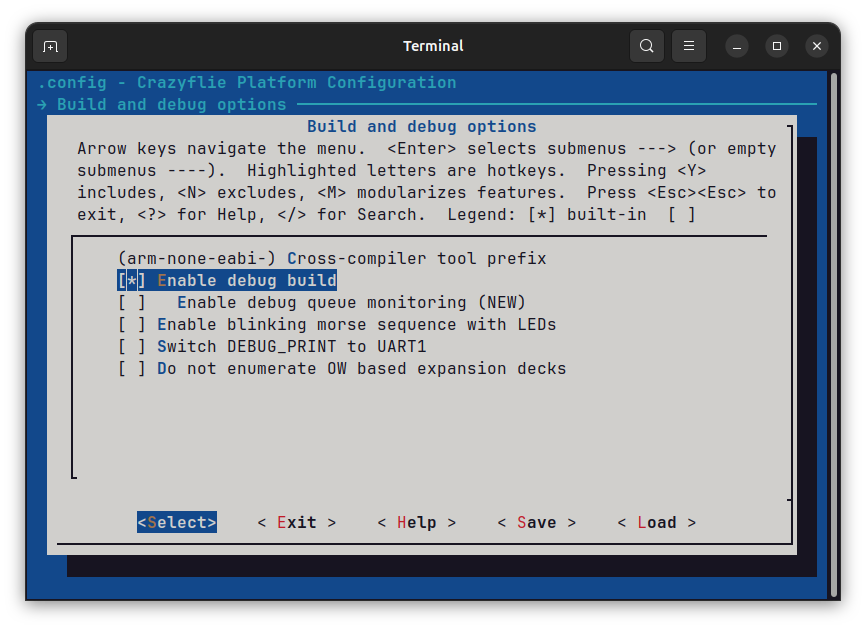
To enable a debug build, you need to set the CONFIG_DEBUG option in your Kconfig configuration. You can do this, for example, by running make menuconfig in a terminal. Then navigate to Build and debug options and select Enable debug build. After changing Kconfig options, re-run make to rebuild the firmware with the new configuration.

Enabling debug build Kconfig option through menuconfig

VS Code Debug Configuration

With debug builds enabled, you’ll get more predictable stepping and reliable breakpoints. The next step is setting up your debugger. Below is a launch.json configuration for VS Code that supports both ST-Link and J-Link, and works with Crazyflie 2.x and the 2.1 Brushless.

If you’re using a J-Link probe, you’ll need to install the J-Link software from Segger.

{
    // VS Code debug launch configurations for Crazyflie 2.x and 2.1 Brushless using J-Link and ST-Link
    "version": "0.2.0",
    "configurations": [
        {
            // ST-LINK configuration for Crazyflie 2.x
            "name": "STLink CF21 Debug",
            "cwd": "${workspaceRoot}",
            "executable": "${workspaceRoot}/build/cf2.elf",
            "request": "launch",
            "type": "cortex-debug",
            "device": "STM32F405",
            "svdFile": "${workspaceRoot}/tools/debug/STM32F405.svd",
            "servertype": "openocd",
            "configFiles": ["interface/stlink-v2.cfg", "target/stm32f4x.cfg"],
            "runToEntryPoint": "main",
            "preLaunchCommands": [
                "set mem inaccessible-by-default off",
                "enable breakpoint",
                "monitor reset"
            ]
        },
        {
            // ST-LINK configuration for Crazyflie 2.1 Brushless
            "name": "STLink CF21BL Debug",
            "cwd": "${workspaceRoot}",
            "executable": "${workspaceRoot}/build/cf21bl.elf",
            "request": "launch",
            "type": "cortex-debug",
            "device": "STM32F405",
            "svdFile": "${workspaceRoot}/tools/debug/STM32F405.svd",
            "servertype": "openocd",
            "configFiles": ["interface/stlink-v2.cfg", "target/stm32f4x.cfg"],
            "runToEntryPoint": "main",
            "preLaunchCommands": [
                "set mem inaccessible-by-default off",
                "enable breakpoint",
                "monitor reset"
            ]
        },
        {
            // J-Link configuration for Crazyflie 2.x
            "name": "JLink CF2 Debug",
            "cwd": "${workspaceRoot}",
            "executable": "${workspaceRoot}/build/cf2.elf",
            "request": "launch",
            "type": "cortex-debug",
            "device": "STM32F405RG",
            "svdFile": "${workspaceRoot}/tools/debug/STM32F405.svd",
            "servertype": "jlink",
            "runToEntryPoint": "main",
            "preLaunchCommands": [
                "set mem inaccessible-by-default off",
                "enable breakpoint",
                "monitor reset"
            ]
        },
        {
            // J-Link configuration for Crazyflie 2.1 Brushless
            "name": "JLink CF21BL Debug",
            "cwd": "${workspaceRoot}",
            "executable": "${workspaceRoot}/build/cf21bl.elf",
            "request": "launch",
            "type": "cortex-debug",
            "device": "STM32F405RG",
            "svdFile": "${workspaceRoot}/tools/debug/STM32F405.svd",
            "servertype": "jlink",
            "runToEntryPoint": "main",
            "preLaunchCommands": [
                "set mem inaccessible-by-default off",
                "enable breakpoint",
                "monitor reset"
            ]
        },
    ]
}Code language: JSON / JSON with Comments (json)

To use this setup with a different platform, like the Flapper, just change the executable field to point to the correct .elf file. By default, starting a debug session in VS Code will erase and reflash the firmware, so make sure the firmware is built beforehand. If you need to attach to a running target without flashing, you’ll need to modify the launch.json to skip loading the binary.

A couple of weeks ago, we were at ICRA 2025 in Atlanta. This year’s ICRA drew over 7,000 attendees, making it the biggest edition yet. We had a booth at the exhibition where we showed our decentralized swarm demo. The setup included a mix of Crazyflie 2.1+ units with Qi charging decks and Crazyflie 2.1 Brushless platforms with our new charging dock. The entire swarm operated onboard, with two Lighthouse base stations for positioning. More details about the setup can be found in the recent swarm demo blog post.

8 Crazyflies flying simultaneously in our decentralized swarm at ICRA 2025

Some of the brushless drones carried our high-powered LED deck prototype to make the swarm more visible and engaging. One of the drones also had a prototype camera streaming deck, which held up well despite the busy wireless environment.

A Different Perspective

This year we were also invited to participate in a workshop: 25 Years of Aerial Robotics: Challenges and Opportunities, where I (Rik) gave a short presentation about the evolution of positioning in the Crazyflie, from webcam-based AruCo marker tracking to the systems we use today.

Usually, we spend most of our time on the exhibition floor, so being part of a workshop like this was a different experience. It was interesting to hear researchers mention the Crazyflie in their work without needing to explain what it is. That kind of familiarity isn’t something we take for granted, and it was nice to see.

The workshop also gave us a chance to talk with both established researchers and newer faces in the field. What stood out most was hearing how people are using the Crazyflie in their work today. It’s very rewarding to see how what we do at the office connects with and supports real research.

Catching Up and Looking Around

One of the most rewarding parts of the conference was the chance to connect directly with people using the platform. We talked to many users, both current and past, and saw new research based on the platform. It was also great to reconnect with Flapper Drones, who build flapping-wing vehicles powered by the Crazyflie Bolt. And it was nice to see HopTo on the exhibition floor for the first time. The company is a spin-off from the Robotics and Intelligent Systems Lab at CityU Hong Kong, which published a Science Robotics paper on the hopcopter concept that used a Crazyflie. We also had the chance to catch up with a maintainer of CrazySim, an open-source simulator in the Crazyflie ecosystem. It’s always valuable to connect with people building on top of the platform, whether through research, hardware, or open-source tools.

Wrapping Up

ICRA 2025 was packed with activity. From demoing the swarm, to the workshop, to hallway conversations, it gave us a lot of valuable feedback and insight. Thanks to everyone who stopped by, joined a talk, or came to say hello.

We’re happy to announce that release 2025.02 is now available. This update includes fixes and improvements for the Crazyflie 2.1 Brushless, along with stability enhancements for the AI-deck.

Release overview

crazyflie-firmware release 2025.02 GitHub

crazyflie2-nrf-firmware release 2025.02 GitHub

aideck-esp-firmware release 2025.02 GitHub

aideck-gap8-examples release 2025.02 GitHub

cfclient (crazyflie-clients-python) release 2025.2 GitHub, PyPi

cflib (crazyflie-lib-python) release 0.1.28 GitHub, PyPi

Major changes

  • Automatically disarm Crazyflie 30 seconds after landing if manual arming is required
  • Calculate latency, receive uplink RSSI, calculate bandwidth congestion and packet rate in Python library
  • Improved AI-deck GAP8 initialization stability by delaying boot by 5 seconds if the deck is attached
  • Improved AI-deck WiFi streamer stability
  • Improved Crazyflie 2.1 Brushless platform default settings and parameters
  • Crazyflie 2.1 Brushless ESC flashing fixes
  • Modernize Python packaging

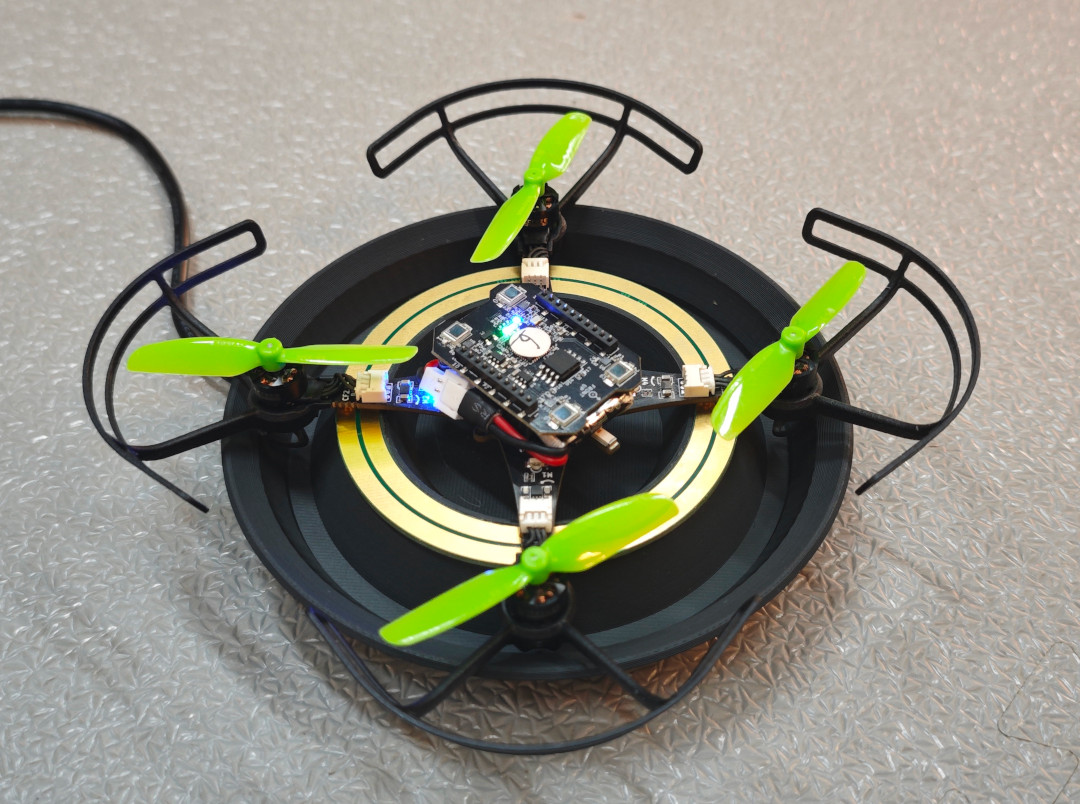
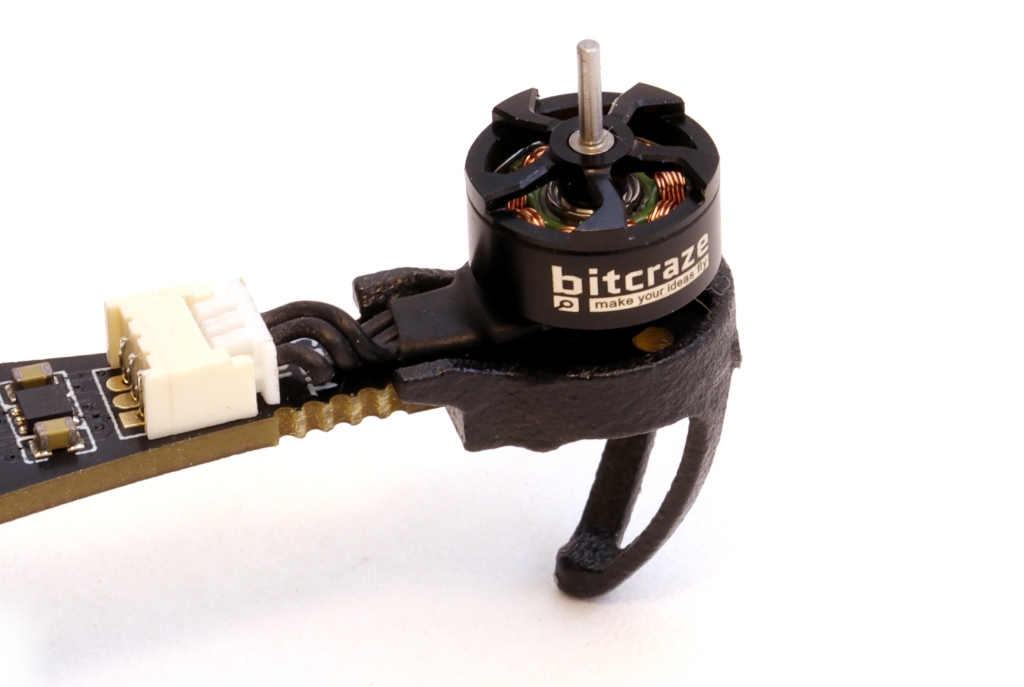
As 2024 comes to an end, it’s the perfect time to reflect on what we’ve accomplished over the past year. A major highlight has been our work on the Crazyflie 2.1 Brushless. We’re thrilled that it will be available early in the new year! While much of our efforts focused on refining and preparing the platform as a whole, we also introduced some standout features like support for contact charging on a charging pad, perfecting the specially optimized motors, and propeller guards to enhance safety for both users and the drone.

Finalizing the integration of the Crazyflie 2.1 Brushless into our software ecosystem and expanding its documentation were key steps in preparing for its launch. These efforts ensure compatibility, improve the user experience, and make the platform more accessible to the community. We’re looking forward to a smooth launch and to seeing how the community will utilize the new platform!

This year, we introduced updates to the Crazyflie 2.1 kit, making the 47-17 propellers the new default and including an improved battery. These upgrades enhance flight performance and endurance, culminating in the release of the Crazyflie 2.1+—an optimized iteration of our established platform.

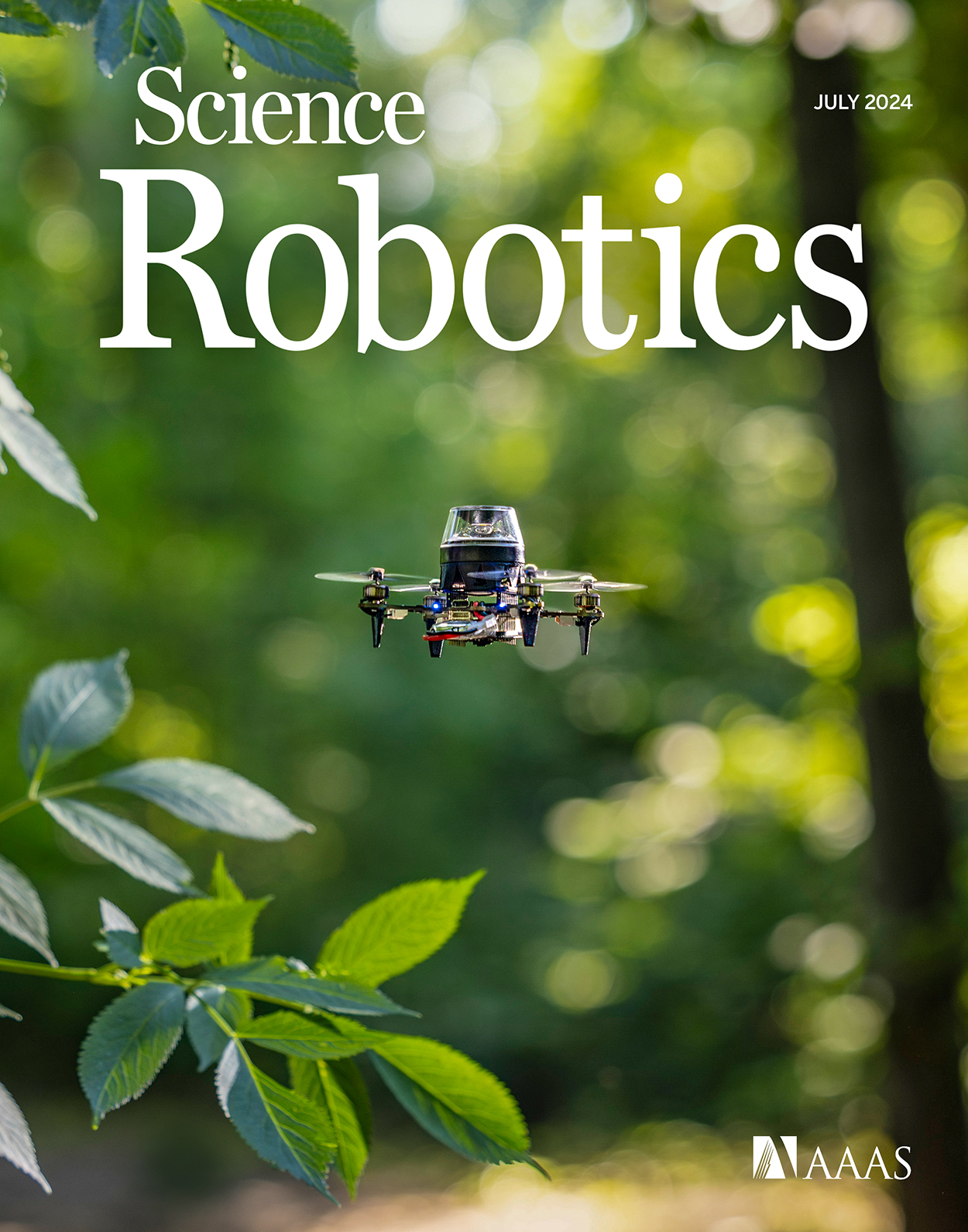
The Crazyflie 2.1 Brushless featured on the cover of Science Robotics vol. 9, no. 92

Community

In 2024, Bitcraze had an action-packed year, engaging with the robotics community through numerous conferences, workshops, and live events.

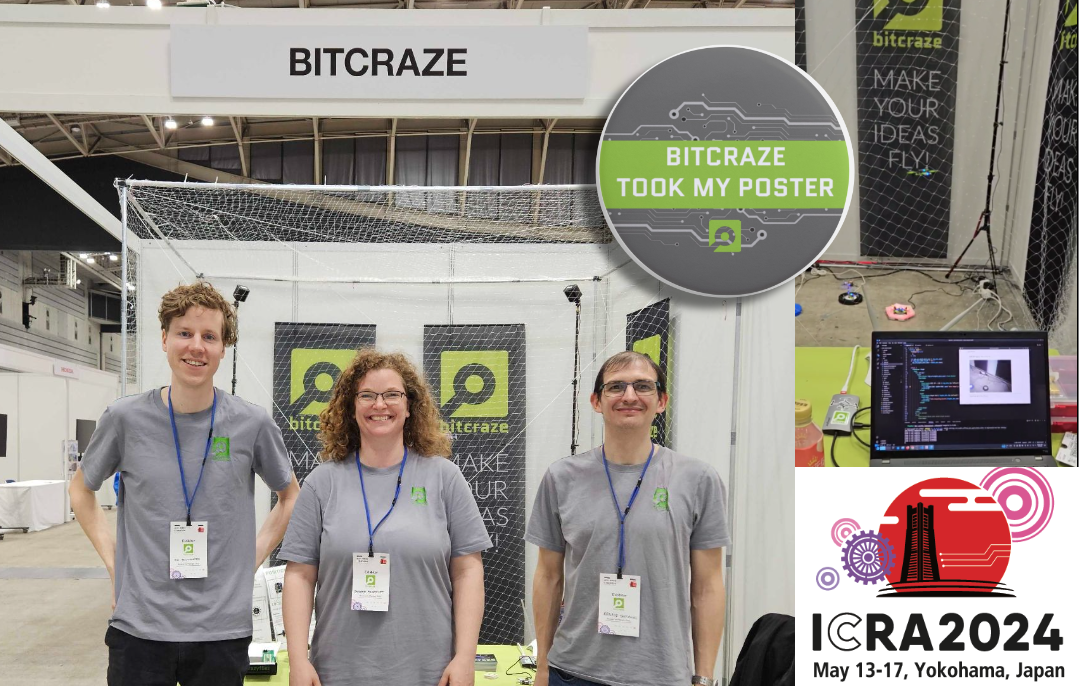
In May, we attended ICRA 2024 in Yokohama. We collected several research posters that now proudly feature at the office. Kimberly presented at the Robotics Developer Day, where she won Best Speaker Award for her impressive live hardware demos with ROS2. We co-organized the ‘Aerial Swarm Tools and Applications’ workshop at RSS 2024 in Delft. Arnaud and Kimberly shared insights on demo-driven development on an episode of OpenCV Live!. Additionally, we had a booth at ROSCon ’24 in Odense, connecting with the vibrant ROS community and showcasing our latest developments.

And don’t forget the developer meetings, where we shared some more behind the scenes information and collected invaluable feedback from the community.

We also released a new edition of our research compilation video, showcasing some of the coolest projects from 2023 and 2024 that highlight the versatility and impact of the Crazyflie platform in research.

Team

In the past year, Bitcraze saw significant changes within the team. in February, Rik rejoined the team. Tove started at Bitcraze in April. Mandy, with whom we’ve already worked extensively over the years, joined as our production representative in Shenzen. At the end of the year, we said goodbye to Kimberly, whose contributions will be deeply missed. Additionally, we had Björn with us for a few months, working on his master’s thesis on fault detection, and Joe continued his industrial postdoc at Bitcraze that began in December 2023. Looking ahead, Bitcraze is hiring for two new roles: a Technical Sales Lead and a Technical Success Engineer, to support our ongoing projects and customer collaborations.


As we close the chapter on 2024, we’re proud of the progress we’ve made, the connections we’ve strengthened, and the milestones we’ve reached. With exciting launches, new faces on the team, and continued collaboration with our community, we’re ready to soar to even greater heights in 2025. Thank you for being part of our journey!

We are excited to announce that we are working on several new link performance metrics for the Crazyflie that will simplify the troubleshooting of communication issues. Until now, users have had access to very limited information about communication links, relying primarily on a “link quality” statistic based on packet retries (when we have to re-send data) and an RSSI channel scan. Our nightly tests have been limited to basic bandwidth and latency testing. With this update, we aim to expose richer data that not only enables users to make more informed decisions regarding communication links but also enhances the effectiveness of our nightly testing process. In this blog post, we will explore the new metrics, the rationale behind their introduction, and how they will improve your interaction with the Crazyflie. Additionally, we will be holding a developer meeting on Wednesday November 13th to discuss these updates in more detail, and we encourage you to join us!

“Link Quality”—All or Nothing

Until now, users of the Crazyflie have had access to a single link quality metric. Implemented in the Python library, this metric is based on packet retries—instances when data packets need to be re-sent due to communication issues. This metric indicates that for every retry, the link quality drops by 10%, with a maximum of 3 retries allowed. As a result, the link quality score usually ranges from 70% to 100%, with a drop to 0% when communication is completely lost. However, as packet loss occurs, users often experience a steep decline, commonly seeing 100% when packets are successfully acknowledged or dropping to 0% when communication is completely lost.

Client representation of link quality; no link, yes link

The current link quality metric has served as a basic indicator but provides limited insight, often making it difficult to gauge communication reliability accurately. Recognizing these limitations, we’re introducing several new link performance metrics to the Crazyflie Python library, designed to provide a far more detailed and actionable view of communication performance.

What’s Coming in the Upcoming Update

The first metric we are adding is latency. We measure the full link latency, capturing the round-trip time through the library, to the Crazyflie, and back. This latency measurement is link-independent, meaning it applies to both radio and USB connections. The latency metric exposed to users will reflect the 95th percentile—a commonly used measure for capturing typical latency under normal conditions.

Next are several metrics that (currently) only support the radio link. For these, we distinguish between uplink (from the radio to the Crazyflie) and downlink (from the Crazyflie to the radio).

The first is packet rate, which simply measures the number of packets sent and received per second.

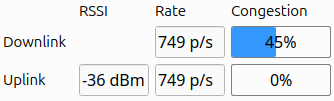
More interestingly, we are introducing a link congestion metric. Whenever there is no data to send, both the radio and the Crazyflie send “null” packets. By calculating the ratio of null packets to the total packets sent or received, we can estimate congestion. This is particularly useful for users who rely heavily on logging parameters or, for example, stream mocap positioning data to the Crazyflie.

The Received Signal Strength Indicator (RSSI) measures the quality of signal reception. Unlike our current “link quality” metric, we hope that a poor RSSI will serve as an early warning signal for potential communication loss. While RSSI tracking has been possible before with the channel scan example, this update will monitor RSSI in the library by default, and expose it to the user. The nRF firmware will also be updated to report RSSI by default. Currently, we only receive uplink RSSI, that is, RSSI measured on the Crazyflie side.

Work in progress client representation of new link performance metrics

We’ve already found these new metrics invaluable at Bitcraze. While we have, of course, measured various parameters throughout development, it was easy to lose track of the precise status of the communication stack. In the past, we relied more on general impressions of performance, but with these new metrics, we’ve gained a clearer picture. They’ve already shed light on areas like swarm latency, helping us fine-tune and understand performance far better than before.

You can follow progress on GitHub, and we invite you to try out these metrics for yourself. If there’s anything you feel is missing, or if you have feedback on what would make these tools even more helpful, we’d love to hear from you. Hit us up over on GitHub or join the developer meeting on Wednesday the 13th of November (see the join information on discussions).

We are happy to announce that release 2024.10 is now available! Special thanks to our community contributors for their valuable input and code contributions in this release!

Release overview

crazyflie-firmware release 2024.10 GitHub

crazyflie2-nrf-firmware release 2024.10 GitHub

crazyflie2-nrf-bootloader release 2024.10 GitHub

cfclient (crazyflie-clients-python) release 2024.10 GitHub, PyPI

cflib (crazyflie-lib-python) release 0.1.27 on GitHub, PyPI

User upgrade notice

While older versions may still function, users are encouraged to upgrade:

  • Minimum supported Python version changed to 3.10
  • Supported Ubuntu versions changed to 22.04 and 24.04

Major changes

  • Enhanced out-of-tree (OOT) kbuild configuration, allowing users to perform full Kconfig configuration for app layer applications.
  • Introduced recovery functionality, allowing users or scripts to safely re-enable the system after a crash without reboot.
  • Added a timeout for auto-disarming, allowing the system to remain armed during brief landings in manual arming mode.
  • Introduced a workaround for PID derivative kick, improving the performance of the PID controller during large setpoint changes (#1337, #1403).
  • Spiral and constant velocity high-level commander segments (#1410).
  • Changed BLE name format to include part of the NRF MAC address, allowing users to easily differentiate between Crazyflies.

For detailed release notes, check out the individual releases on GitHub. Links can be found in the release overview above.

We are excited to announce the release of our new PID Tuning Guide! This guide is designed to help users understand and apply the basics of PID tuning within our ecosystem, making it easier to achieve stable and responsive flight for your Crazyflie. This guide is particularly useful if you’ve modified your drone, such as adding expansion decks or changing its motor and/or propeller configuration. While our default tuning is designed to work in a wide range of situations and configurations, fine-tuning your PID settings can enhance performance for your specific setup and flight profile.

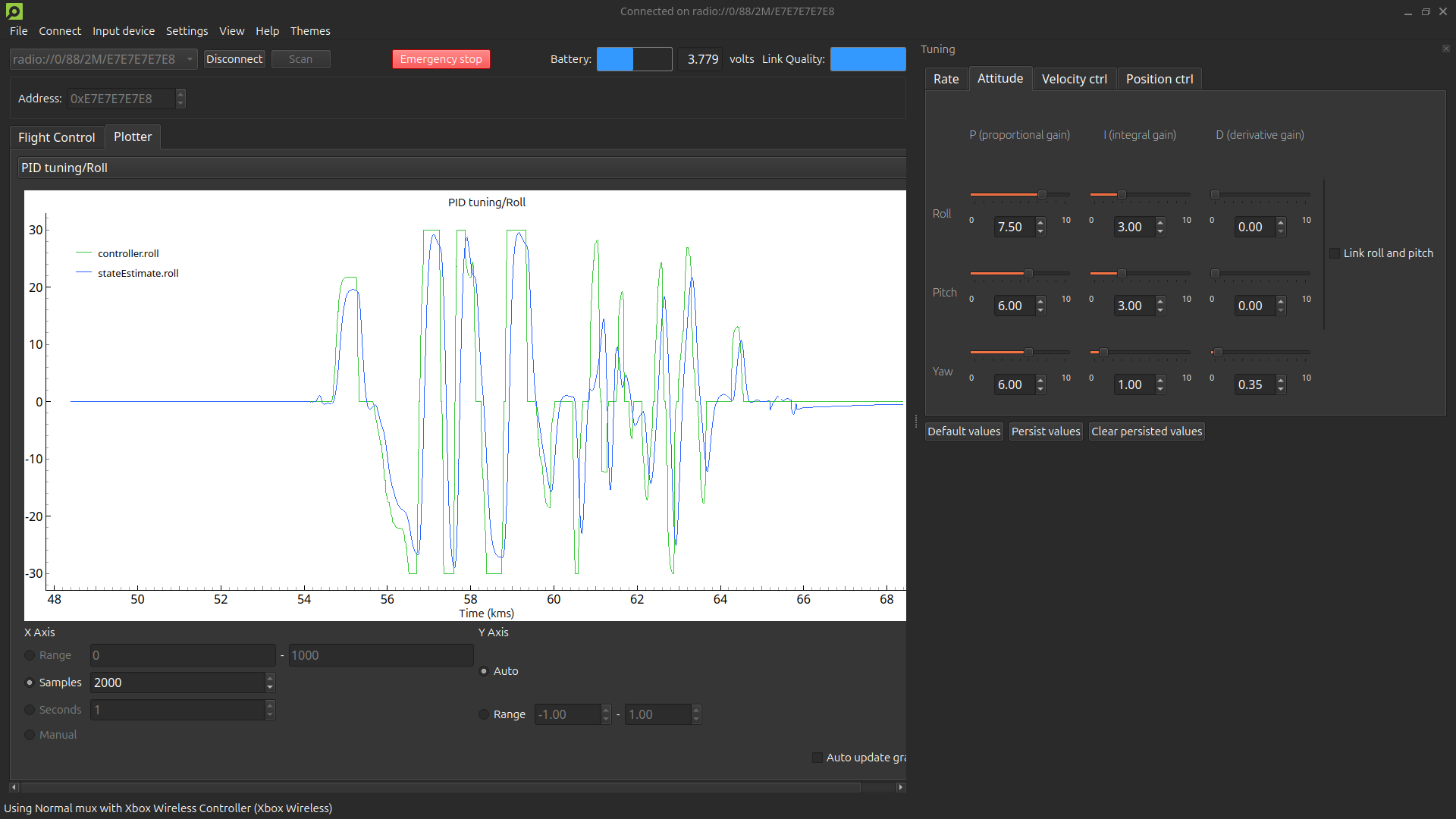
Interface with tuning toolbox and plotter displaying the roll angle setpoint and the roll angle state estimate.

What’s in the guide?

The guide covers essential topics, including:

  • Fundamental PID Concepts: Understand the role of Proportional, Integral, and Derivative parameters in controlling your Crazyflie’s movements.
  • Step-by-Step Instructions: Learn how to set up your software, and use cfclient for tuning.
  • Practical Tuning Tips: Get insights on adjusting PID gains, using the tuning toolbox, and conducting safe manual flight tests.

Why this guide is useful

Even though this guide focuses on the basics, it provides a solid foundation for anyone new to PID tuning. Whether you’re using the Crazyflie 2.1, Crazyflie 2.0, or a custom-built quadcopter with the Crazyflie Bolt, this guide will help you:

  • Understand how PID controllers work and why they are important.
  • Use the cfclient for PID tuning within our ecosystem.

Safety first

We prioritize safety in our guide. Always secure your quadcopter in a safe environment, use protective gear, and configure an emergency stop on your controller to ensure a safe tuning process.

Get started with PID tuning today!

Ready to improve your quadcopter’s flight performance? Check out our PID Tuning Guide and start tuning.

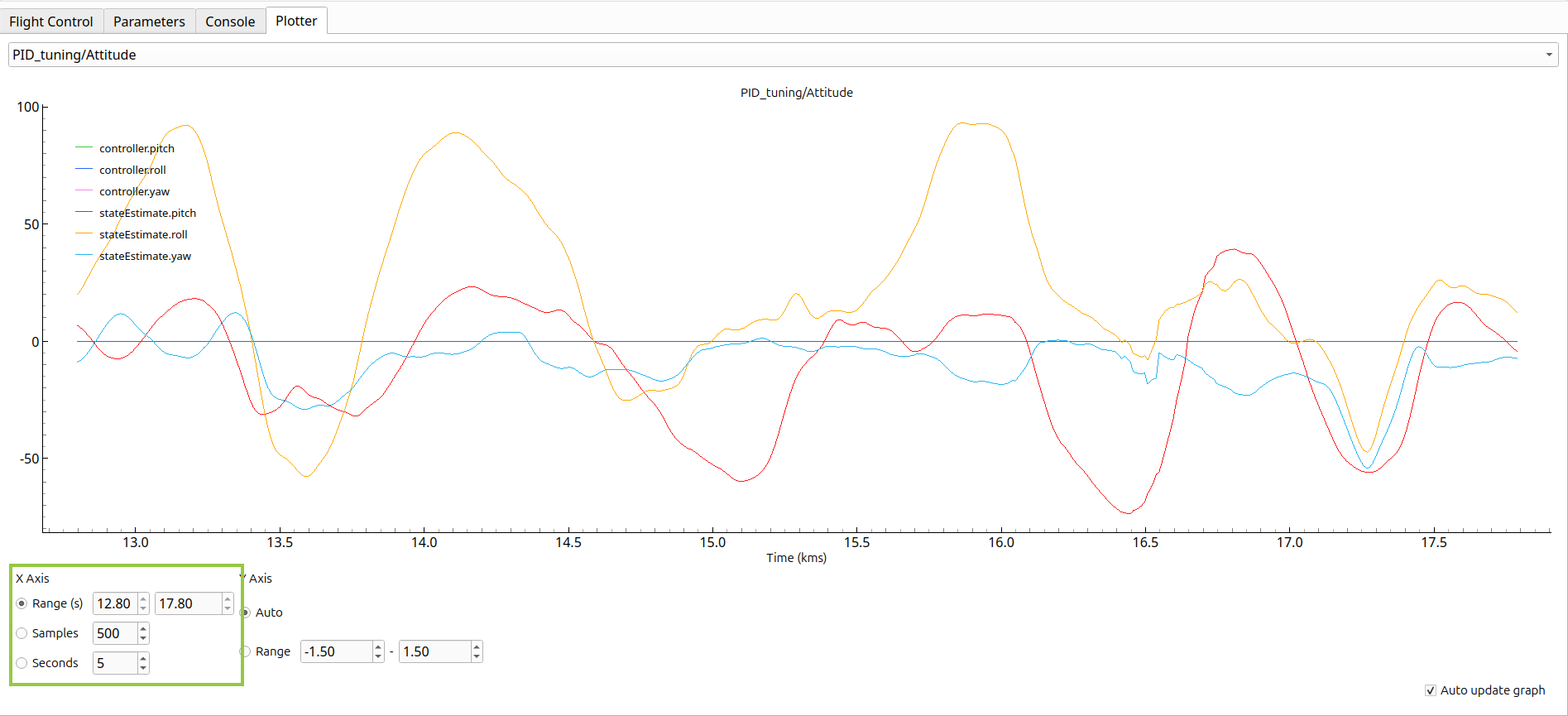
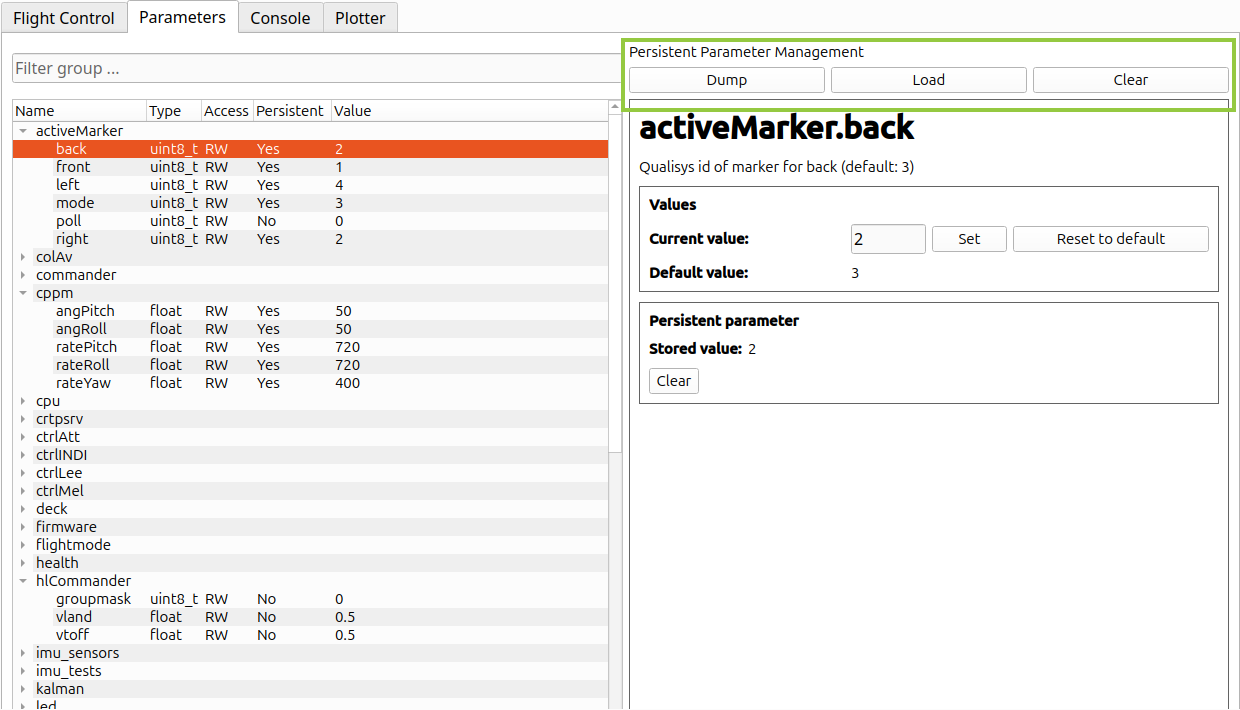
We are happy to announce the latest updates to the Crazyflie client and Python library. Major changes include improved persistent parameter management, enhanced plotting with new x-axis manipulation features, and new default logging configurations (for PID tuning). Minor updates include bug fixes and documentation improvements.

Updated plotter tab. Besides the existing option for a number of samples, users can now set x-axis limits to a number of seconds or a time range.
Updated parameters tab. Users can now mass dump/load persistent parameters to/from a file, or clear all stored persistent parameters.

For detailed release notes, check out crazyflie-lib-python release 0.1.26 and crazyflie-clients-python release 2024.7.