Author: Aris

Some Fun-Friday projects begin with a clear goal and a straight path to the finish line. The best ones, however, take you somewhere completely unexpected.

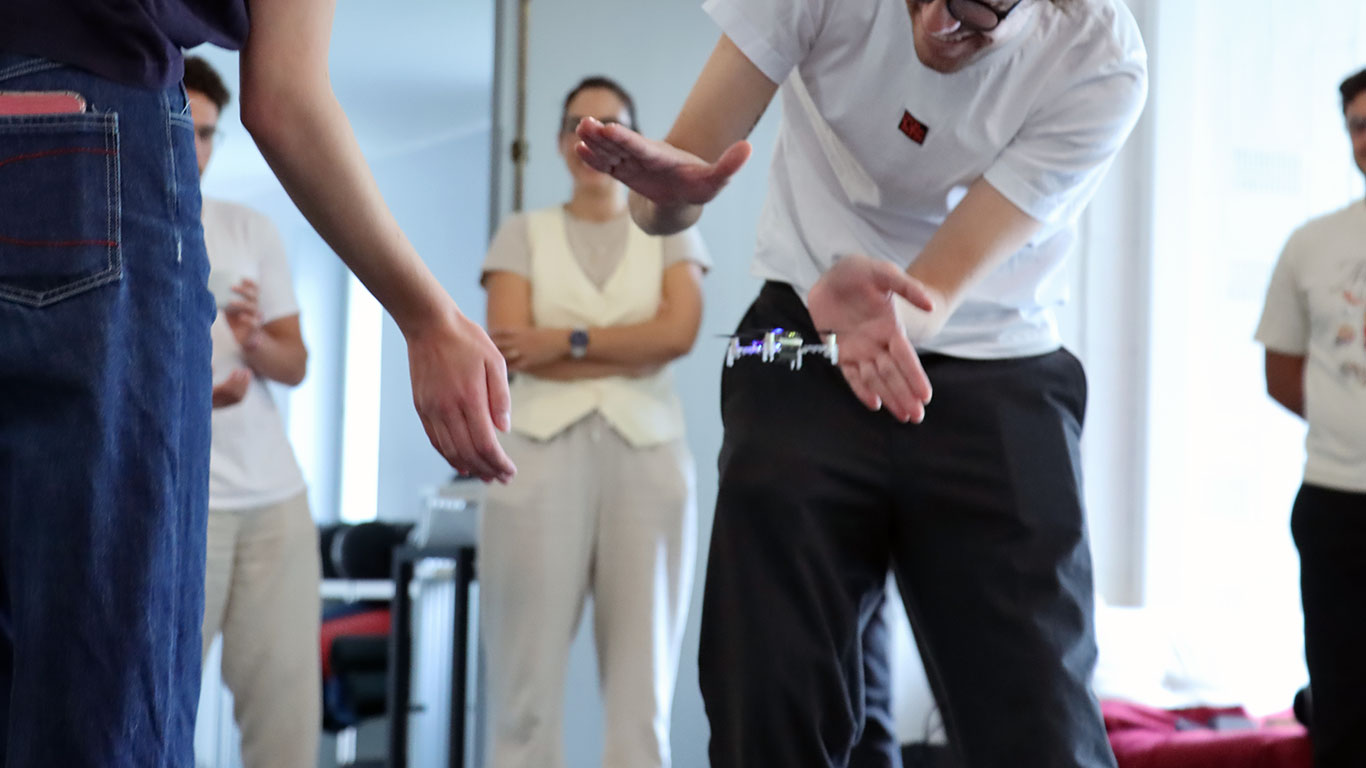
This project originally set out to build a device for determining spatial coordinates within a Lighthouse-covered flight area. Instead, it evolved into the Lighthouse Wand, a hand-held “magic wand” letting you grab and move drones in 3D space just by pointing at them.

How it works

The Wand is a Crazyflie platform with a Lighthouse positioning deck. That’s enough for it to know its own position and orientation in the room. When the button is pressed, it starts broadcasting those 6 numbers over Peer to Peer radio.

Any Crazyflie/receiver in the room on the same radio channel, listens to those packets and runs a simple “grasping” algorithm: while the wand line (positive x-axis) passes close enough to the drone, it builds up a confidence score. Once the score crosses a threshold, the drone is considered grasped. From that point on, it just keeps a specific distance from the wand, while being on the wand line.

When the button is released, the grasped drone either hovers in place, or lands, depending on the release height.

The Color LED deck on the receiver drone, gives you visual feedback: yellow while the Crazyflie is building up its confidence score, green when it’s grasped, and red when it’s landing.

A big advantage of this system is that all interactions run entirely onboard the Crazyflies, allowing them to operate without relying on the cfclient or cflib during flight.

The hardware design

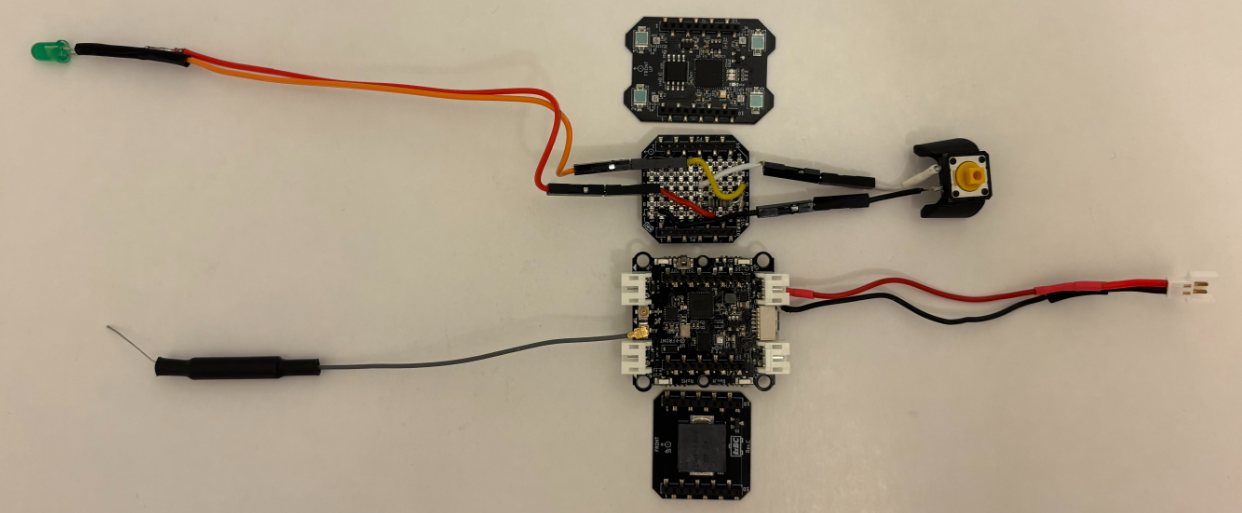
The wand is a Crazyflie Bolt 1.1 with a Lighthouse positioning deck and a Buzzer deck for audio feedback. To allow for user input, I created a simple “Button deck” based on the Prototyping deck utilizing the GPIO pins of the Crazyflie. It also includes an LED for visual feedback when the button is pressed.

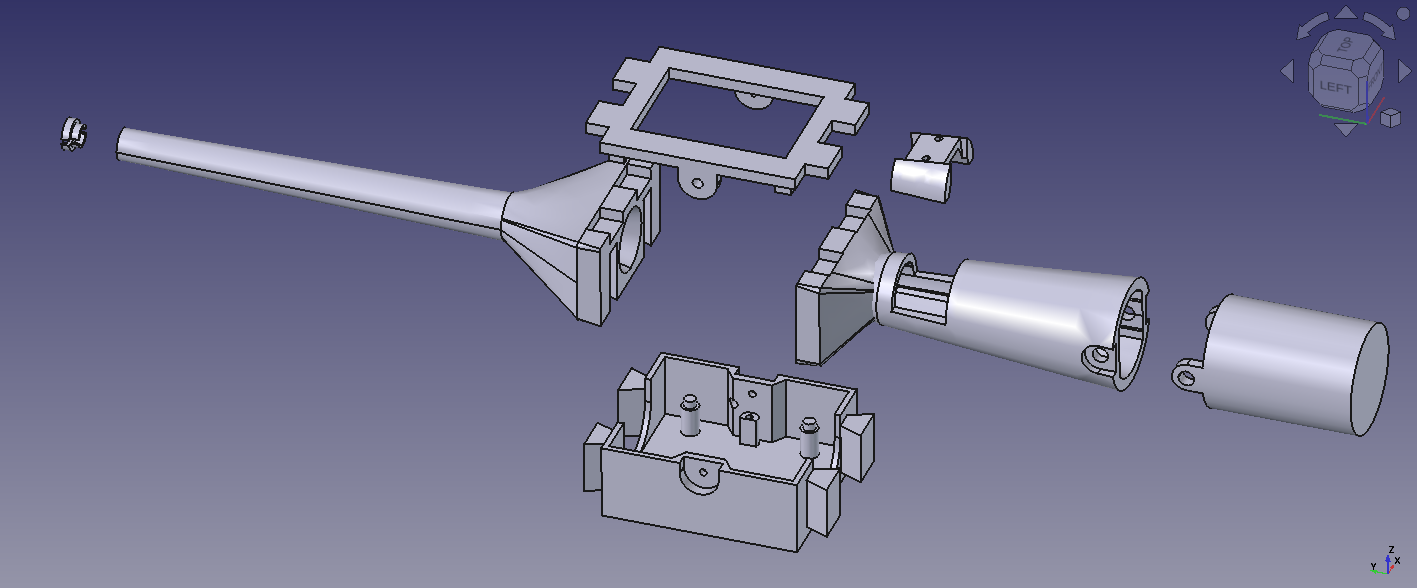
The casing is fully 3D printed in PLA and was designed to give the device a more wand-like feel in the hand. Its shape also makes it easier to hold, aim, and use intuitively during interaction.

The firmware design

Both the Wand and the receiver are firmware apps created on top of the crazyflie-firmware. In the design that I followed, there is a clean separation between the two parties. The wand is a pure broadcaster: it only reads its own pose and transmits it. All grasping logic and flight control run independently on each receiver. Since each receiver is fully autonomous, the system scales to any number of drones with no extra load on the wand.

Where to find the Lighthouse Wand?

A version of the Lighthouse wand is now integrated in our decentralized swarm demo, where it can be used to interact with multiple drones, while the collision avoidance algorithms are still on. This system was first showcased at the European Robotics Forum 2026 in Stavanger, and we’ll also be bringing it to ICRA 2026. If you’re there, stop by booth 91and try flying a bunch of Crazyflies yourself using the wand.

You can find the complete Lighthouse Wand project in this repository. It contains the firmware, the hardware files, and detailed documentation to build and experiment with the wand yourself.

If you’ve ever gone looking for a more advanced, or use-case-specific Crazyflie example (something beyond the basic single-feature ones), you’ve probably ended up digging through the cflib and crazyflie-firmware example folders. That’s about to change.

We’ve created a new repository: crazyflie-demos. It’s a dedicated place where both us at Bitcraze and the broader community can host self-contained, well-described Crazyflie demos.

Why a new repository?

The examples in the core Bitcraze repositories were meant to be kept focused: demonstrating one feature, one API, or one subsystem at a time. But real demos tend to grow beyond that pretty quickly. Once you start combining positioning systems, swarming, custom firmware apps, external sensors, or other integrations, things stop fitting naturally into the firmware or library repos.

crazyflie-demos gives those larger, more practical examples a proper home, and finally provides a good answer to the question: “where should I put this cool thing I built?

Why not just a folder of examples?

We want to avoid the fate of some older example collections that gradually turned into an unmaintained pile of half-working demos and missing context.

The goal with crazyflie-demos is that every demo should be properly documented and actually runnable. That means clear descriptions, listed dependencies, and enough context to understand what’s going on without digging through source code for an hour.

Another important part is reproducibility: each demo is self-contained and uses pinned dependencies, so an example you clone two years from now should still work.

What’s in there already?

The repository is organized by demo type:

  • scripts/cflib: Host-side Python scripts using crazyflie-lib-python, covering the full Crazyflie API.
  • scripts/rust: Rust demos using crazyflie-lib-rs, showcasing its high-performance and native async support.
  • scripts/cflib2: Early demos for our new Python library, crazyflie-lib-python-v2, built on top of the Rust library. cflib2 doesn’t have a release yet, but we’re already writing demos for it to test the API and the performance.
  • firmware: Out-of-tree firmware apps that are flashed directly to the Crazyflie. Each demo carries its own crazyflie-firmware submodule so you’re always building against the right version.
  • hybrid: Demos that combine onboard firmware with a host-side script working together.

A place to share your work

A big motivation behind crazyflie-demos is making it easier to share work with the community.

If you’ve built something useful, or just a fun experiment using our products, this is the place for it. Not everything needs to live in its own repository or branch. A well-described demo here makes it easier for others to find, understand, and build on your work, and most importantly, to get inspired by it.

We’ll also be using this repository as the go-to reference whenever people ask for more use-case-specific examples, so good demos here will naturally help more people discover what’s possible with the Crazyflie ecosystem.

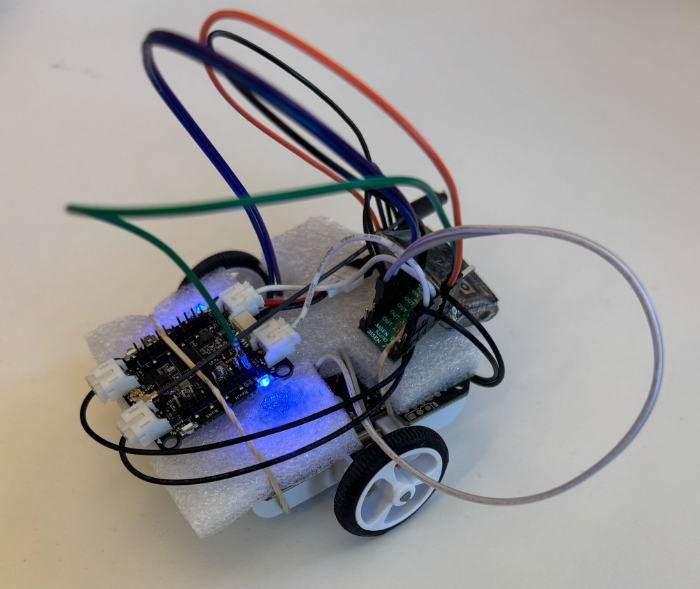
At Bitcraze, we spend a lot of time making things fly. Even though flying robots are, and will always be, fascinating to watch , every now and then it’s refreshing to try something different. Last Friday, I started exploring an idea that has been lying around for a while now: having a ground robot with the same Crazyflie infrastructure – the radio communication, the deck ecosystem and the cfclient connection. This robot is also known as the Crazyrat.

Fair warning: this is a first prototype, and it definitely looks like one. Jumper wires going in every direction, plastic foam and rubber bands to keep everything in place. But it drives, and it drives fast! That’s enough to call it a success and write about it.

Hardware

The entire vehicle was built around the Crazyflie Bolt 1.1, using its motor connectors, and specifically the S pins to drive a small H-bridge motor driver, enabling proper bidirectional DC motor control. To make it possible to drive the H-bridge, the motors must be configured as brushed.

For the motor driver, I used a Pololu DRV8833 Dual Motor Driver Carrier. I experimented with two different motor sets: one with a 75:1 gear ratio and one with 15:1. Even though the 75:1 motors offered better precision and were easier to drive, the 15:1 setup was the clear winner due to their speed.

The motors, the chassis and the power supply were taken from a Pololu 3pi+ robot.

Firmware

For the firmware, I used the Out-Of-Tree functionality of the crazyflie-firmware which makes it easy to integrate custom controllers. The controller itself is relatively simple. It maps pitch and yaw commands sent from the cfclient to throttle and steering respectively. Then, it sends the calculated values directly to the motors as PWM signals.

float throttle = -(setpoint->attitude.pitch / maxPitch);
float steer = -(setpoint->attitudeRate.yaw / maxYaw) * steerGain;

float left = throttle - steer;
float right = throttle + steer;

control->controlMode         = controlModePWM;
control->normalizedForces[0] = (left  > 0.0f) ?  left  : 0.0f;  /* M1 AIN1 left  fwd */
control->normalizedForces[1] = (left  < 0.0f) ? -left  : 0.0f;  /* M2 AIN2 left  rev */
control->normalizedForces[2] = (right > 0.0f) ?  right : 0.0f;  /* M3 BIN1 right fwd */
control->normalizedForces[3] = (right < 0.0f) ? -right : 0.0f;  /* M4 BIN2 right rev */Code language: PHP (php)

The Crazyrat in action

To test the prototype, I used a gamepad and drove it through the cfclient – no modifications are required. Here’s a video showing the capabilities of the Crazyrat using the 15:1 motor setup.

What’s Next

This project was a really fun learning experience on the potential and the limitations of the ground robots. These are some of the directions I plan to explore in the future:

  • Robust design – Design a proper chassis, clean up the wiring and make the whole vehicle smaller, to fit better in the Crazyflie ecosystem.
  • Deck integration – Use either the Lighthouse or the LPS deck for positioning and the Multi-Ranger deck for obstacle detection.
  • Experiment – Explore heterogeneous multi-agent swarming scenarios with the Crazyrat and the Crazyflie.

With spring just around the corner, we thought it was the perfect excuse to make our Crazyflies bloom. The result is a small swarm demo where each drone flies a 3D flower trajectory, all coordinated from a single Crazyradio 2.0. This blog post walks through how it works and highlights two things that made it possible: the new Color LED deck and the Crazyflie Rust library.

The Color LED deck

There are two Color LED decks for the Crazyflie – one mounted on top and one on the bottom – each with its own individually controllable LED via the standard parameter interface. In this demo we use the one mounted on the bottom to give color to the flowers, along with the Lighthouse deck for accurate positioning in space.

The deck opens up a lot of creative possibilities for swarm demos as well as clear visual feedback about what each drone is doing.

Fast swarm connections with the Crazyflie Rust library

Getting five drones connected quickly on a single Crazyradio used to be a real bottleneck. The Crazyflie Rust library introduces a lazy-loading parameter system. Parameter values are not downloaded at connect time; instead, they are fetched only if the API user explicitly accesses them.

Additionally, caching the TOC (Table of Contents) makes it trivial to persist it locally and reuse it on every subsequent connection. In practice this means that after connecting to each drone once, all future connections are nearly instantaneous. The cache is keyed by the TOC’s CRC32 checksum, so it automatically stays valid as long as the firmware doesn’t change, and it’s identical between drones with the same checksum.

The library also uses Tokio’s async runtime, which means all Crazyflie connections start at the same time without waiting for each other. Combined with generally higher communication performance in the Rust implementation, these features significantly reduce the startup overhead, making the swarm feel reliable and responsive, which would require much more effort with the current Python library.

Generating the trajectories

The flower shapes are generated in Python using this script. It produces two .json files per drone (one stem{n} and one petals{n}) containing all the waypoints to fly through. The trajectories are then uploaded to the drone as compressed poly4d segments, a compact format that the Crazyflie’s onboard high-level commander can execute autonomously. Both trajectories are expressed relative to each drone’s initial position, so the formation geometry is entirely determined by where you place the drones on the ground before takeoff.

Putting them all together

The flight sequence is pretty straightforward:

1. Build the trajectories as waypoints on the host.

2. Connect to all drones simultaneously.

3. Upload each drone’s compressed trajectories in parallel.

4. Fly the trajectories while switching the LED colors.

Everything after the connection is driven by Tokio’s join_all, so the swarm stays in sync without any explicit synchronization logic – the drones are just given the same commands at the same time.

The full source code is available at this repository (Python for trajectory generation, Rust for flying).

We’re excited about where the Rust library is heading. It’s improving the communication with the Crazyflie and allows us to increase dramatically the number of Crazyflies per Crazyradio, leading to bigger and more reliable swarms. If you build something cool with it, let us know!

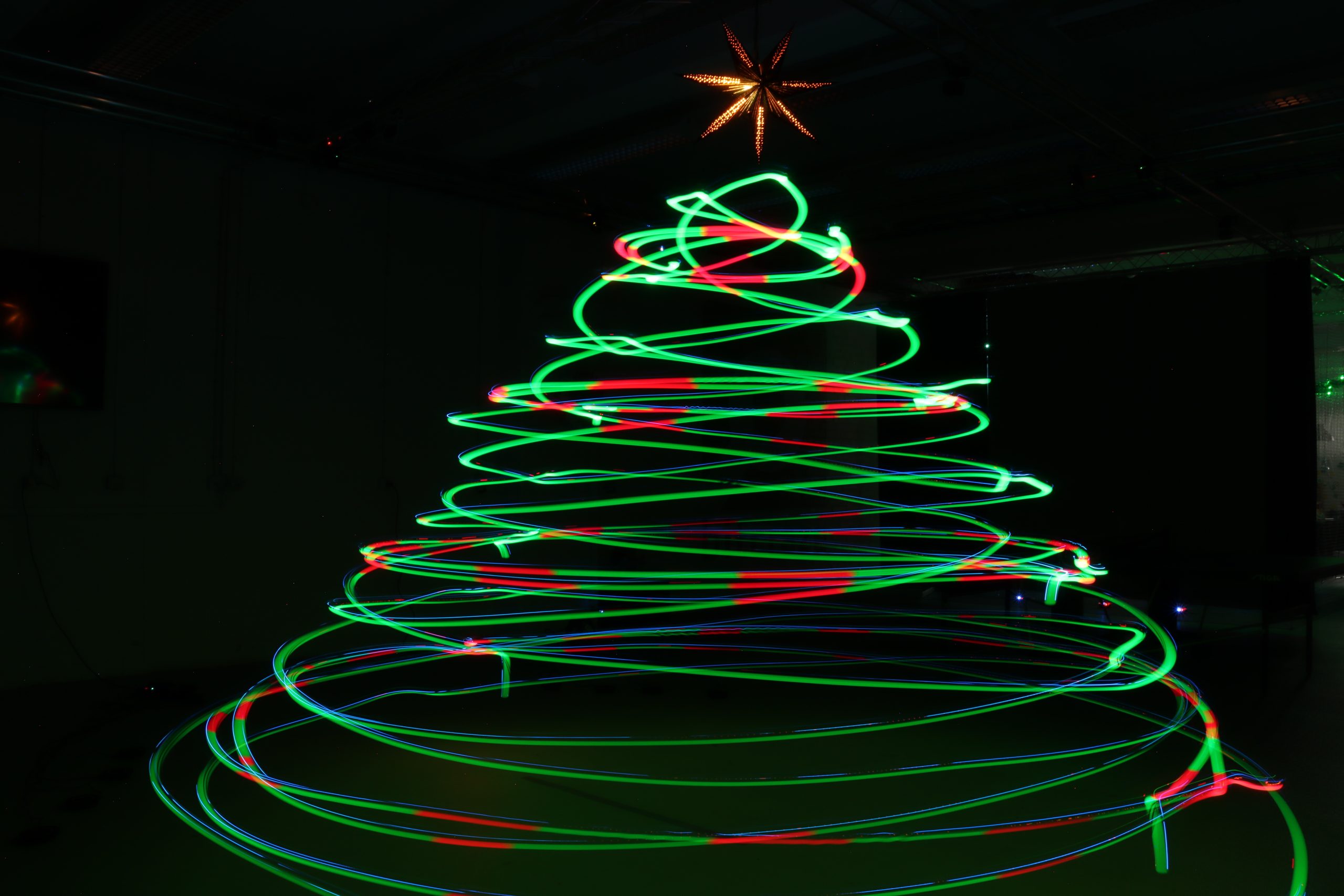
Christmas is getting close, and while most people are just starting to hang lights and decorate their tree, we decided to go a little bigger and a whole lot brighter. Instead of adding tinsels and ornaments, we set up a swarm of 8 Crazyflie 2.1 Brushless drones with the upcoming Color LED decks along with some long-exposure photography magic, and decorated our flying arena with a Christmas tree made of Crazyflies.

How it works

The project is split into two parts: the firmware side that controls the Color LED decks and the script that is responsible for the choreography of the swarm.

The Firmware

Instead of lighting the LEDs based on time or commands, each Crazyflie uses its 3D position to decide on the correct color. This makes the whole communication with the central computer easier. Inside the firmware, multiple virtual spheres are created in the flight arena, just like ornaments floating in a tree-shaped structure. Whenever a Crazyflie flies into one of these spheres, its Color LED deck switches instantly from green to red. When it flies back out, it glows green again. Since we’re taking a long-exposure photo, the whole color pattern begins when the drones are ready to perform the choreography and stops when they start landing.

The Script

The python script is pretty simple. It commands a swarm of Crazyflies to perform a coordinated spiral choreography resembling a Christmas tree outline in 3D space. Each drone takes off to a different height, flies in spiraling circular layers, and changes radius as it rises and descends, forming the visual structure of a cone when viewed from outside. To pull this off with the current state of the cflib, we used 3 Crazyradios 2.0 and the high level commander.

A Testbed for Crazyradio 2.0 Improvement

Lately, we have been looking again at improving the radio communication with the Crazyflie. A prototype featuring a new USB communication mode for the Crazyradio was ready just in time for testing with the Christmas tree demo.

This new mode makes Crazyradio 2.0 much more efficient when communicating with swarms. With it, we were able to fly the same demo using only one Crazyradio 2.0 instead of 3 with the connection time to the swarm greatly accelerated. This demonstrates the efficiency of the new mode.

The new mode is called “inline setting mode” since it works by inlining all radio settings with the packet data, negating the need to issue time-costly USB setup requests. It is currently a Pull Request to Crazyradio 2.0 and the Rust Crazyradio driver. Support for Crazyswarm/ROS and CFLib will be implemented and when we know that the protocol works out for all libs, we will merge and release support for the new mode. It will be enabled by default so you will get the benefits from upgrading the Crazyradio 2.0 firmware and lib. We will talk more about it when it is released, in the mean time do not hesitate to test and feedback on the PRs ;-).

Demo source code

You can find the project’s repository as well as the rust version on Github. The python version was used for the picture and video, and the Rust one behaves identically.

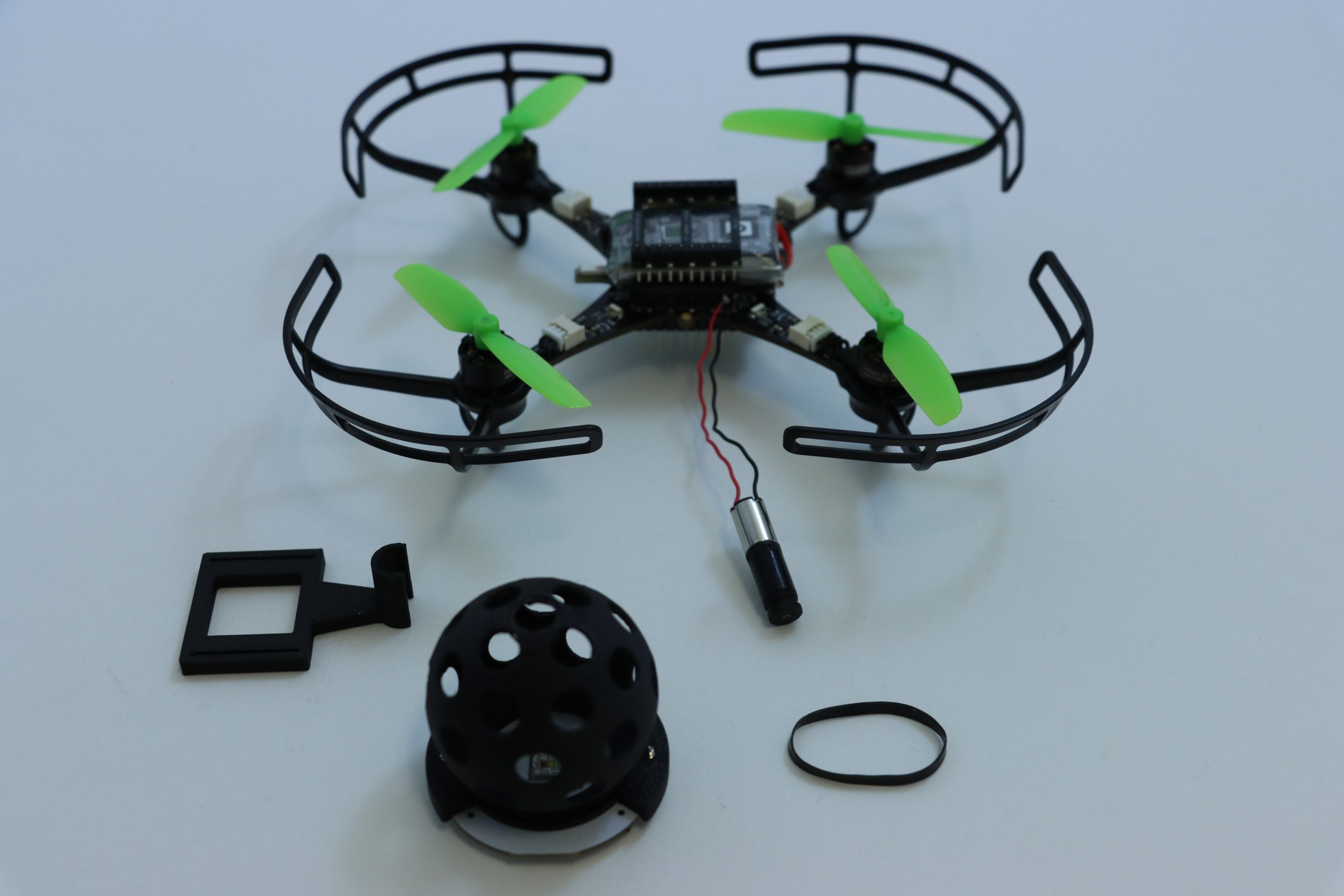
It’s always a good feeling to wrap up the week with a Fun Friday project – especially when it involves some questionable mechanical additions to a Crazyflie platform. This time, I decided to test the capabilities of the upcoming Color LED deck by turning it into a Disco deck.

Mechanics

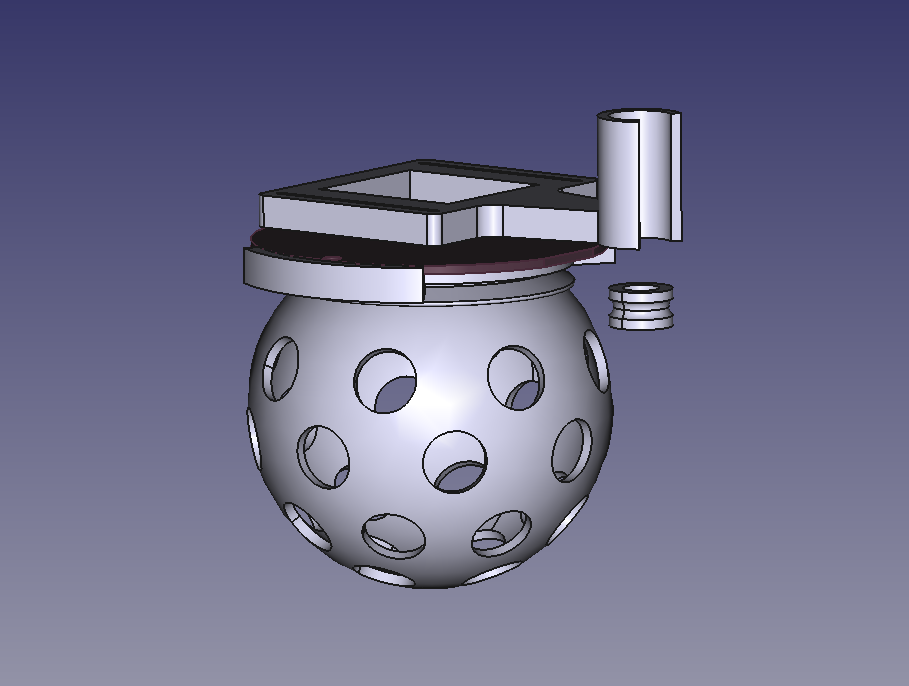
The core of the Disco Deck is pretty simple: a 3D-printed disco ball mounted directly on top of the Color LED Deck with a couple of screws. To bring it to life, I added a Sub-Micro Plastic Planetary Gearmotor and used a rubber band as a drive belt to transfer the rotation. It’s a lightweight, low-tech solution that works surprisingly well with the Crazyflie 2.1 Brushless. All the structural parts were designed to be easily 3D printed in PLA, and they fit on a single print plate for a quick build. You can find all the part files here.

Electronics & Firmware

On my first attempt, I connected the motor directly to VCC and GND, which meant it started spinning as soon as the Crazyflie powered up. This turned out to be a problem as the vibrations prevented the Crazyflie from completing its initialization sequence, since it needs to remain completely still for about one second at startup. The proper fix was to connect the motor to one of the GPIO pins (IO_4) along with GND. For the firmware, I added a new deck driver for setting the IO_4 output to low during initialization and controlling it through a parameter.

Next Steps

The biggest limitation of the current Disco Deck design is the landing. The disco ball extends below the length of the Crazyflie 2.1 Brushless legs, which means the drone can’t take off or land horizontally – not even when using the standard Crazyflie 2.1 Brushless charging dock. To fix this, I’m planning to design a custom charging dock that also works as a stable landing platform for the Party drone.

If you’re interested on the process, you can check out the project repository for any updates.

You might already be familiar with the Crazyflie’s presence in numerous publications across various research fields. However, in this blog post, we’ll return to the basics and showcase some robotics concepts that can be taught using our platform.
The Crazyflie has already found its way into several classrooms such as the “Introduction to Robotics” in the Mechanical & Aerospace Engineering Department at Princeton University, the “Introduction to Control of Unmanned Aerial Vehicles” at UC Berkeley and the “Embedded control systems” at Chalmers University of Technology.
Whether you’re designing a robotics course for undergraduates or developing advanced labs for graduate students, here’s some fields where the Crazyflie can help your students grasp the fundamentals of modern robotics.

Basic Drone Principles

How does the quadcopter generate enough thrust? In which direction should the motors spin? How does the shape of a propeller affect performance?
As an introduction to drones and specifically quadcopters, students can explore these basic principles behind how they work. Then, by flying them, they can better understand the three axes of motion, roll, pitch and yaw and even find out their limitations, such as the ground effect.

Control Systems

What is the difference between controllers? How does a different controller tuning affect performance? How does an estimator work? What types of commands can be sent to a drone?
The Crazyflie platform offers a rich “playground” for exploring the stabilization process from sensor acquisition to motor control, that we often call “stabilizer module“. This includes a variety of controllers, estimators and commanders that can be modified to visualize results in the real world. Also, with the firmware being open-source and modular, it is relatively easy to build your own controller or estimator and integrate it to the platform.

Localization

How can a drone know its position and orientation in 3D space? What is the difference between a local and a global positioning system?
With a wide variety of deck sensors and positioning systems, students can find ways to control the Crazyflie through relative or absolute position/attitude commands. The different sensing methods used in these systems are also interesting to explore – for example, IR signals from the Lighthouse Positioning System, UWB radio from the Loco Positioning System, or optical flow data from the Flow deck v2.

Autonomous Navigation

How could the Crazyflie perform a collision-free trajectory? What is the most efficient way of flying from point A to point B?
In the field of autonomous navigation, the Crazyflie can be treated like any other moving robot by applying existing path planning algorithms or testing newly developed ones. Environment-aware problems are always exciting to work on and the Multi-ranger deck makes them feasible.

Swarm Robotics

What happens when you add another Crazyflie to your setup? How could multiple Crazyflies operate in a swarm? How could you make sure that they won’t collide? What is the difference between a centralized and a decentralized swarm?
Scaling a system up is always challenging but also fascinating. The examples provided in our Python library help you get a swarm in the air, but it’s up to you and your students to explore how the Crazyflies should coordinate and cooperate.

Small Drone, Big Educational Impact

The Crazyflie ecosystem is a fully capable robotics lab in the palm of your hand. Its flexibility, safety, and robust API support make it ideal for hands-on learning in a wide variety of robotics fields. Integrating the Crazyflie into a university robotics curriculum, gives students the chance to explore, test, fail, and fly their way to mastery.

Swarm robotics has undergone rapid evolution and is now used in real-world applications. At the center of this exciting journey is the Crazyflie. Although small, its capabilities make it ideal for swarming applications in research, education, and prototyping.

Small and Safe for Indoor Use

The Crazyflie 2.1+ is a nano-quadcopter that weights only 29g. Crazyflie swarms are safe to interact with and can fly in confined spaces like labs or classrooms. If the maximum recommended payload of 15g is not enough for your application, the Crazyflie 2.1 Brushless is a suitable alternative, as it has a recommended payload of 40g. These two platforms are compatible, allowing them to cooperate within a mixed swarm of your preference.

Setting Up a Crazyflie Swarm

Transitioning from a single Crazyflie to a swarm setup requires certain adjustments. Depending on the amount of data that you want to transfer to and from your Crazyflies, you might need to use more Crazyradio 2.0 dongles. We recommend 3-4 Crazyflies per radio but under ideal conditions each one can handle up to 15 drones. To get the most out of your swarm, you will also need an external positioning system. This could be a Lighthouse positioning system, a Loco positioning system or a Motion Capture system. This allows each Crazyflie to know its absolute position in space. A very interesting swarming project is Crazyswarm where they managed to fly a swarm of 49 Crazyflies using 3 Crazyradios and different positioning systems.

The Crazyswarm project. You can find the full video here.

Available Swarming Frameworks and Examples

To make your introduction to a Crazyflie swarm smoother, our python library contains a swarm class. It allows the user to control each drone in the swarm simultaneously, sending commands either in parallel or sequentially. The library also includes examples that demonstrate the capabilities of a Crazyflie swarm.
For users interested in exploring advanced decentralized swarm schemes, we support firmware that enables peer-to-peer communication. This is at an experimental level and has been used for the decentralized brushless swarm demo and for the ICRA 2025 demo.

Getting Started

Interested in building your first swarm? Explore our swarm bundles featuring multiple platforms and positioning systems that suit your research or development needs. If you are new to the Crazyflie ecosystem, make sure to follow the step-by-step swarm tutorial to better understand the setup process, communication flow, and control mechanisms involved in operating a drone swarm.

The ability to attach expansion decks to the Crazyflie platforms without modifying their electronics allows experimenting with different hardware components. Most existing decks contain different types of sensors that are used for positioning and collecting data. On this Fun Friday project that has been running for the past couple of months, I explored adding mechanical principles to the Crazyflie with the long-term goal to create a working claw to grab and transfer objects.

The claw

The claw mechanism is built on a DC motor. The motor shaft is connected to a worm gear, which drives the claw to open or close depending on the direction of rotation. All the parts are 3D printed and designed from scratch.

The deck

Making the DC motor rotate in both directions requires reversing its polarity, which can be done using an H-bridge. So, the deck controlling the claw, is essentially an H-bridge that uses VCC 3V, GND and 4 GPIO pins on the Crazyflie. This way it can be compatible with the Lighthouse positioning deck. The circuit consists of 4 Mosfets (2 P-type and 2 N-type) and 2 pull-down resistors.

How it works

When designing a custom deck for the Crazyflie, you need to initialize it with its own drivers. The drivers for the H-bridge deck contain 2 basic functions; the one that opens the claw and the one that closes it. They are triggered using 2 float parameters (clawOpen and clawClose), and remain active for the number of milliseconds specified by the value of each parameter.

Experiments

Since the entire claw setup weighs 29g, I used 2 Crazyflie 2.1 Brushless drones, to equally share the weight, while one of them controls the claw. Together, they can lift up to 74g. A fishing line is attached underneath each drone and the claw can slide along it, keeping it always centered between them. For the load, I used a Crazyflie 2.1+ with a lighthouse deck attached and its motors removed, to reduce its weight. When the script starts, the initial positions are collected and a flight sequence for the swarm is created based on them. Then, the swarm takes off and approaches, grabs, lifts and transfers the load.

Next steps

The initial goal of grasping and transferring objects with a flying claw has been achieved. However, in the future I plan to make the system more robust and easy to use. Some points that I might focus on:

  • Making the whole setup lighter – replace the current motor with a lighter one, print with lighter materials.
  • Improve the controller tuning to damp the oscillations and make the flight more stable.
  • Implement a control system to keep track of the claw’s state – add limit switches.

There has been some extended work lately related to the Lighthouse positioning system. The goal of this work is to expand the maximum base station number to 16 enabling the system to cover larger areas and support more complex use cases.

First Lighthouse 16 RP2350 prototype mounted on a development board.

Previous work

One previous attempt to enable multiple base stations using the current lighthouse deck left us with a highly untested “hacky” solution. After flashing the Crazyflie with the proper firmware, this solution requires to strategically position the base stations so that no more than 4 are visible at any given time. Then, the geometry estimation that is normally carried out by the cfclient has to be done through the multi_bs_geometry_estimation.py script in the cflib.

Last year we developed a prototype deck, used in last year’s holiday video, that had a bigger FPGA to receive the lighthouse signals and an esp32 to be able to decode and filter most of the lighthouse pulses onboard the deck. This approach ended up not working for us since it still included the moderately-hard-to-develop FPGA and the algorithm we implemented in the esp32 to identify lighthouse V2 pulses happened to be not fast enough to handle enough base stations.

Current limitations

A key factor that currently limits the maximum number of usable base stations is the Lighthouse deck which can’t handle more than 4 visible base stations at a time. Additionally, the Crazyflie’s STM32 is doing all the filtering and 16 base stations generate so much data that it would exceed the compute and memory budget we have in the Crazyflie. This was one of the main reasons to add a MCU in the deck of our last-year prototype.

Ongoing progress

The last couple of months we have redesigned a new LH-16 deck containing a RP2350 microcontroller so that part of the computation and filtering can take place on the deck, rather than on the Crazyflie. With a deck like this, it should be possible to receive large amounts of data from the base stations and filter some of it out to finally estimate the Crazyflie’s position in the Crazyflie’s STM32.

This deck has been designed to run a firmware developed by Said Alvarado-Marin from the AIO team at Inria in Paris. This firmware is able to acquire, decode and identify the FM1-encoded LFSR data stream we get from the base stations without the help of an FPGA or a big look-up table. This allows to greatly simplify the hardware and software by using only one microcontroller on the deck.

We are currently bringing-up the prototype and hope to be able to soon fly in our lab with 16 base stations. We will also be looking at making a standalone lighthouse receiver for other robots and applications. For the curious: the board under the deck in the picture in a debug board that contains everything we might need for making a standalone receiver plus everything needed to bring-up and debug the deck until we have it ready to fly.