Category: Video

This week’s guest blogpost is from Xinyu Cai from the research group of ShaoHui Foong, located in the Engineering Product Development Faculty from Singapore University of Technology and Design. Please check out their youtube channel. Enjoy!

Unmanned Aerial Vehicles (UAVs) have garnered much attention from both researchers and engineers in recent decades. Aerial robots in general are classified into mainly three categories: fixed wings, rotary wings and flapping wings.

Fixed wings are one of the most common aerial vehicles as it has relatively higher power efficiency and payload capacity than other types, thanks to their big and highly customizable wing. But this also leads to a bigger footprint and usually the lack of ability for Vertical Taking Off and Landing (VTOL). Rotary wings generally include helicopter and multirotors (such as quadrotors), and they have recently become increasingly popular in our daily lives. Easily achieving great performance in attitude and position control, rotary wings are widely applied in many fields. Flapping wing robots take inspirations from small flapping insects (such as Harvard Robobee) or birds (Purdue Hummingbird Robot).

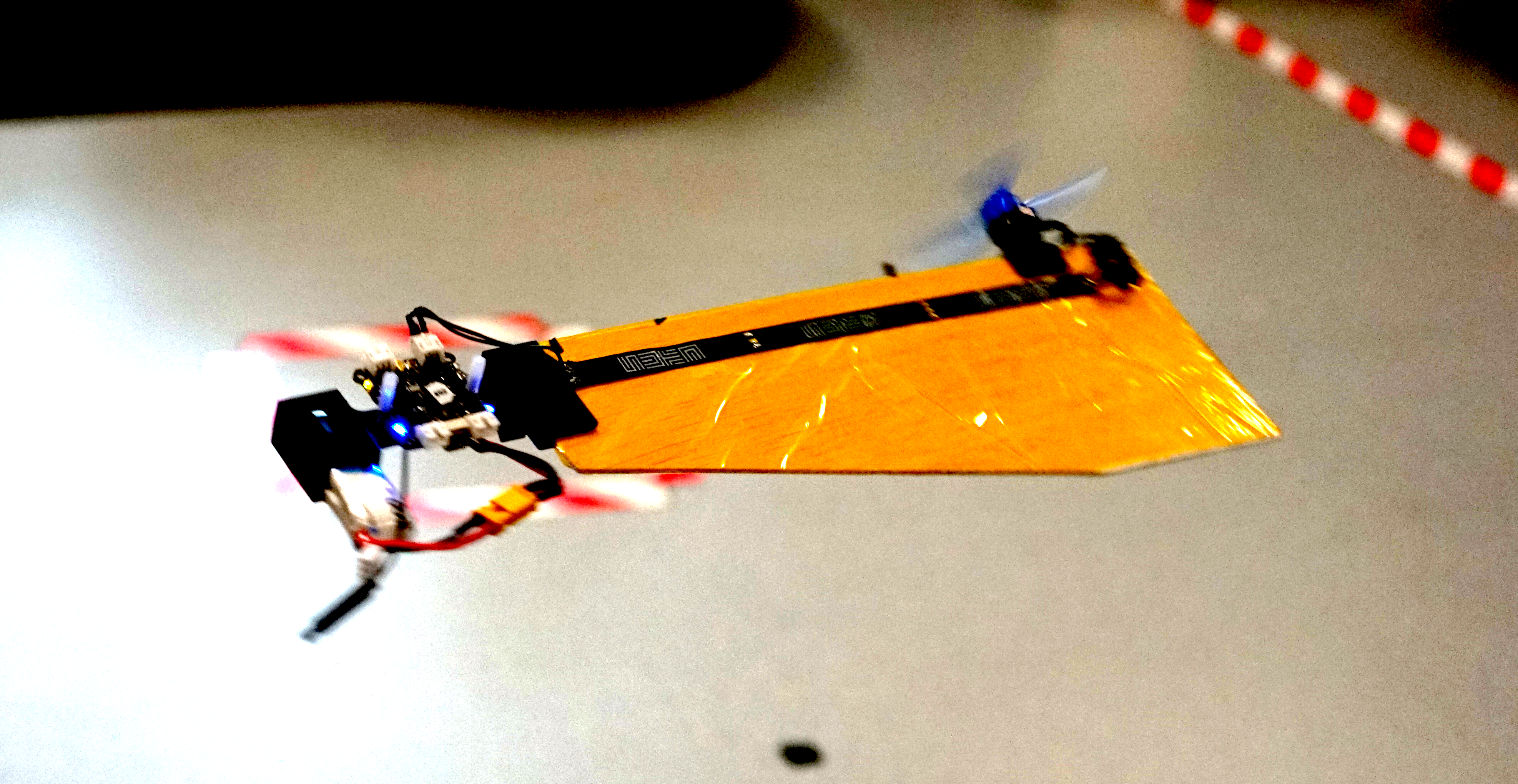
Fig: A simple prototype of SAM from SUTD with Crazyflie Bolt.

Monocopters are largely inspired from the falling motion of maple seeds, and they are relatively much simpler to build as compared to its counterparts. They can keep a relative smaller footprint and achieve decent control performance although they are highly underactuated. The Single Actuator Monocopter (SAM) has the ability to VTOL, perform 3D trajectory tracking as well as maintain high hovering efficiency. With those advantages, rapid developments have been made in recent years such as the Foldable Single Actuator Monocopter (F-SAM) and Modular Single Actuator Monocopter (M-SAM) from Engineering Product Development (EPD) of Singapore University of Technology and Design (SUTD).

Taking inspiration from nature – Samara inspired monocopter

A descending samara or maple seed, is able to passively enter auto-rotation motion and stabilize its flight attitude, helping to slow down its descent speed and travel further for better survival of the species. This natural behavior attracts interests from scientists and researchers. With previous studies, we learnt that this passive attitude stability is mainly guaranteed by mass distribution (Center of Mass) and wing geometry (Center of Pressure) as well as the rotation motion.

A maple seed inspired Single Actuator Monocopter (SAM).

The SAM is designed to be very close in its mechanical make-up to its natural sibling, having a large single wing structure and a smaller, denser ‘seed’ structure. A single motor with propeller is installed on the leading edge, parallel to the wing surface. Comparing with flight dynamics of the original maple seed, SAM has extra torques and force caused by the spinning propeller, including a reaction torque and thrust directly from propeller, as well as an extra torque caused by precession motion. As a result, the balance of the combined forces and torques allows SAM to enter a new equilibrium condition while still retaining the passive attitude stability.

Development of monocopters

The research on monocopters can be traced back to a long time ago. Here are some examples of different types of air frame to roughly introduce their developments. An air-frame called Robotic Samara [1] was created in 2010, which has a motor to provide rotational force, a servo to control collective pitch of the wing, a winged body fabricated by carbon fiber, and a lipo battery. In the following year, Samarai MAV [2] was developed by following the mass distribution of a natural maple seed. To achieve the control, a servo is equipped to regulate the wing flap. In 2020, a single actuator monocopter was introduced with a simplified air-frame [3]. The main structure is made by laminated balsa wood while the trailing edge of the wing is made by foam for better mass distribution. By making use of the passive attitude stability, only one actuator is required to control the position in 3D space. Based on which, F-SAM [4] and M-SAM [5] were developed in 2021 and 2022 respectively.

SAM with foldable wing structure (F-SAM).

A Modular SAM (M-SAM) with Crazyflie Bolt

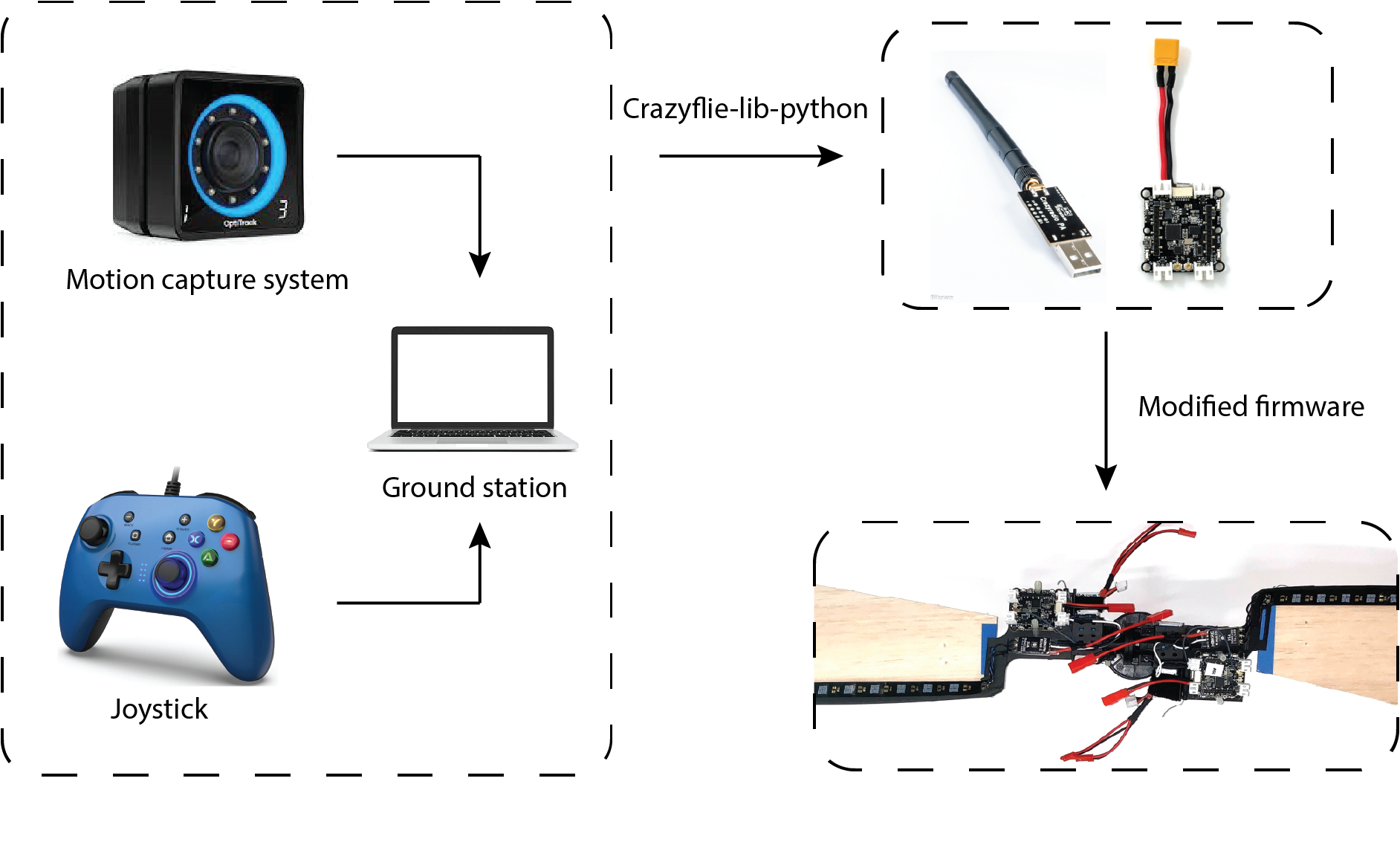
Thanks to its easy implementation and reliable performance, we use the Crazyflie Bolt as the flight controller for M-SAM. Like other robotic systems, the ground station is integrated with motion capture system (position and attitude feedback for both control and ground truth) and a joystick (control reference directly generated by user) is responsible for sending filtered state feedbacks and control references or control signal directly to flight controller. This is realized by employing the Crazyradio PA under the Crazyflie-lib-python environment. Simple modifications from the original firmware were made to map from the control reference to motor command (a customized flight controller).

A diagram shows how Crazyflie Bolts work in M-SAM project.

Another advantage of using Crazyflie Bolt in M-SAM project is its open source swarm library. Under the swarm environment, SAMs can fly in both singular and cooperative configurations. With simple human assistance, two SAMs can be assembled into cooperative configuration by making use of a pair of magnetic connectors. The mid-air separation from cooperative configuration to singular configuration is passively triggered by increasing the rotating speed until the centrifugal force overcomes the magnetic force.

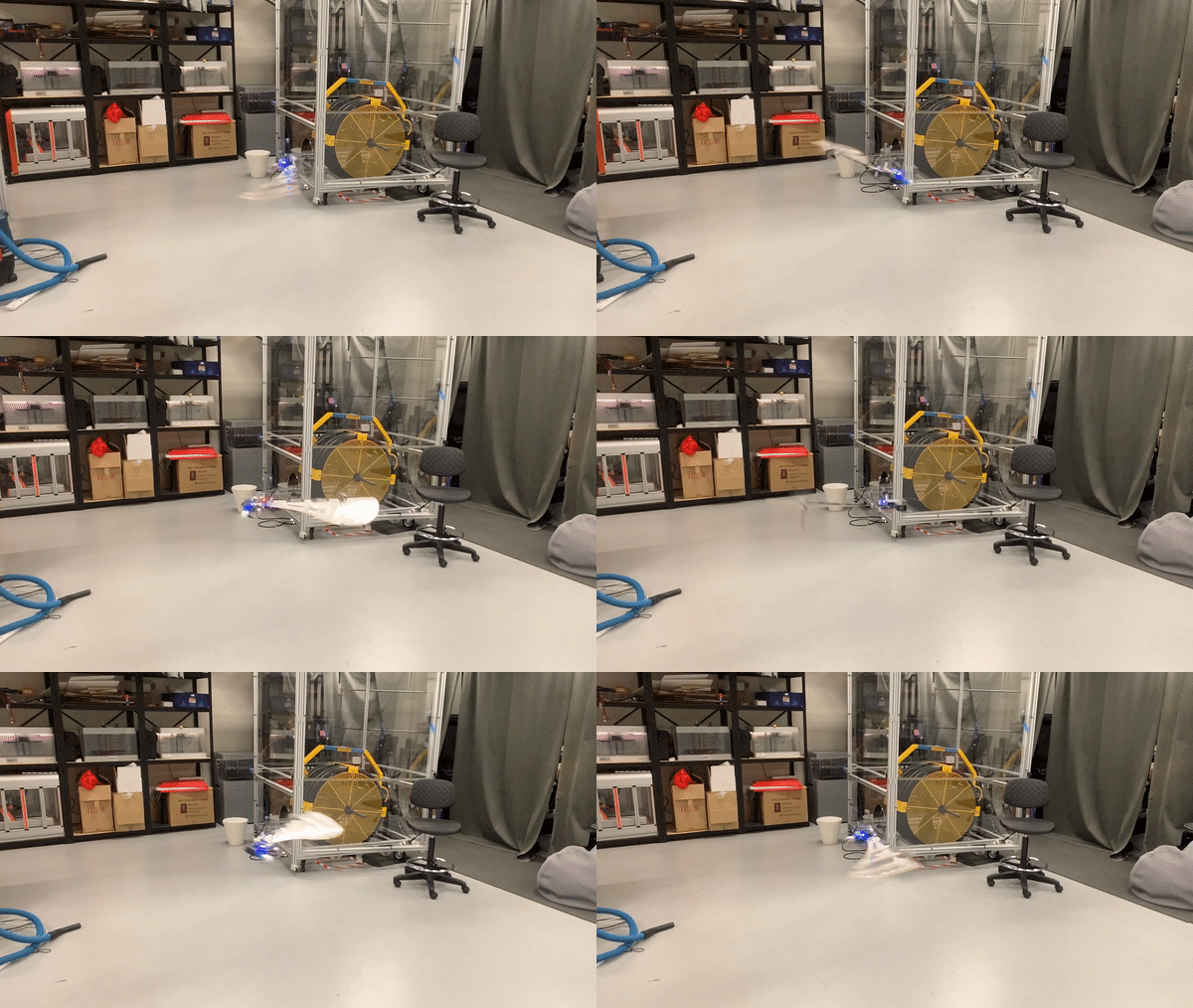
Modular Single Actuator Monocopters (M-SAM), which is able to fly in both singular and cooperative configuration.

Potential applications

What kinds of applications can be achieved with the monocopter aerial robotic platform? On the one hand, many applications are limited by the nature of self-rotation motion. On the other hand, the passive rotating body also offers advantages in some special scenarios. For example, SAM is an ideal platform for LIDAR application, which usually requires the rotating motion to sense the environment around. Besides, thanks to simple mechanical design and cheap manufacturing cost, SAM can be designed for one time use such as light weight air deployment or unknown, dangerous environments.

An example [6] shows the potential applications of a rotating robot with camera.

Reference

  • [1] Ulrich, Evan R., Darryll J. Pines, and J. Sean Humbert. “From falling to flying: the path to powered flight of a robotic samara nano air vehicle.” Bioinspiration & biomimetics 5, no. 4 (2010): 045009.
  • [2] Fregene, Kingsley, David Sharp, Cortney Bolden, Jennifer King, Craig Stoneking, and Steve Jameson. “Autonomous guidance and control of a biomimetic single-wing MAV.” In AUVSI Unmanned Systems Conference, pp. 1-12. Arlington, VA: Assoc. for Unmanned Vehicle Systems International, 2011.
  • [3] Win, Luke Soe Thura, Shane Kyi Hla Win, Danial Sufiyan, Gim Song Soh, and Shaohui Foong. “Achieving efficient controlled flight with a single actuator.” In 2020 IEEE/ASME International Conference on Advanced Intelligent Mechatronics (AIM), pp. 1625-1631. IEEE, 2020.
  • [4] Win, Shane Kyi Hla, Luke Soe Thura Win, Danial Sufiyan, and Shaohui Foong. “Design and control of the first foldable single-actuator rotary wing micro aerial vehicle.” Bioinspiration & Biomimetics 16, no. 6 (2021): 066019.
  • [5] X. Cai, S. K. H. Win, L. S. T. Win, D. Sufiyan and S. Foong, “Cooperative Modular Single Actuator Monocopters Capable of Controlled Passive Separation,” 2022 International Conference on Robotics and Automation (ICRA), 2022, pp. 1989-1995, doi: 10.1109/ICRA46639.2022.9812182.
  • [6] Bai, Songnan, Qingning He, and Pakpong Chirarattananon. “A bioinspired revolving-wing drone with passive attitude stability and efficient hovering flight.” Science Robotics 7, no. 66 (2022): eabg5913.

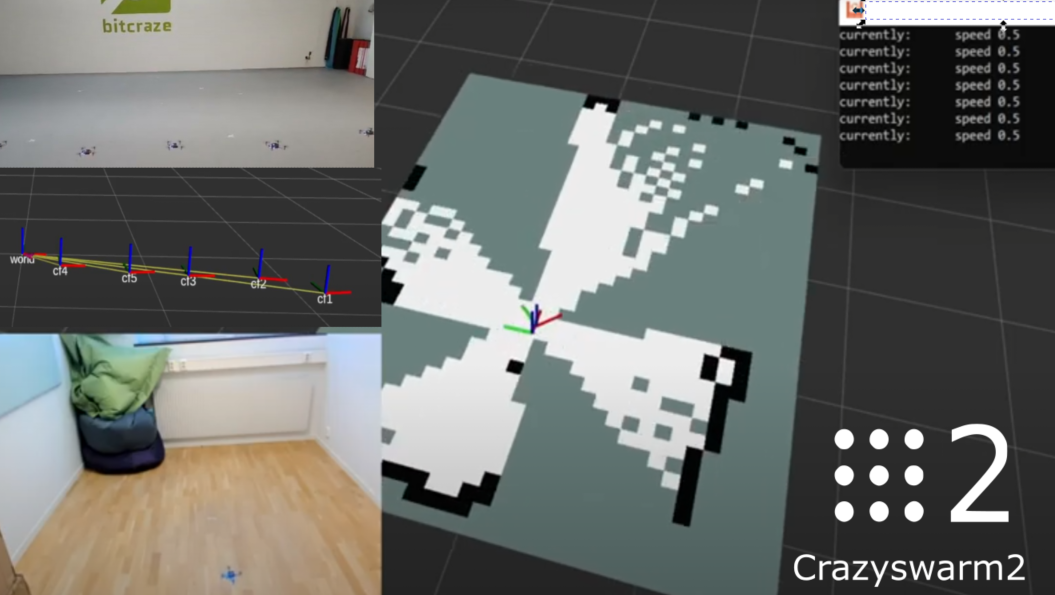
Now it is time to give a little update about the ongoing ROS2 related projects. About a month ago we gave you an heads-up about the Summer ROS2 project I was working on, and even though the end goal hasn’t been reached yet, enough has happened in the mean time to write a blogpost about it!

Crazyflie Navigation

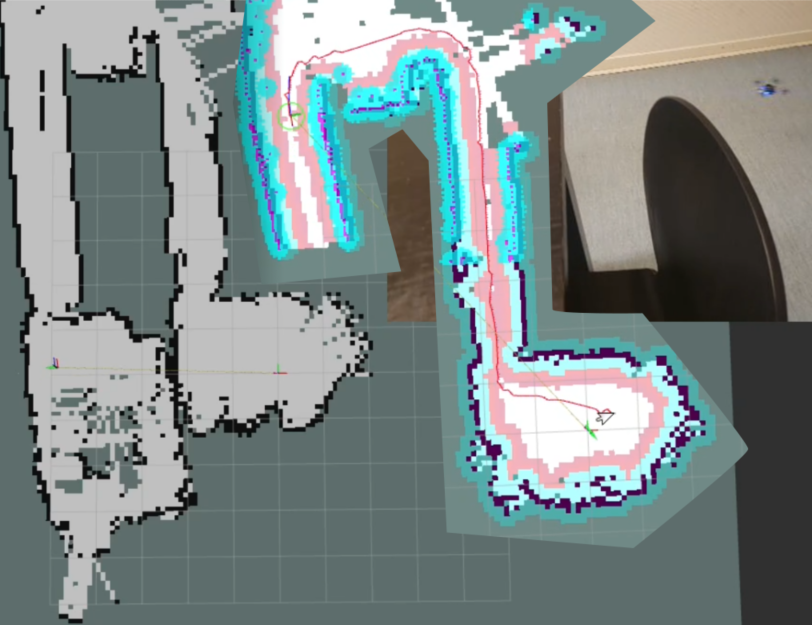
Last time showed mostly mapping of a single room, so currently I’m trying to map a bigger portion of the office. This was initially more difficult then initially anticipated, since it worked quite well in simulation, but in real life the multi-ranger deck saw obstacles that weren’t there. Later we found out that was due to this year old issue of the multi-ranger’s driver incapability to handle out-of-range measurements properly (see this ongoing PR). With that, larger scale mapping starts to become possible, which you can see here with the simple mapper node:

If you look at the video until the end, you can notice that the map starts to diverge a bit since the position + orientation is solely based on the flow deck and gyroscopes , which is a big reason to get the SLAM toolbox to work with the multi-ranger. However, it is difficult to combine it with such a sparse ‘Lidar’ , so while that still requires some tuning, I’ve taken this opportunity to see how far I get with the non-slam mapping and the NAV2 package!

As you see from the video, the Crazyflie until the second hallway. Afterwards it was commanded to fly back based on a NAV2 waypoint in RViz2. In the beginning it seemed to do quite well, but around the door of the last room, the Crazyflie got into a bit of trouble. The doorway entrance is already as small as it is, and around that moment is also when the mapping started to diverge, the new map covered the old map, blocking the original pathway back into the room. But still, it came pretty close!

The diverging of the map is currently the blocker for larger office navigation, so it would be nice to get some better localization to work so that the map is not constantly changed due to the divergence of position estimates, but I’m pretty hopeful I’ll be able to figure that out in the next few weeks.

Crazyflie ROS2 node with CrazySwarm2

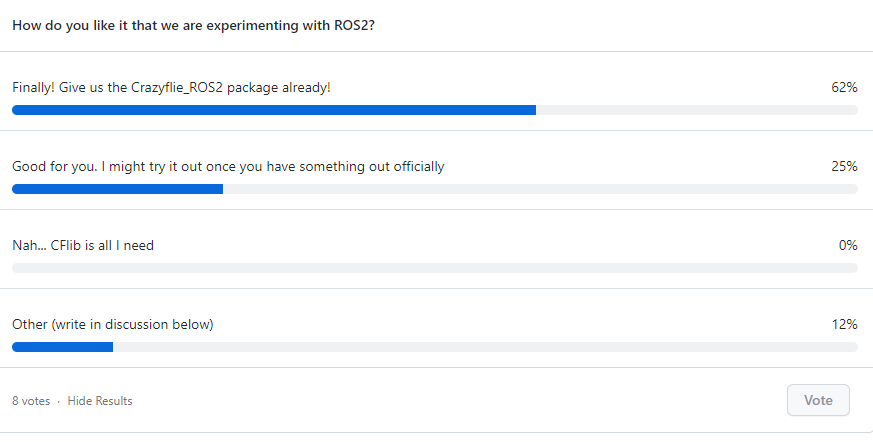
Based on the poll we set out in the last blogpost, it seemed that many of you were mostly positive for work towards a ROS2 node for the Crazyflie! As some of you know, the Crazyswarm project, that many of you already use for your research, is currently being ported to ROS2 with efforts of Wolfgang Hönig’s IMRCLab with the Crazyswarm2 project. Instead of in parallel creating separate ROS2 nodes and just to add to the confusion for the community, we have decided with Wolfgang to place all of the ROS2 related development into Crazyswarm2. The name of the project will be the same out of historical reasons, but since this is meant to be the standard Crazyflie ROS2 package, the names of each nodes will be more generic upon official release in the future.

To this end, we’ve pushed a cflib python version of the crazyflie ros2 node called crazyflie_server_py, a bit based on my hackish efforts of the crazyflie_ros2_experimental version, such that the users will have a choice of which communication backend to use for the Crazyflie. For now the node simply creates services for each individual Crazyflie and the entire swarm for take_off, land and go_to commands. Next up are logging and parameter handling, positioning support and broadcasting implementation for the CFlib, so please keep an eye on this ticket to see the process.

So hopefully, once the summer project has been completed, I can start porting the navigation capabilities into the the Crazyswarm2 repository with a nice tutorial :)

ROScon talk

As mentioned in a previous blogpost, we’ll actually be talking about the Crazyflie ROS2 efforts at ROScon 2022 in Kyoto in collaboration with Wolfgang. You can find the talk here in the ROScon program, so hopefully I’ll see you at the talk or the week after at IROS!

This week we have a guest blog post from Jiawei Xu and David Saldaña from the Swarmslab at Lehigh University. Enjoy!

Limits of flying vehicles

Advancements in technology have made quadrotor drones more accessible and easy to integrate into a wide variety of applications. Compared to traditional fixed-wing aircraft, quadrotors are more flexible to design and more suitable for motioning, such as statically hovering. Some examples of quadrotor applications include photographers using mounting cameras to take bird’s eye view images, and delivery companies using them to deliver packages. However, while being more versatile than other aerial platforms, quadrotors are still limited in their capability due to many factors. 

First, quadrotors are limited by their lift capacity, i.e., strength. For example, a Crazyflie 2.1 is able to fly and carry a light payload such as an AI deck, but it is unable to carry a GoPro camera. A lifter quadrotor that is equipped with more powerful components can transport heavier payload but also consumes more energy and requires additional free space to operate. The difference in the strength of individual quadrotors creates a dilemma in choosing which drone components are better suited for a task.

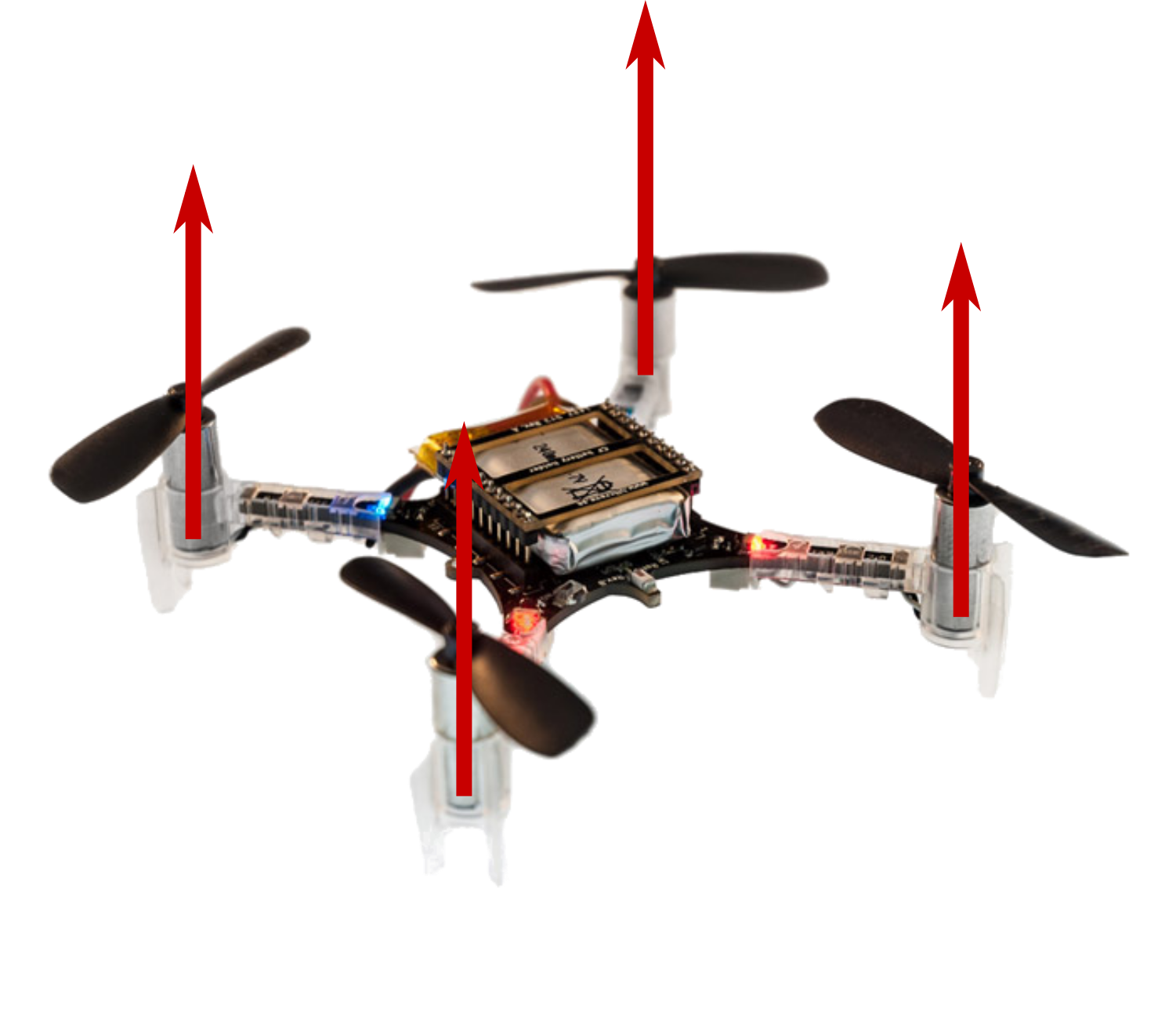
Second, a traditional quadrotor’s motion in translation is coupled with its roll and pitch. Let’s take a closer look at Crazyflie 2.1, which utilizes a traditional quadrotor design. Its four motors are oriented in the same direction – along the positive z-axis of the drone frame, which makes it impossible to move horizontally without tilting. While such control policies that convert the desired motion direction into tilting angles are well studied, proven to work, and implemented on a variety of platforms [1][2], if, for instance, we want to stack a glass filled with milk on top of a quadrotor and send it from the kitchen to the bedroom, we should still expect milk stains on the floor. This lack of independent control for rotation and translation is another primary reason why multi-rotor drones lack versatility.

Fig 1. A crazyflie has four propellers generating thrust forces in parallel. Credit to: https://robots.ros.org/crazyflie/

Improving strength

These versatility problems are caused by the hardware of a multi-rotor drone designed specifically to deal with a certain set of tasks. If we push the boundary of these preset tasks, the requirements on the strength and controllability of the multi-rotor drone will eventually be impossible to satisfy. However, there is one inspiration we take from nature to improve the versatility in the strength of multi-rotor drones – modularity! Ants are weak individual insects that are not versatile enough to deal with complex tasks. However, when a group of ants needs to cross natural boundaries, they will swarm together to build capable structures like bridges and boats. In our previous work, ModQuad [3], we created modules that can fly by themselves and lift light payloads. As more ModQuad modules assemble together into larger structures, they can provide an increasing amount of lift force. The system shows that we can combine weak modules with improving the versatility of the structure’s carrying weight. To carry a small payload like a pin-hole camera, a single module is able to accomplish the task. If we want to lift a heavier object, we only need to assemble multiple modules together up to the required lift.

Improving controllability

On a traditional quadrotor, each propeller is oriented vertically. This means the device is unable to generate force in the horizontal direction. By attaching modules side by side in a ModQuad structure, we are aligning more rotors in parallel, which still does not contribute to the horizontal force the structure can generate. That is how we came up with the idea of H-ModQuad — we would like to have a versatile multi-rotor drone that is able to move in an arbitrary direction at an arbitrary attitude. By tilting the rotors of quadrotor modules and docking different types of modules together, we obtain a structure whose rotors are not pointing in the same direction, some of which are able to generate a force along the horizontal direction.

H-ModQuad Design

H-ModQuad has two major characteristics: modularity and heterogeneity, which can be indicated by the “Mod” and “H-” in the name. Modularity means that the vehicle (we call a structure) is composed of multiple smaller modules which are able to fly by themselves. Heterogeneity means that we can have modules of different types in a structure. 

As mentioned before, insects like ants utilize modularity to enhance the group’s versatility. Aside from a large number of individuals in a swarm that can adapt to the different scales of the task requirement, the individuals in a colony specializing in different tasks are of different types, such as the queen, the female workers, and the males. The differentiation of the types in a hive helps the group adapt to tasks of different physical properties. We take this inspiration to develop two types of modules.

In our related papers [4][5], we introduced two types of modules which are R-modules and T-modules.

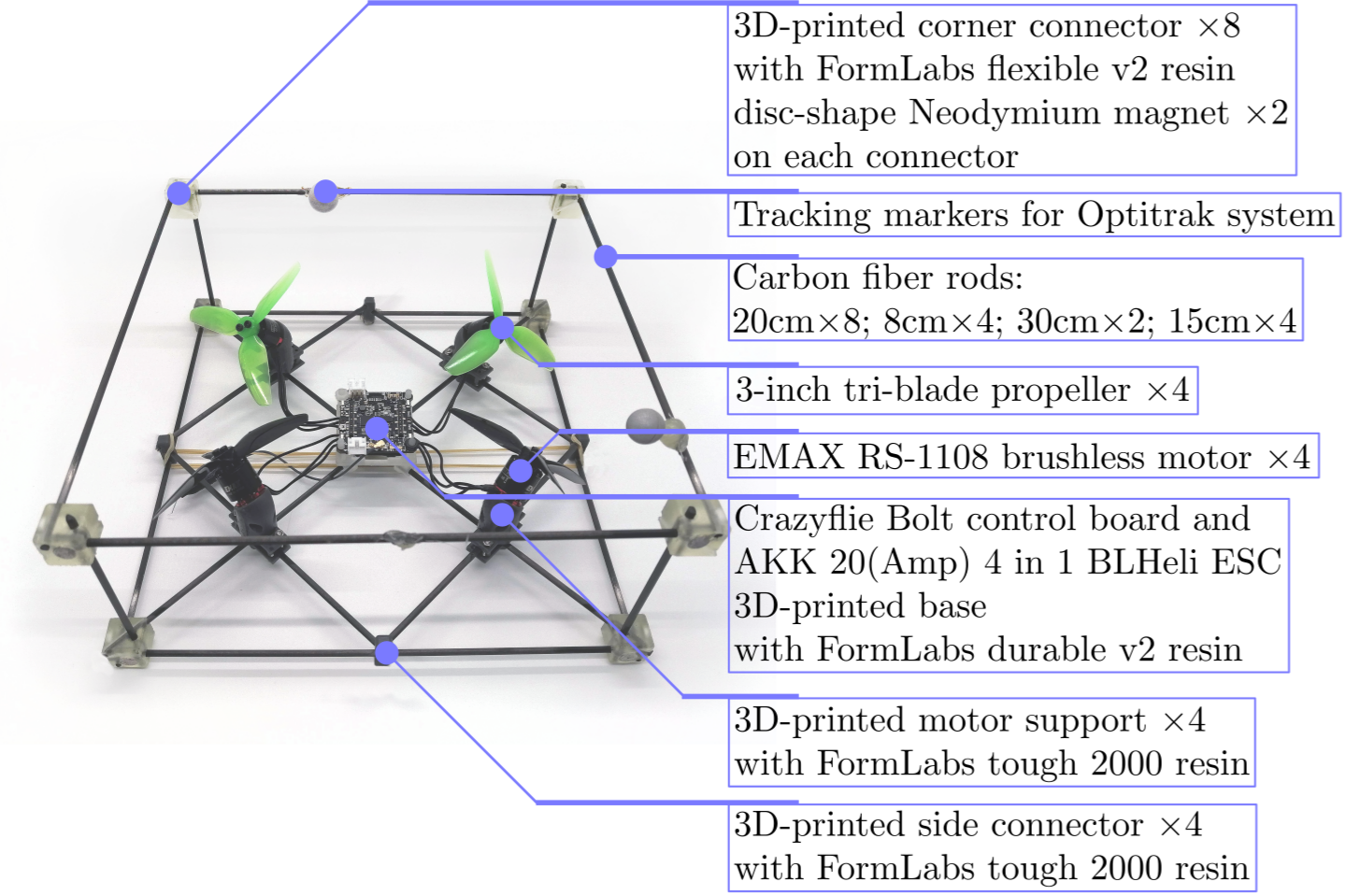
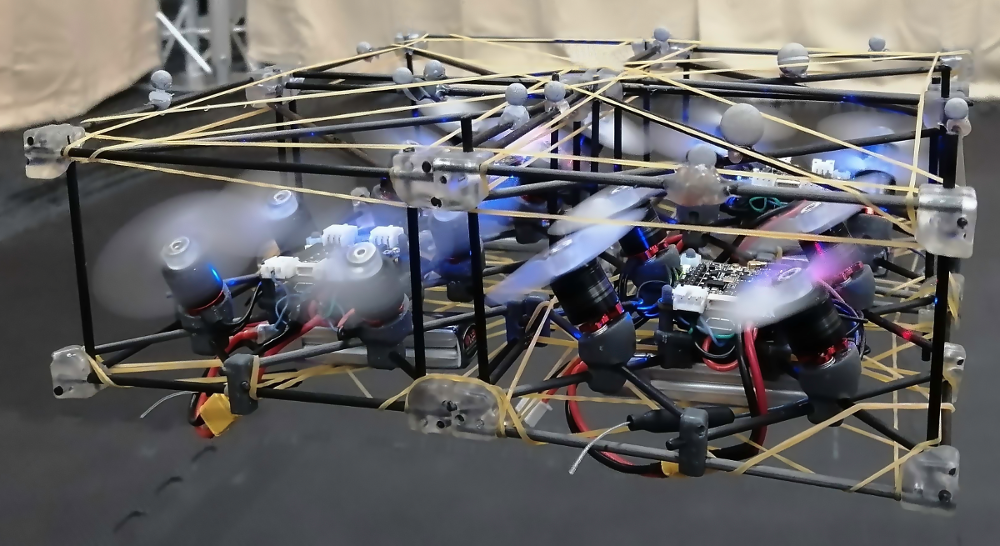
Fig 2. Major components of an H-ModQuad “T-module” we are using in our project. We use Bitcraze Crazyflie Bolt as the central control board.

An example T-module is shown in the figure above. As shown in the image, the rotors in a T-module are tilted around its arm connected with the central board. Each pair of diagonal rotors are tilted in the opposite direction, and each pair of adjacent rotors are either tilting in the same direction or in the opposite direction. We arrange the tilting of the rotors so that all the propellers generate the same thrust force, making the structure torque-balanced. The advantage of the T-module is that it allows the generation of more torque around the vertical axis. One single module can also generate forces in all horizontal directions.

An R-module has all its propellers oriented in the same direction that is not on the z-axis of the module. In this configuration, when assembling multiple modules together, rotors from different modules will point in different directions in the overall structure. The picture below shows a fully-actuated structure composed of R-modules. The advantage of R-modules is that the rotor thrusts inside a module are all in the same direction, which is more efficient when hovering.

Structure 1: Composed of four types of R-modules.

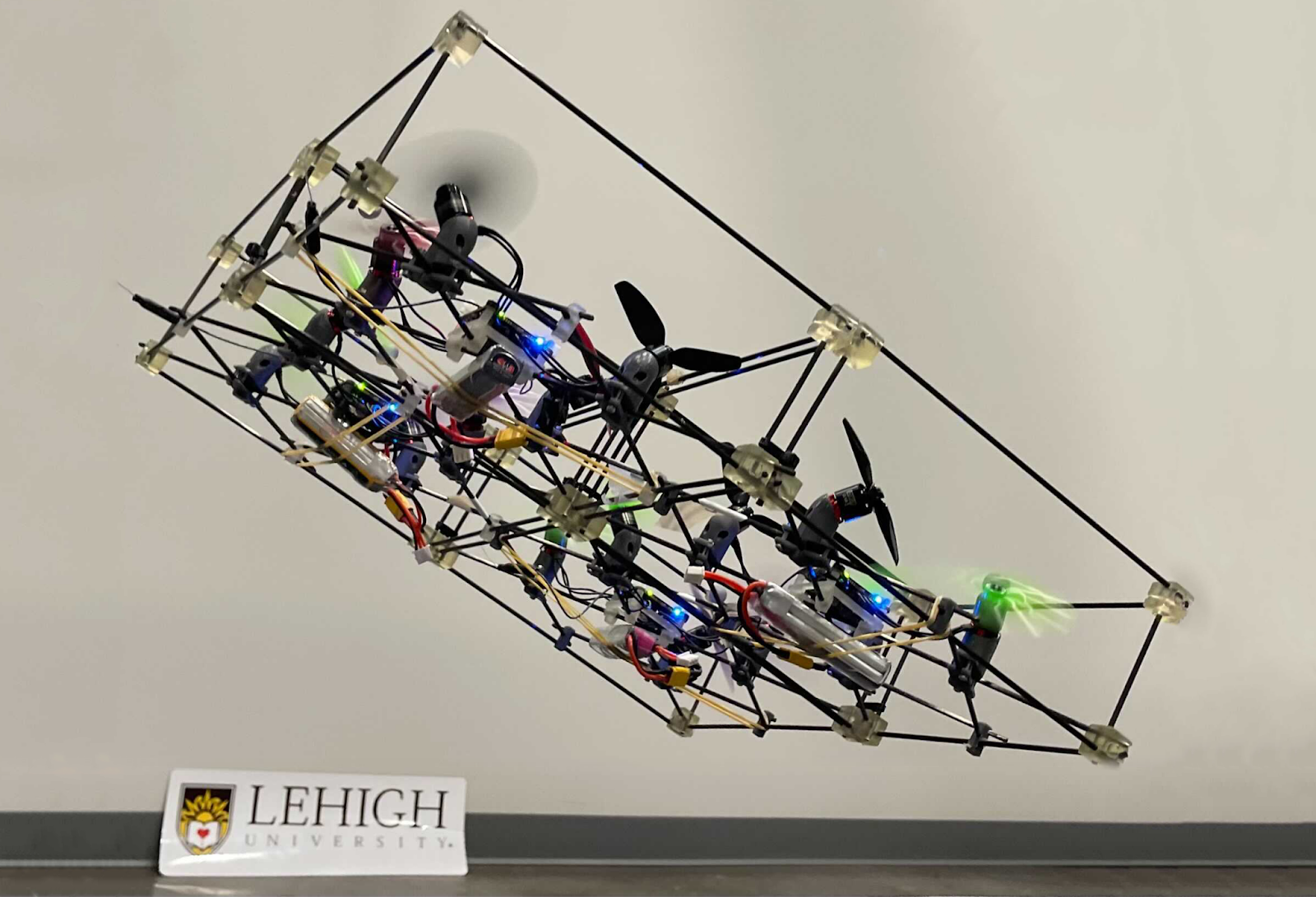
Depending on what types of modules we choose and how we arrange those modules, the assembled structure can obtain different actuation capabilities. Structure 1 is composed of four R-modules, which is able to translate in horizontal directions efficiently without tilting. The picture in the intro shows a structure composed of four T-modules of two types. It can hover while maintaining a tilting angle of up to 40 degrees.

Control and implementation

We implemented our new geometric controller for H-ModQuad structures based on Crazyflie Firmware on Crazyflie Bolt control boards. Specifically, aside from tuning the PID parameters, we have to change the power_distribution.c and controller_mellinger.c so that the code conforms to the structure model. In addition, we create a new module that embeds the desired states along predefined trajectories in the firmware. When we send a timestamp to a selected trajectory, the module retrieves and then sends the full desired state to the Mellinger Controller to process. All modifications we make on the firmware so that the drone works the way we want can be found at our github repository. We also recommend using the modified crazyflie_ros to establish communication between the base station and the drone.

Videos

Challenges and Conclusion

Different from the original Crazyflie 2.x, Bolt allows the usage of brushless motors, which are much more powerful. We had to design a frame using carbon fiber rods and 3-D printed connecting parts so that the chassis is sturdy enough to hold the control board, the ESC, and the motors. It takes some time to find the sweet spot of the combination of the motor model, propeller size, batteries, and so on. Communicating with four modules at the same time is also causing some problems for us. The now-archived ROS library, crazyflie_ros, sometimes loses random packages when working with multiple Crazyflie drones, leading to the stuttering behavior of the structure in flight. That is one of the reasons why we decided to migrate our code base to the new Crazyswarm library instead. The success of our design, implementation, and experiments with the H-ModQuads is proof of work that we are indeed able to use modularity to improve the versatility of multi-rotor flying vehicles. For the next step, we are planning to integrate tool modules into the H-ModQuads to show how we can further increase the versatility of the drones such that they can deal with real-world tasks.

Reference

[1] D. Mellinger and V. Kumar, “Minimum snap trajectory generation and control for quadrotors,” in 2011 IEEE International Conference on Robotics and Automation, 2011, pp. 2520–2525.

[2] T. Lee, M. Leok, and N. H. McClamroch, “Geometric tracking control of a quadrotor uav on se(3),” in 49th IEEE Conference on Decision and Control (CDC), 2010, pp. 5420–5425.

[3] D. Saldaña, B. Gabrich, G. Li, M. Yim and V. Kumar, “ModQuad: The Flying Modular Structure that Self-Assembles in Midair,” 2018 IEEE International Conference on Robotics and Automation (ICRA), 2018, pp. 691-698, doi: 10.1109/ICRA.2018.8461014.

[4] J. Xu, D. S. D’Antonio, and D. Saldaña, “Modular multi-rotors: From quadrotors to fully-actuated aerial vehicles,” arXiv preprint arXiv:2202.00788, 2022.

[5] J. Xu, D. S. D’Antonio and D. Saldaña, “H-ModQuad: Modular Multi-Rotors with 4, 5, and 6 Controllable DOF,” 2021 IEEE International Conference on Robotics and Automation (ICRA), 2021, pp. 190-196, doi: 10.1109/ICRA48506.2021.9561016.

As the Crazyflie ecosystem expands, more and more novel aerial (but also ground or hybrid) robots are being built with one of the Crazyflie controllers onboard. For recent examples, you can check e.g. the recent blogpost about ICRA 2022.

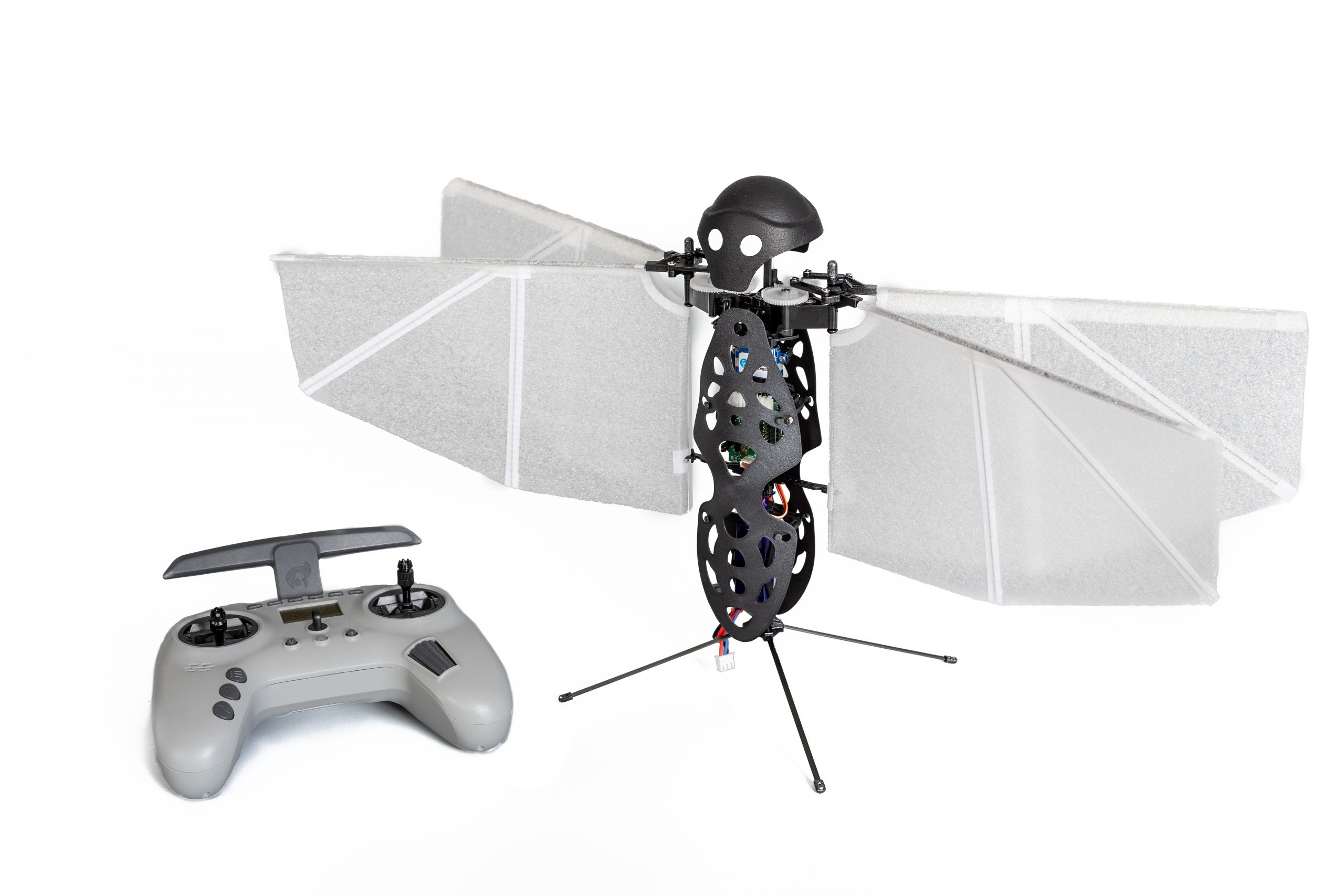
In this post, I will introduce yet another Crazyflie-Bolt-powered aerial robot, the Flapper Nimble+ from our company Flapper Drones, which unlike other flying robots doesn’t have any propellers but uses flapping wings instead.

The best aerial robot design is…

Small drones, or micro air vehicles, have seen a lot of progress and new developments in the last 20 years. The most widespread design nowadays is a quadcopter, such as the Crazyflie 2.1. But is a quadcopter the ultimate (micro) drone solution? At Flapper Drones, we believe nature might provide even better designs… For some applications at least! 😊

Flying like a bird…

Flapper Drones is a spinoff of the MAVLab of the Delft University of Technology. At the MAVLab, we have been researching bio-inspired flight as part of the DelFly project since 2005. From the beginning, the goal has been to develop a lightweight, mission capable micro air vehicle, the design of which would draw inspiration from nature. Over the years, many such MAV concepts have been designed, built and tested, including the DelFly Micro, the world’s smallest camera-equipped MAV, or the DelFly Explorer, the first autonomous flapping-wing MAV equipped with a stereovision system. All these designs were propelled by a pair of flapping wings, while being controlled (and passively stabilized) by a tail such as birds or men-made airplanes.

… or an insect

The latest design, the DelFly Nimble is insect-inspired instead. What does that mean? The Nimble has no tail, which would provide the damping needed for stable flight. Instead, it is stabilized actively, by adjustments of the motion of its flapping wings. This is what all flying insects and also hummingbirds do. Flies, for example, sense their body motions with their halteres, drum-stick like biological gyroscopes, and adapt their wing motion accordingly to stay balanced…. or to be agile, when someone is trying to swat them!

And while the Nimble was originally built just to demonstrate that an insect-inspired flying robot can be built, eventually we could also use it to learn more about the flight of insects:

Flapper Drones – how do they work?

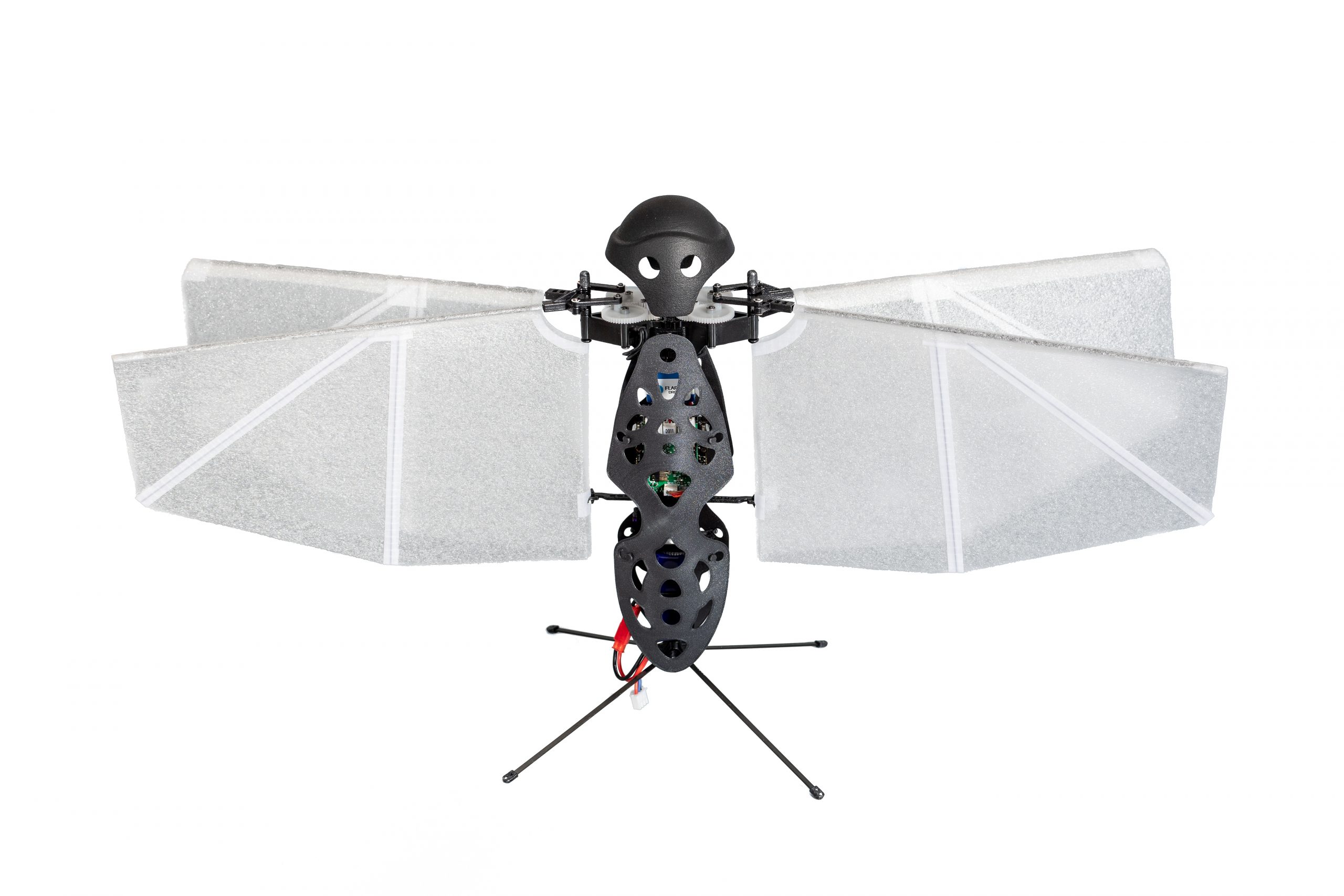
The Flapper Nimble+ is the commercial (and enlarged) version of the DelFly Nimble, developed and produced by Flapper Drones. To our knowledge, it is the first, and so far the only hover-capable tailless flapping-wing drone available!

The thrust keeping the Nimble+ airborne is created by its four flapping wings, which flap back and forth horizontally, about 10 to 12 times per second.

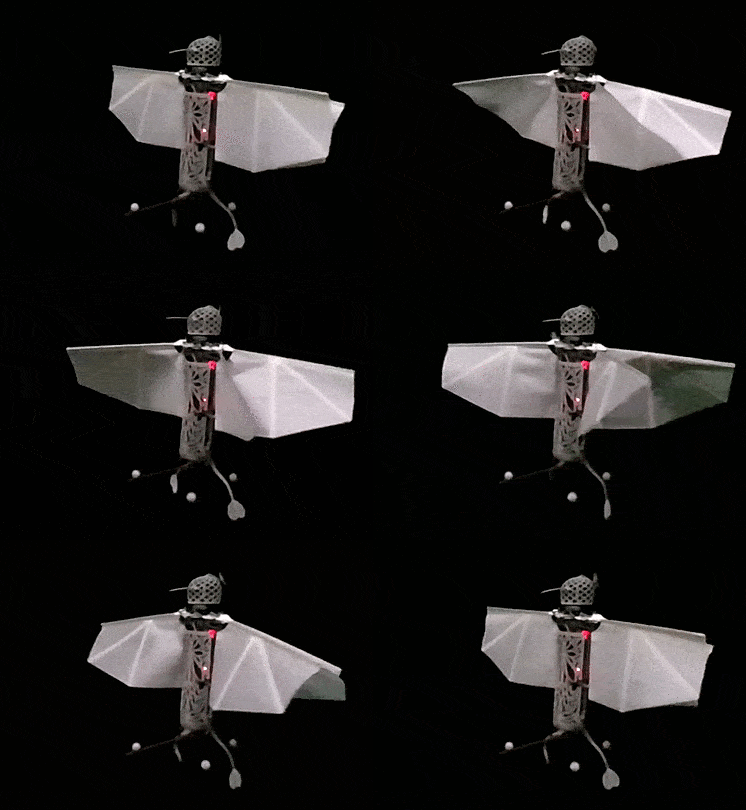
The wing actuation mechanism allows to adjust the flapping frequency of the left and right wing pairs independently, which enables control of the roll rotation. Pitch rotation is controlled by adjusting the mean wing position within the stroke plane, which shifts the mean thrust force forward or backward with respect to the center of mass, and also introduces a stabilizing dihedral angle in forward flight. Finally, yawing motion is achieved by tilting the wing roots of the left and right wing pair asymmetrically:

Advantages of flapping wings

The use of flapping-wing drones such as the Flapper Nimble+ brings several advantages. Next to their attractive biological appearance, the soft flapping wings produce less intrusive, low frequency sound and are safer, compared to propellers. As the wings move back and forth, minor mid-air collisions are not a problem. The wings bounce off objects leaving no damage, and the drone keeps flying as this only represents a minor disturbance:

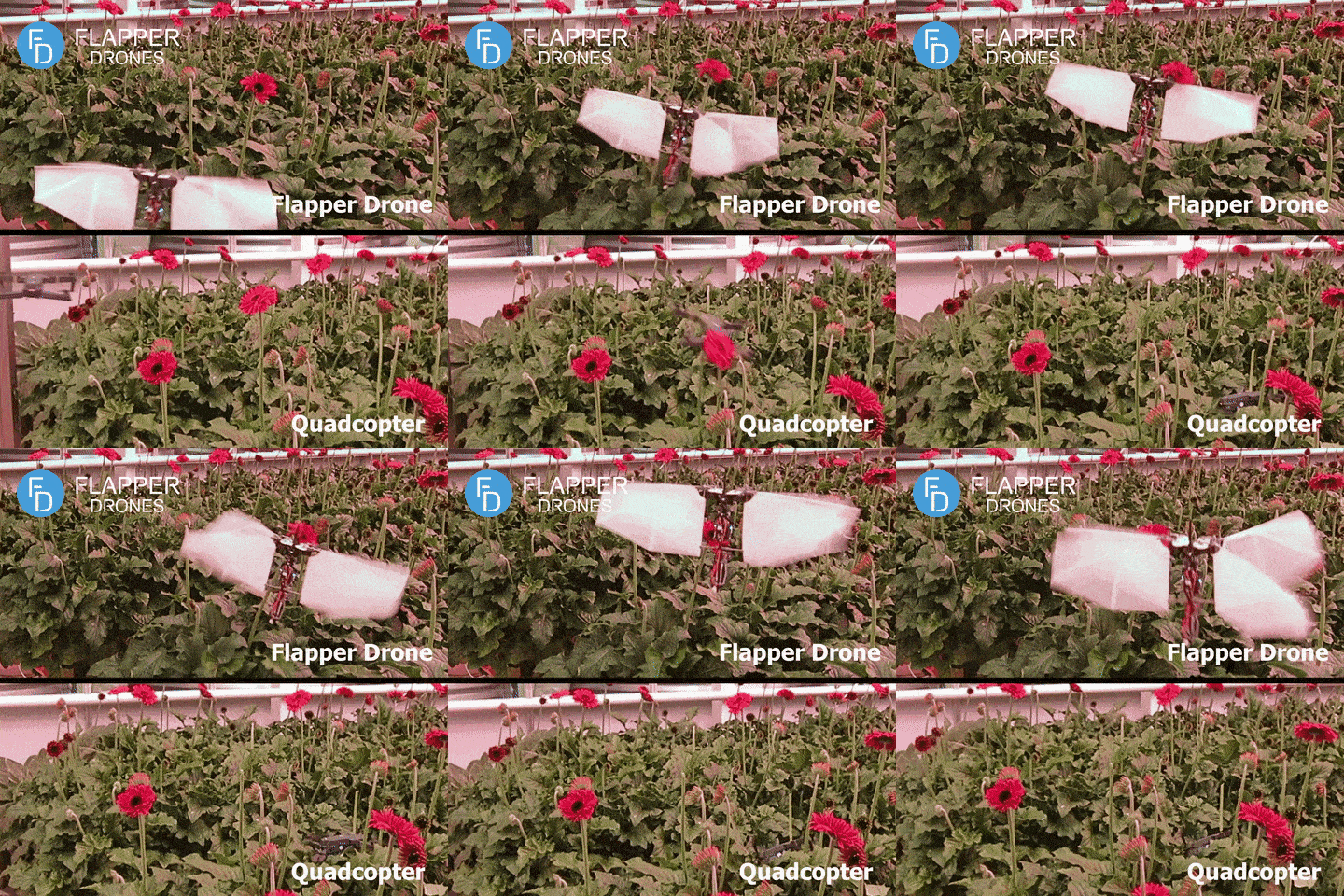
The aerial drag characteristic is also different and helps with precise indoor flight. As soon as zero attitude is commanded, the Nimble+ goes into halt in a matter of several wingbeats, making it an ideal choice for novice drone pilots as well as in constrained or cluttered indoor spaces. Finally, the flapping wings can provide additional lift force as they also glide in forward flight. This can improve the power efficiency by over 20%, compared to hovering.

Otherwise, Flapper Drones can be operated as any other drone, with vertical take offs and landings, quick maneuvers and flight in any direction:

Crazyflie Bolt & compatibility

The Flapper Nimble+ is powered by the Crazyflie Bolt 1.1, where the Bolt’s BMI088 IMU and STM32F4 MCU are suitable substitutes to the halteres and brains of the real fly. We made this choice, because this enables compatibility with most of the Crazyflie ecosystem, but also, because we felt the only way a Crazyflie would do justice to its name is if it had flapping wings😊

Currently, the Nimble+ uses a fork of the Crazyflie firmware, which is of course open source. Moreover, with the recently introduced platform functionality, we will be able to include the Flapper platform into the official crazyflie firmware very soon (expected still in July 2022). This means that the Flapper remains compatible with the official Python libraries, the PC client or the smartphone app. But also third-party projects like the Crazyswarm or the Skybrush should only require minor adjustments, if any, to operate a swarm of Flappers. Thus, for the existing Crazyflie users, switching from a Crazyflie to the Flapper should be a breeze!

The Flapper Nimble+ is hardware compatible with most of the Crazyflie expansion decks. While software support remains experimental (the Flapper Nimble+ is not a native Crazyflie product, after all), many of the decks work out of the box and others might need just minor firmware modifications. Would you like to fly the Nimble+ autonomously? Add an LPS or Lighthouse deck and you’re good to go!

For more details regarding deck compatibility, you can check this overview.

Applications

While the Nimble+ was originally designed for drone shows and similar entertainment applications, the open-source firmware and expansion decks enabling autonomous flight make it ideal also as for academic research and, in general, as a development platform. Are you researching swarming, and would you like to make your swarm even more bio-inspired? Are you developing new sensors, or new controllers (possibly even bioinspired), which you would like to test on a new type of flying platform? Are you interested in the aerodynamics of flapping wings, or the flight dynamics of insect-like flight? Or are you just curious and would you like to learn more about bioinspired flight? In all these cases, a Flapper might be what you are looking for!

The 114-g and 49-cm wide Flapper Nimble+ has been designed as a modular system where any part can easily be replaced. Flapper Drones provides all the spares, which are available upon request. If you are interested in using the Nimble+ for entertainment, rather than research, you can modify the appearance by creating your own body shells, which can also be illuminated by RGB Leds (a suitable interface and power supply is already integrated). Or even by altering the design of the wings. Finally, you can easily extend the Flapper with your own sensors, or other devices. Would you like to add a tail? A gripper? A perching device? This is all possible, as long as these additions fit within the payload limit of about 25 grams.

Available soon in the webstore!

Did you get (bio)inspired, and would you like to try an insect-like flying robot yourself? Then we have some good news! The Flapper Nimble+ will soon be available for sale in an exclusive partnership with Bitcraze and their webstore. Checkout the product description and leave your email address behind, such that you get a notification when the Flappers are in stock and ready to ship. The first batch of 10 units is expected to be available at the end of summer, so do not wait too long 😉

Want to learn more?

To learn more about Flapper Drones, you can check our website, or watch the talk I gave at the last miniBAM:

In December we had a blogpost where we gave an overview of existing simulation models that were out there. In the mean time, I have done some work during my Fun Fridays to get this to work even further. Currently I moved the efforts from my personal Github repo to the Bitcraze organization github called crazyflie-simulation. It is all still very much work in progress but in this blogpost I will explain the content of the repository and what these elements can already do.

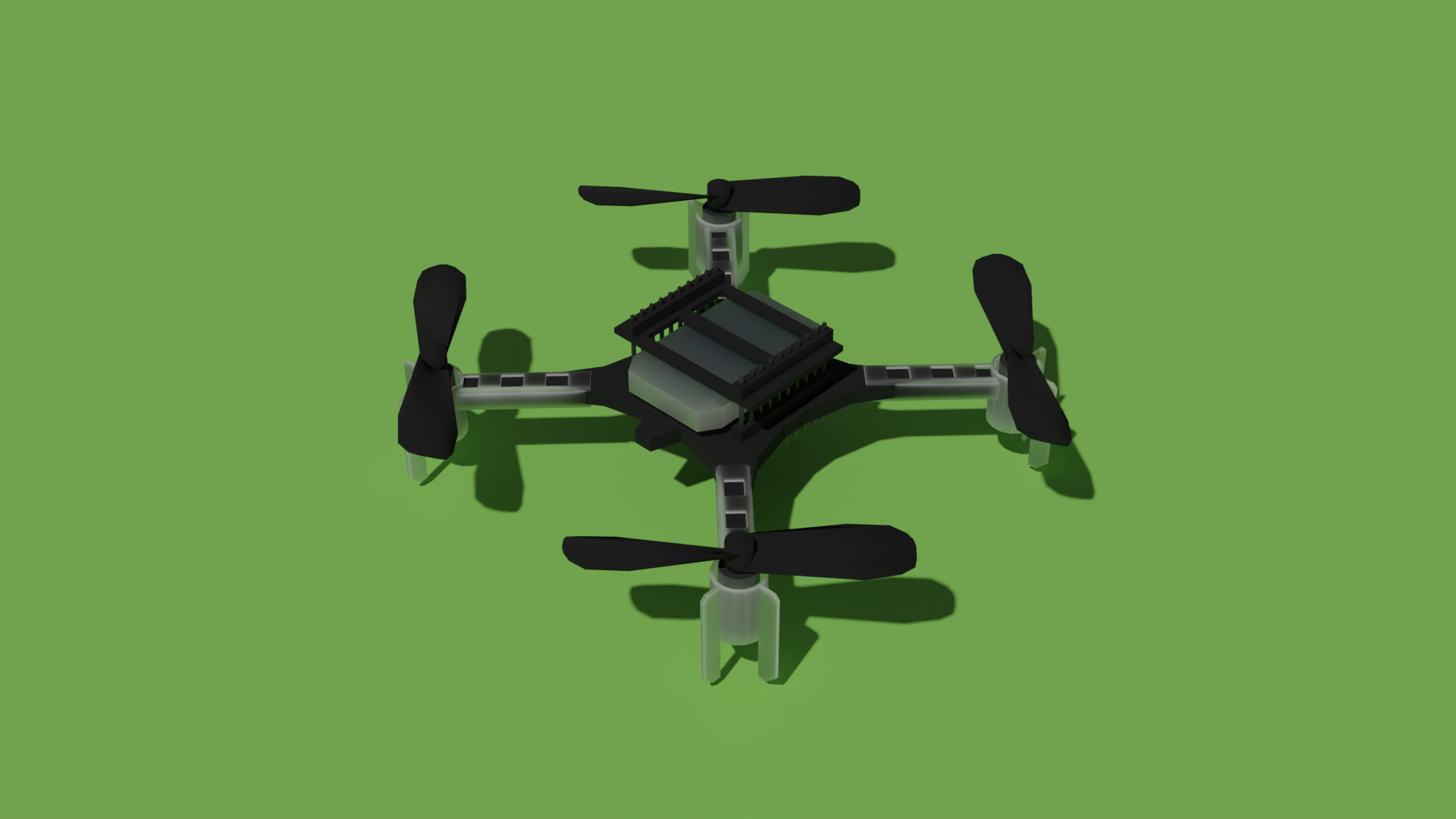
Low Poly CAD model

The first thing that you will need to have for any simulation, is a 3D model of the Crazyflie. There is of course already great models available from the CrazyS project, the sim_cf project and the multi_uav_simulator, which are completely fine to use as well. But since we have direct access to the exact geometries of the real crazyflie itself, I wanted to see if I could abstract the shapes myself. And also I would like to improve my Blender skills, so this seemed to be a nice project to work with! Moreover, it might be handy to have a central place if anybody is looking for a 3D simulation model of the Crazyflie.

For simulations with only one or a few Crazyflie, the higher resolution models from the other repository are absolutely sufficient, especially if you are not using a very complicated physics geometry model (because that is where most of the computation is). But if you would like to simulate very big swarms, then the polygon count will have more influences on the speed of the simulation. So I managed to make it to 1970 vertices with the below Crazyflie model, which is not too bad! I am sure that we can make it even with lesser polygons but this is perhaps a good place to start out with for now.

In the crazyflie-simulation, you can find the Blender, stl files and collada files under the folder ‘meshes’.

Webots model

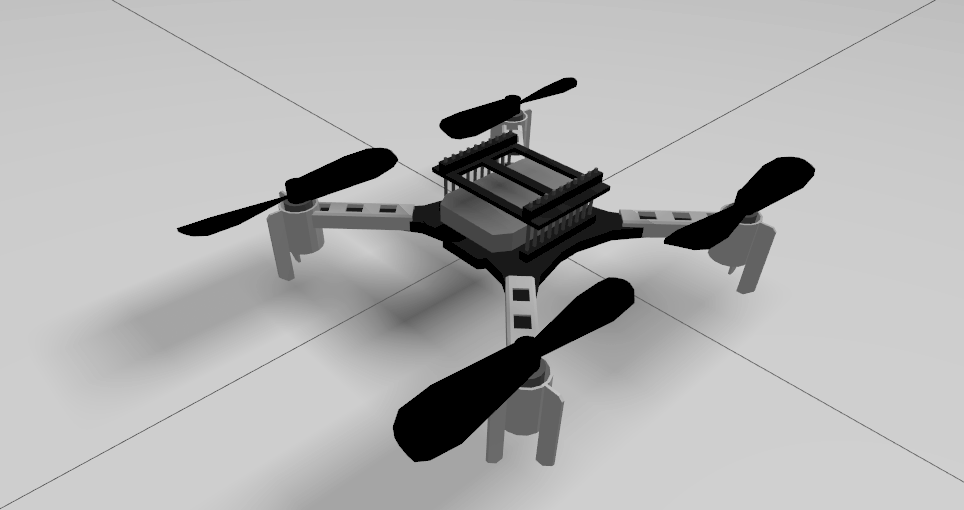
We implemented the above model in a Webots simulator, which was much easier to implement than I thought! The tutorials they provide are great so I was able to get the model flying within a day or two. By combining the propeller node and rotational motor, and adjusting the thrust and drag coefficient to be a bit more ‘Crazyflie like’, it was able to take off. It would be nice to perhaps base these coefficients on the system identification of the Crazyflie, like what was done for this bachelor thesis, but for now our goal is just to make it fly!

The webots model can found in the same simulation repository under /webots/. You can try out the model by

webots webots/world/crazyfly_world.wbt

It would then be possible to control the pitch and roll with the arrow keys of your keyboard while it is maintaining a current height of 1 meter. This is current state of the code as of commit 79640a.

Ignition Gazebo model

Ignition will be the replacement for Gazebo Classic, which is already a well known simulator for many of you. Writing controllers and plugins is slightly more challenging as it is only in C++ but it is such a landmark in the world of simulation, it only makes sense that we will try to make a Gazebo model of the Crazyflie as well! In the previous blogpost I mentioned that I already experimented a bit with Ignition Gazebo, as it has the nice multicopter motor model plugin standard within the framework now. Then I tried to make it controllable with the intergrated multicopter velocity control plugin but I wasn’t super successful, probably because I didn’t have the right coefficients and gains! I will rekindle these efforts another time, but if anybody would like to try that out, please do so!

First I made my own controller plugin for the gazebo model, which can be found in the repository in a different branch under /gazebo-ignition/. This controller plugin needs to be built first and it’s bin file added to the path IGN_GAZEBO_SYSTEM_PLUGIN_PATH, and the Crazyflie model in IGN_GAZEBO_RESOURCE_PATH , but then if you try to fly the model with the following:

 ign gazebo crazyflie_world.sdfCode language: CSS (css)

It will take off and hover nicely. Unfortunately, if you try out the key publisher widget with the arrow keys, you see that the Crazyflie immediately crashes. So there is still something fishy there! Please check out the issue list of the repo to check the state on that.

Controllers

So the reason why I made my own controller plugins for the above mentioned simulation models, is that I want to experiment with a way that we can separate the crazyflie firmware controllers, make a code wrapper for them, and use those controllers directly in the simulator. So this way it will become a hybrid software in the loop without having to compile the entire firmware that contains all kinds of extra things that the simulation probably does not need. We can’t do this hybrid SITL yet, but at least it would be nice to have the elements in place to make it possible.

Currently I’m only experimenting with a simple fixed height and attitude PID controller written in C, and some extra files to make it possible to make a python wrapper for those. The C-controller itself you can try out in Webots as of this commit 79640a, but hopefully we will have the python version of it working too.

What is next?

As you probably noticed, the simulation work are still very much work in process and there is still a lot enhancements to add or fix. Currently this is only done on available Fridays so the progress is not super fast unfortunately, but at least there is one model flying.

Some other elements that we would like to work on:

  • Velocity controller, so that the models are able to react on twist messages.
  • Crazyflie firmware bindings of controllers
  • Better system variables (at least so that the ign gazebo model and the webots model are more similar)
  • CFlib integration
  • Add a multiranger and/or camera.
  • and more!

I might turn a couple of these into topics that would be good for contribution, so that any community members can help out with. Please keep an eye on the issue list, and we are communicating on the Crazyswarm2 Discussion page about simulations if you want to share your thoughts on this as well.

Today we will have a guest blogpost by Dominik Natter, working in the Robotics & Control group at SINTEF in Trondheim, Norway. Enjoy!!

In this blogpost we will teach you how to fly the Crazyflie beyond edges without crashing, using only on-board sensors. Come join in!

flying over edges
Safe flights across edges are achievable!

Introduction

UAVs have seen tremendous progress in the last decades and have since moved from research labs to various real-world environments. Small UAVs (so-called micro air vehicles, MAVs) like the Crazyflie open up even more possibilities. For example, their size allows them to traverse narrow passages or fly in cluttered environments (as recently showcased in this blog post). However, in order to achieve these complex tasks the community must further improve the cognitive ability of these MAVs in order to avoid crashes.

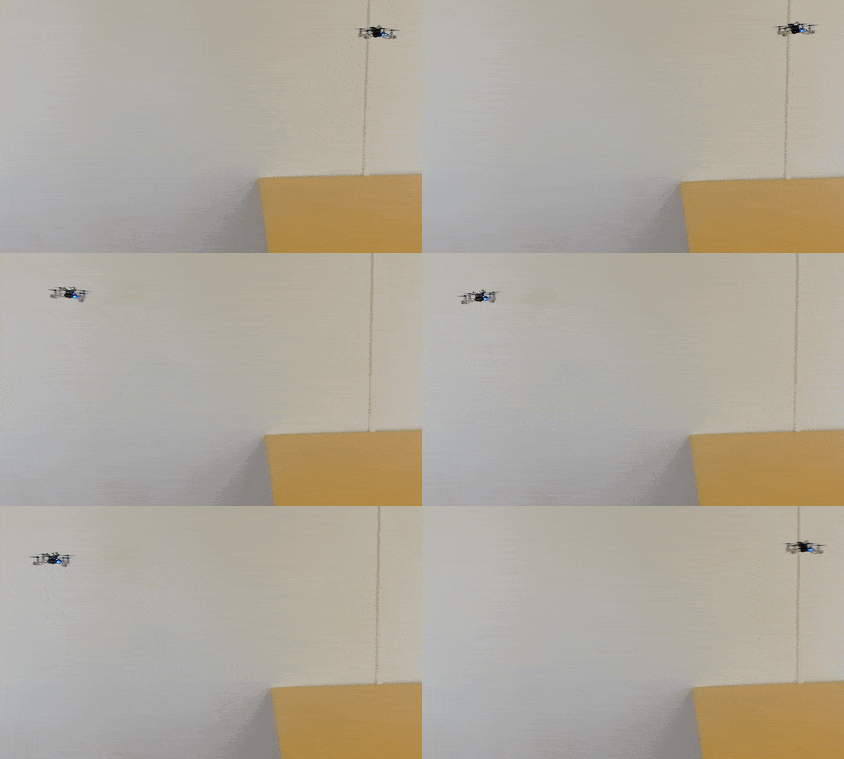
One task on this list and today’s topic is the possibility to fly at constant altitude irrespective of the terrain. This feature has been discussed in the community already two years ago. To understand the problem, let’s look at the currently implemented solution: With the Flow deck mounted the Crazyflie uses a 1D lidar sensor to estimate its vertical position. This vertical position (more or less) equals the current sensor reading. On flat floors this solution works very well. However, if the Crazyflie shall traverse through a narrow window or fly above irregular terrain its altitude will change based on the sensor readings. This can lead to unstable flights, as in the following video, or even crashes!

You might wonder: why not use any of the other great tools from the Bitcraze universe? Indeed, the Lighthouse positioning system and the Loco positioning system work well for absolute positioning (as we have seen earlier, e.g., in this blog post). However, the required setups are often not available in difficult environments. Alternatively, the barometer could be used to achieve a solution based solely on on-board sensors. In fact, Bitcraze has proposed an altitude hold functionality a few years ago. This is a cool feature, but its positioning accuracy of “roughly ±15cm” is not fully satisfying. Finally, relying on the on-board IMU alone will inevitably lead to drifting over time.

Thus, we propose a solution based on the Flow deck and the Multiranger deck. This approach, only based on on-board sensors, allows to fly at constant altitude with obstacles above, below, or even both above and below the Crazyflie. Kristoffer Skare developed this solution when he worked with us as an intern in 2021.

Technical Description

As a first step, the upward-facing lidar of the Multiranger deck is incorporated in the same way the downward-facing lidar of the Flow deck is used in the firmware. This additional measurement can then be used in the extended Kalman filter (EKF) to improve the state estimation. Currently, the EKF estimates and outputs 1 value for the altitude. For our purpose two more states are added to the EKF: one state is defined as the height of the object under the Crazyflie compared to the height where the altitude state is defined as 0. Similarly, the other state is defined as the height of the object above the Crazyflie compared to the same reference height. The Crazyflie keeps therefore track of the environment in order to keep its own altitude constant. To achieve this, an edge detection was implemented: The errors between the predicted and measured distance are tracked in both the upward or downward range measurement. If either of these errors is too large the algorithm assumes that the floor or roof has changed (while the original EKF would think the drone’s position has changed, triggering a change in thrust). Thus, the corresponding state gets updated. For more details on the technical implementation and the code itself, check out our pull request.

Results

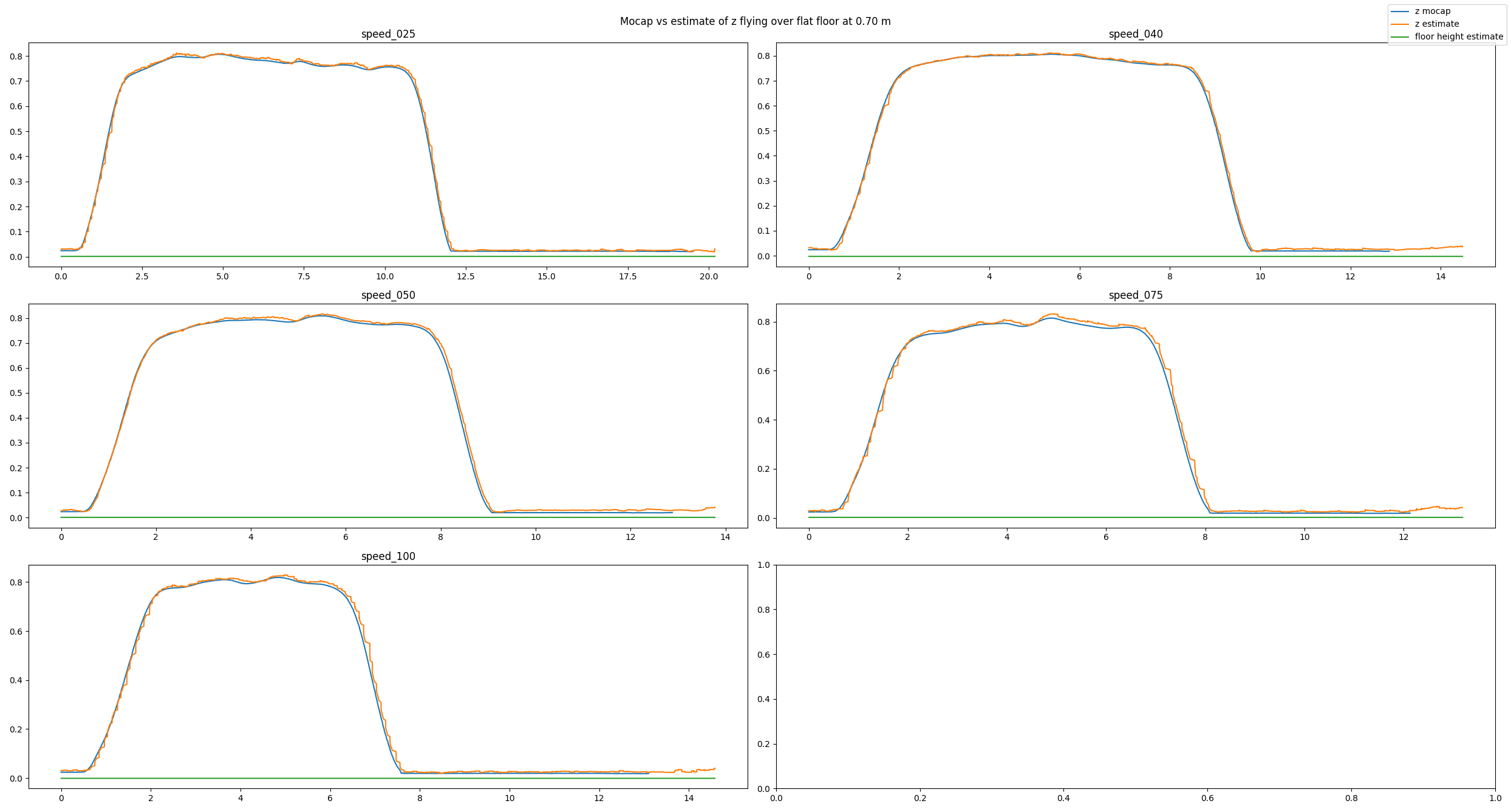
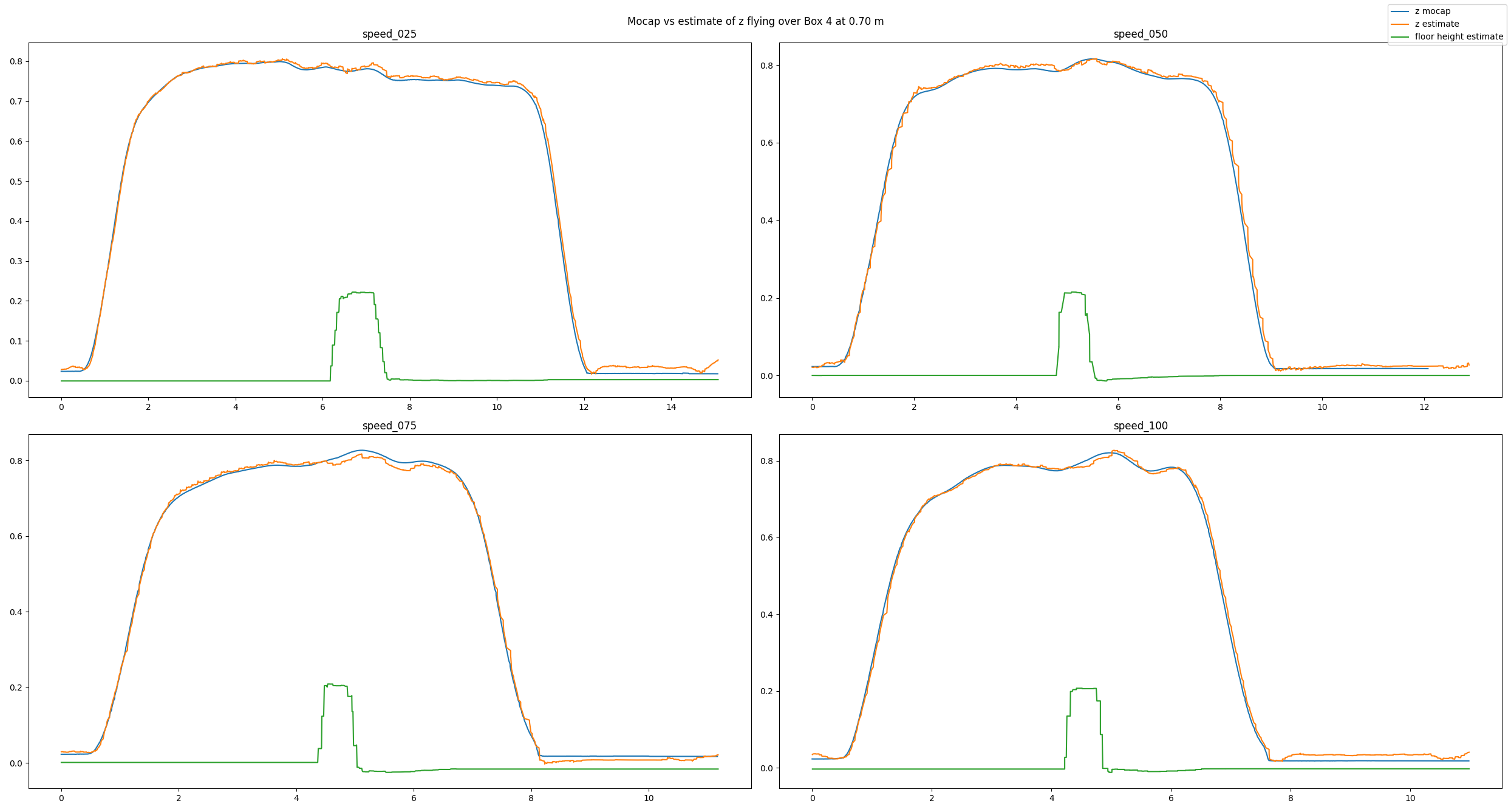
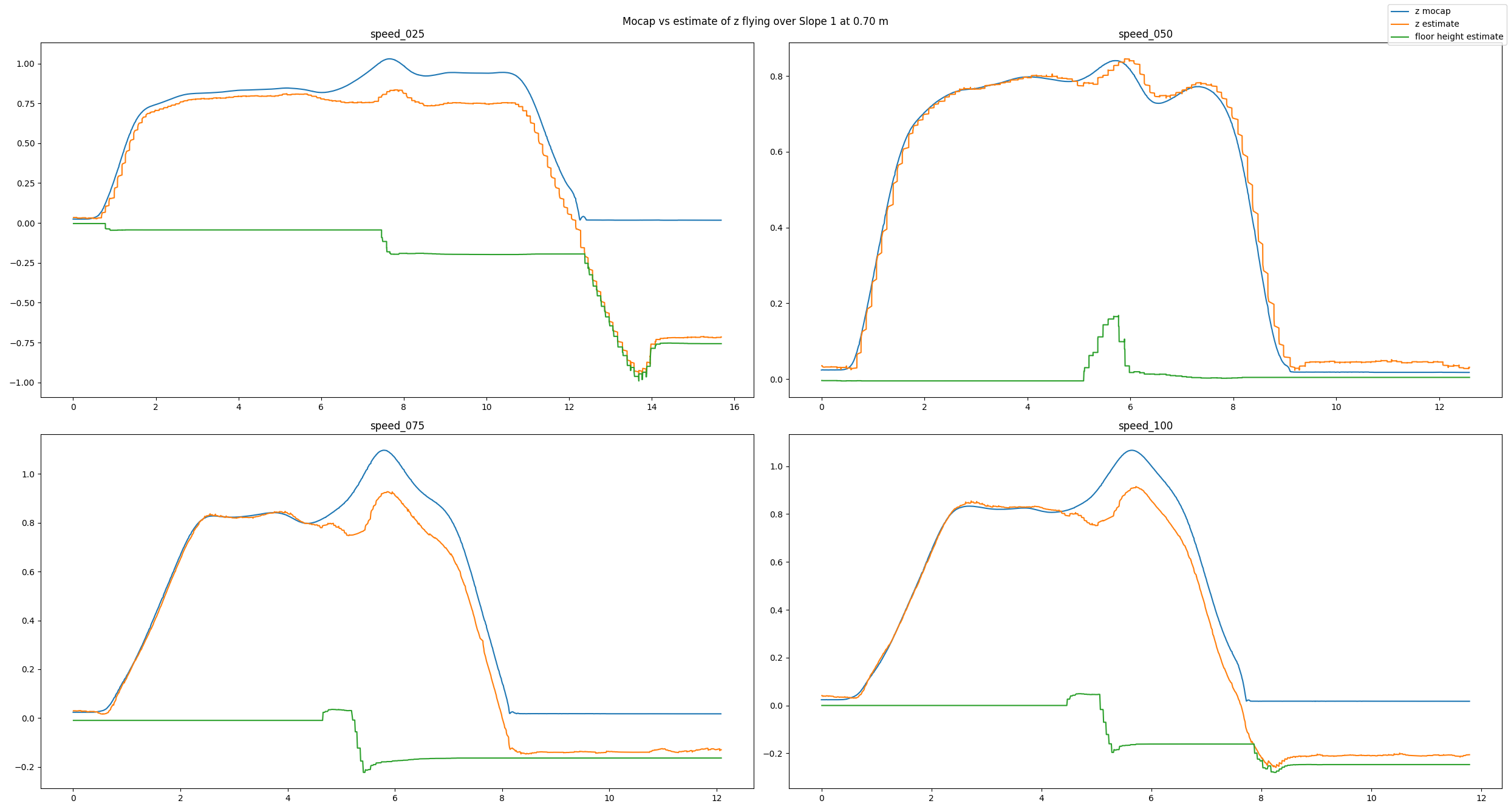
To analyze our approach we have used a Qualisys motion capture system. We have conducted many different tests: flying over different obstacles, flying at different velocities, flying at different altitudes, or even flying under different lighting conditions. Exemplarily, in this post we will have a look at a baseline example, a good estimate, and a bad estimate. In each picture you can see the altitude (in meters) over time (in seconds) for different flight speeds (in centimeters per second). You will see three lines: The motion capture ground truth (blue), the altitude estimated by our code (orange), and the new state keeping track of the floor height (green). For each plot, the Crazyflie takes off, flies in positive x direction, and lands.

In the baseline experiment, it flies over a flat floor. Clearly, the altitude estimates follow the ground truth values well, and the floor is correctly estimated to be flat.

baseline experiment
Baseline experiment flying over a flat floor

In the next example, we have added a box with an approximate height of 0.225 m and made the Crazyflie fly over it. Despite the obstacle the altitude estimates follow the ground truth values well. Note how the floor estimates indicates the shape of the box.

experiment with box
Experiment flying over a box

Because the algorithm is based on an edge detection, we had a hunch that smoothly changing obstacles will pose a problem. Indeed, the estimates can be messy as we see in the next example. Here, the Crazyflie flies over an orthogonal triangle, with the short leg at 0.23 m pointing upwards and the long leg with 0.65 m pointing in flight direction (thus forming a slope). For different flight speeds different the estimates turn out quite differently.

experiment with slope
Experiment flying over a slope

If you don’t like looking at plots, check out this video with some cool shots instead!

Conclusion

To summarize, we propose a solution for constant altitude flight with Crazyflies, using the Flow deck and the Multiranger deck. We have tested it successfully under various circumstances. Still, we see some potential for improvement, e.g. when dealing with slopes. In addition, the current implementation is quite a change to the original EKF, which poses a problem for integration.

Thus, a way forward can be an out-of-tree build to ease the use of the solution for the community. At SINTEF we certainly plan to deploy this code in all of our tests in 2022, which will hopefully allow us to gather more experience and thus find further ways to improve or tune the system.

We want to emphasize that this is not a perfect solution. That means a) you should use it with care and b) you are very much welcomed to contribute. E.g. feel free to chime in in the pull request, test the code in your environments, propose improvements, or implement an out-of-tree build! :) Maybe you can even come up with an alternative approach for constant altitude flights?

If you want to check out more of our work, visit our website. Also, keep reading this amazing blog from Bitcraze as we try to be back some day (if Bitcraze wants us hehe)!

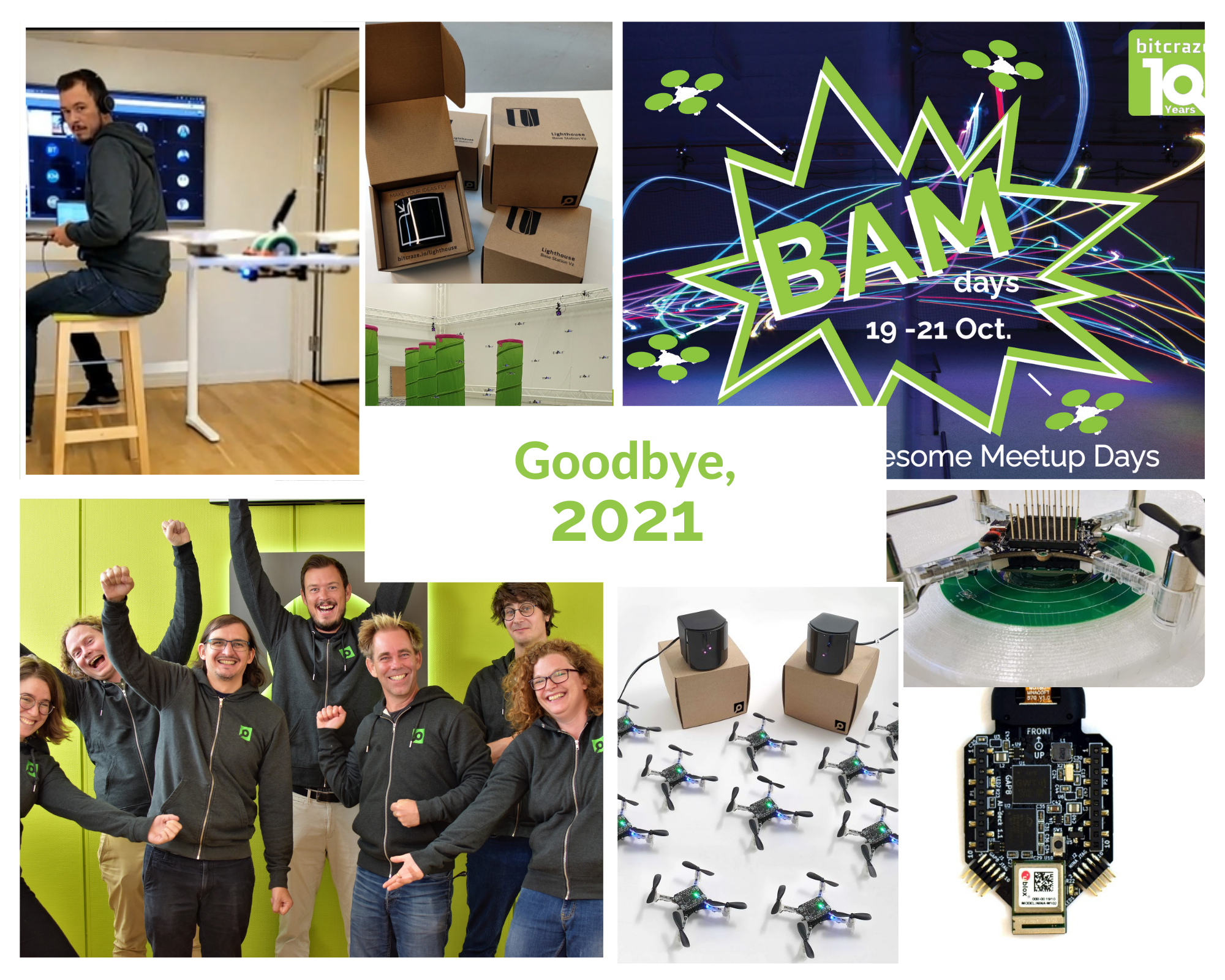
2021 is coming to an end. As we’re about to flip the page on a new calendar, let’s take a look at what happened during this past year.

Community

It’s no news to you, but keeping in touch with our community during a pandemic has forced us to try new ways to meet and interact. The main event for us this year has been the BAM days: our first conference held entirely by ourselves, full of exciting talks and fun, and we’re very happy with how it went down! You can still watch the talks we hosted during those three days in our dedicated Youtube playlist.

Guest blogposts

Once again, we’ve had the honor to host some awesome guests on our blog, which you can read (or re-read) here:

Software

We had 3 releases this year, (one in January, one in March and one in June). We worked a lot on improving things like the Crazyflie logging and parameter interface or wondered how to deal with our API. We’ve also implemented a new way to store things, and we now have new, powerful persistent parameters.

Thanks to Jonas’ hardwork, we also set up a “crazy lab” here in Malmö. During Fun Friday, Arnaud has been experimenting with Rust, working on a webclient.

Hardware

We’ve been dealing since 2020 with a hardware crisis. The component shortage has made production erratic and difficult, and for the first time in Bitcraze’s history, we’ve had to increase our prices.

Lighthouse

The first part of the year was dedicated to the Lighthouse system. At the beginning of the year, we finally got it out of early access. We documented the new Lighthouse Functionality and even wrote a paper for ICRA about the Lighthouse accuracy with Wolfgang’s help. We created the Lighthouse swarm bundle, getting every element to fly a swarm with this positioning system.

AI deck

We worked a lot on the AI deck this year. We upgraded to the AI deck 1.1, with a gray-scale camera and a newer version of the GAP-8. Part of this work was also to improve the documention and informations we had on it. We had a workshop with PULP, and dreamed of a mega-tutorial.

Documentation

As usual, we’ve been trying to improve our documentation. This year, it included an API reference in our Python library , and rethinking our structure

Bitcraze

Bitcraze has once again increased in numbers, as we welcomed into our ranks Jonas. We were also really happy to add Wolfgang to the team for a few months, as well as Rik, an intern from MAV-lab.

The biggest event this year for us was our 10 year anniversary. That’s right, Bitcraze turned 10 in September, and we tried to celebrate it as much as possible ! With a nice outing and with the BAM days, but also with a video trying to show what 10 years of Bitcraze looks like:

Christmas is just around the corner, and it’s time for the traditionnal Christmas video! This year, we wanted to use the AI deck as we’ve been working hard on this deck for some time now. Showcasing its new feature in this festive video seemed the best idea.

Santa this year needed help to find and get the presents delivered, so he asked for help from Bitcraze! Let’s see how it played out:

I’m sure you’re wondering how we managed to set this up, so let’s discuss how we did it!

Picking up the packages

The goal was to pick up some packages and place them in the sleigh, and it all worked out pretty well. All the flying in the video is scripted using the python lib and positioning is done using Qualisys’ motion capture system with Active marker decks. The trajectories are hard coded and with some careful adjustments we managed to lift and fly the 4 crazyflies attached to the same present, even though it was a bit wobbly from time to time. Getting the present into the sleigh was not as easy, and we might have taken some short cuts here as well as when attaching/removing lines.

Sometimes detangling the wires was a teamwork

Picking up the second package needed some precision, and it went incredibly well, on the first try! The present was very light and needed someone to hold it, to prevent it from moving when the Crazyflie approached.

Getting the sleigh off

Our first tries included 5 strings attached to the sleigh, but it was difficult to get the right tension at the right time to have the UAVs actually pull the weight. Here came the “rubber band solution”: we just attached all the strings to a rubber band, that was itself attached to the sleight. That way, the tension could get even when all the Crazyflies were in the air and ready to pull the sleight.

The rubber band

The AI deck camera/streamer

When we started this project, the intention was to run a neural network in the AI-deck to identify or classify the presents. We did not manage to get to a point where we had something that actually added value to the story, so we settled for just streaming the video from the AI-deck camera on the scouting drone instead.

The AI-deck example with color camera viewer is still under development, but if you want to give it a try you can take a look at the readme in the github repo.

Bloopers

And finally, as an added bonus, if you ever wonder how many tries it takes to make 5 Crazyflies pull a sleigh, here is a little behind-the-scenes video too!

Sometimes we get the question of where to modify or add code to change some behavior of the Crazyflie. There is no quick answer to this question but we thought that we should write a post to clear up some question marks and give a better idea of how to approach the problem.

There are quite a few repositories on the Bitcraze github page but there are two that are the main focal point for almost any Crazyflie work, those are the crazyflie-firmware and the crazyflie-lib-python. The crazyflie-firmware contains the source code (written in C) for the firmware that runs in the Crazyflie, that is the code responsible for flying, blinking LEDs, communicating with the radio, scanning sensors and so on. The crazyflie-lib-python (often called the python lib) on the other hand is running on the PC side and is the API to use to communicate with the Crazyflie from a script. The crazyflie-lib-python is also used by the python client which means that anything you see in the client can be done by a script using the python lib.

Let’s assume we have a system of one Crazyflie connected to a computer using a Crazyradio. Now we want to control the Crazyflie and make it take off for instance, how should this be done?

The easiest way would be to use the python lib. The python lib is used to communicate with the Crazyflie and we can use it to send instructions to the Crazyflie, for instance to take off or fly a trajectory. It is also possible to use the parameter framework to change values in the Crazyflie. The main way of monitoring what is going on in the Crazyflie is to use the log framework to read variables from the Crazyflie. The python lib is perfect for controlling the Crazyflie or prototype ideas as it is very fast to make changes and try things out. The best to get started with the python lib is to start from an example that already uses functionalities you want to use.

Another option is to add code in the firmware. Originally this has been quite hard since the firmware has not been initially designed to accept user code. This means that unless you want to modify an already existing code, it is quite hard to find where to add your code so that it runs in the Crazyflie firmware and you would have to make a fork of the firmware which can he hard to maintain and keep up to date in the long run. This is one of the things the out-of-tree build and the app layer is solving, it is now quite easy to add and run your own C files to the firmware in your own project without having to fork the Crazyflie firmware. There is a bunch of examples in the firmware that shows how to implement autonomous behavior as an app. The easiest is to start with the hello world example. When it comes to modifying exiting functionality in the firmware code, most of the time forking and modifying the official firmware unfortunately is the only solution. We are however working our way to make more and more of the firmware modular so that it can be expanded out of tree. For example there has been work to make an out of tree estimator possible to implement.

A prototype written as a python script is often pretty easy to move to the Crazyflie firmware. This is a good pattern when writing an application, rapid prototyping in python and then finalizing in firmware if needed. The best example of that is the push demo. It is a demo where the Crazyflie can be pushed-around with the help of the flow deck for autonomous flight and the multiranger deck for detecting obstacle/hands. We have a python cflib push demo as well as a Crazyflie firmware push demo app.

There is some support in the python lib for interacting with multiple Crazyflies and it is probably a good start point for simple swarms. For more advanced swarm work Crazyswarm may be a better option.

If you would like to see some of the process in action, we have made a workshop during our BAM days about implementing functionality both using the python lib and in the firmware as an out of tree app:

This week we have a guest blog post from Enrica Soria from the Laboratory of Intelligent Systems Faculty of Ecole Polytechnique Fédérale de Lausanne (EPFL) . Enjoy!

From Star Wars to Black Mirror, sci-fi movies predict a future where thousands of drones will fill our sky. Curving sharply around trees or soaring over buildings, they fly just like a flock of starlings. To turn this vision into a reality, real drone swarms need to increase their autonomy and operate in a decentralized fashion. In a decentralized swarm, each robot makes its own decision based only on local information. Decentralization not only allows the swarm to be more robust to the failure of single individuals, but also removes the dependency from a single computing unit, thus making the swarm more scalable in terms of size.

We at LIS (EPFL) have shown that predictive controllers can improve the safety of aerial swarms by predicting and optimizing the agents’ future behavior in an iterative process. However, the centralized nature of this method allowed us to only control five drones and prevented us from scaling up to a large number of drones. For this reason, we have worked on a novel decentralized and scalable swarm controller that allows the safe and cohesive flight of aerial swarms in cluttered environments. In our latest article, published in IEEE Robotics and Automation Letters (RA-L), we describe how we designed the controller, show its scalability in size, and demonstrate its robustness to noise. We studied the swarms’ performance and compared how it changes in two different environments: a forest and funnel-like environment.

The Crazyflie 2.1 was the perfect platform for our experiments. They are lightweight, modular, and tough. This quadcopter can survive big hits when things don’t go as planned… and, if you work on swarms, things can go wrong!

The fleet of Crazyflies equipped with a single marker.

With our algorithm, sixteen robots were able to fly through an artificial forest that we set up in our indoor motion capture arena. In our previous work, we installed four markers on each quadcopter and used the rigid body tracking from Motive (the Optitrack software). The large volume of our experimental room required the usage of big markers for long-distance detection, which added considerable weight to the drone. Hence, in our new work, we use a single marker per drone. Tracking is supported by the ‘crazyswarm’ package and communication with the entire swarm only requires two radio links. However, despite our model being decentralized, in our implementation robots relay the information to an external brain, which does the computations for them. In the future, all the necessary code will be embedded onboard, removing the dependency on external infrastructure.

Our predictive swarm of Crazyflies flying among obstacles in our indoor experimental room.
Video about the article

This work is a step forward towards the fully autonomous deployment of drone swarms in our cities. By enabling safe navigation in cluttered environments, drone fleets will be able to integrate with conventional air traffic, search for missing people, inspect dangerous areas, transport injured people to hospitals quicker, and deliver important packages right to our doors.

For further details, check out our article here!